
On this page
- Write the promise before you pick a window
- The 30 minutes, by the clock
- Three buckets for the morning pass
- The asked-twice rule
- Let AI take the repeats you've already written down
- Hours and away messages, so the 30 minutes holds
- The 20-minute weekly review
- When to stop doing this yourself
- What this setup doesn't do
- Frequently asked questions
Support has a way of eating a founder's day in small bites. A message at 9:40 about a login. Another at 11:15 about an invoice. By 3 p.m. you've answered nine things, shipped nothing, and you still don't know if anyone is angry.
The fix isn't a better tool. It's a routine with edges. This guide is a daily system for customer support for solo founders: three short windows, a way to sort what comes in, saved replies and help articles for the repeats, AI for the questions you've already written down, and a clear signal for when to stop doing it yourself. The whole thing is built around a budget of about 30 minutes a day. That number is ours, not a benchmark. Your volume decides whether it fits, and the last section shows how to tell.
If you're choosing software or setting a monthly budget, that's a different question, and customer support for startups covers tools and cost. This post assumes you have an inbox and want to stop living in it.
Write the promise before you pick a window
Before any schedule, write one sentence that says when customers will hear from you. It has three parts: a reply window, the days you work, and where to reach you.
Here are three you can steal.
- "We reply to every message within one business day, Monday to Friday."
- "Chat is staffed 9 to noon Eastern. Anything else gets an answer by the next morning."
- "Email us any time. Bugs that block your work get a reply the same day, everything else within two days."
The third one is the interesting one, because it ranks your work for you. A promise with two speeds is easier for a one-person team to keep than a promise of "fast". It also tells customers what to expect, which is most of what they want. Put it in your away message and in the footer of your email replies, and stop apologizing for slow answers. If you're keeping it, there's nothing to apologize for.
The 30 minutes, by the clock
Three windows beat one long session. Each has one job, so you never have to decide what to do when you open the inbox.
| When | Length | The only job |
|---|---|---|
| Morning, before anything else | 10 minutes | Triage. Read everything that arrived overnight, sort it, answer only the urgent ones. |
| Midday | 15 minutes | Answer. Work through the "today" pile, mostly with saved replies. |
| End of day | 5 minutes | Turn one repeated question into a saved reply or a help article. |
The morning window is for sorting, not for replying at length. If you start writing a careful answer in minute three, you'll burn the ten minutes on one message and leave the rest unread. The evening window is the one founders skip, and it's the one that makes tomorrow smaller. Five minutes of writing today removes a question you'd have typed from scratch next week.
If your volume is low, the windows will finish early. Let them. If it's high, don't stretch them. Read the last section.

Three buckets for the morning pass
Triage means putting each message in one of three piles without answering it yet.
Now is anything where money is wrong or work is blocked: a failed charge, someone locked out, a bug that stops a customer doing the thing they paid for. Answer these in the morning window, even if the answer is "I'm on it, back by 2".
Today is anything you can answer from memory or a saved reply. This is the bulk of the inbox, and it waits for the midday window.
Later is anything that needs research, a decision or a code change, plus feature requests. Reply with a short acknowledgment that says when you'll know more, then snooze it.
Here's what a morning inbox of 12 messages might sort into. It's an illustration, not a statistic.
| Pile | Messages | What they were |
|---|---|---|
| Now | 2 | A billing error and a login that fails for one customer |
| Today | 7 | Four "how do I reset my password" variants, two invoice-copy requests, one "do you integrate with X" you've answered before |
| Later | 3 | Two feature requests and one vague bug report that needs a screenshot |
Two messages are urgent, seven are mechanical, three need thought. Notice the shape: a small number that matter a lot, a big pile that doesn't need you specifically. The routine exists to protect your attention for the first group.
In Talvo, the tools for this are plain. Priority has four levels (Low, Normal, High, Urgent) and you set it from the side panel. Snooze offers 1 hour, 3 hours, tomorrow at 9:00, next week, "Until I reopen" or a custom date and time, so a "Later" message leaves your view until you want it back. Conversation tags (for example "refund" or "bug") are searchable and filterable in the inbox, which is how you'll count repeats later.
Feature requests don't need a reply thread at all. A teammate can turn a conversation into a feature request on the public board, and the customer isn't told, so you can say "I've logged it" and mean it. More on that in public feedback boards and roadmaps.
The asked-twice rule
This is the whole engine of the routine.
- First askAnswer it by hand and note the question. Nothing to build yet.
- Second askWrite a saved reply. It's for you, so you stop retyping.
- Third askWrite a help article and send the link. It's for the customer, so they stop writing.
Canned responses in Talvo are shared across the workspace, and every plan has them, including Free. Each has a title, an optional shortcut and a message, and you insert one from the composer's "Canned response" button, a picker you can search by title, shortcut or text. (There's no typing /hi to expand a reply; you choose it from the picker.) They take six variables, such as {{contact.first_name}}, and each can have a fallback, like {{contact.first_name | there}}. If a value is missing and there's no fallback, Talvo blocks the send until you fix it, so nobody gets "Hi ,". The full set is in live chat canned responses.
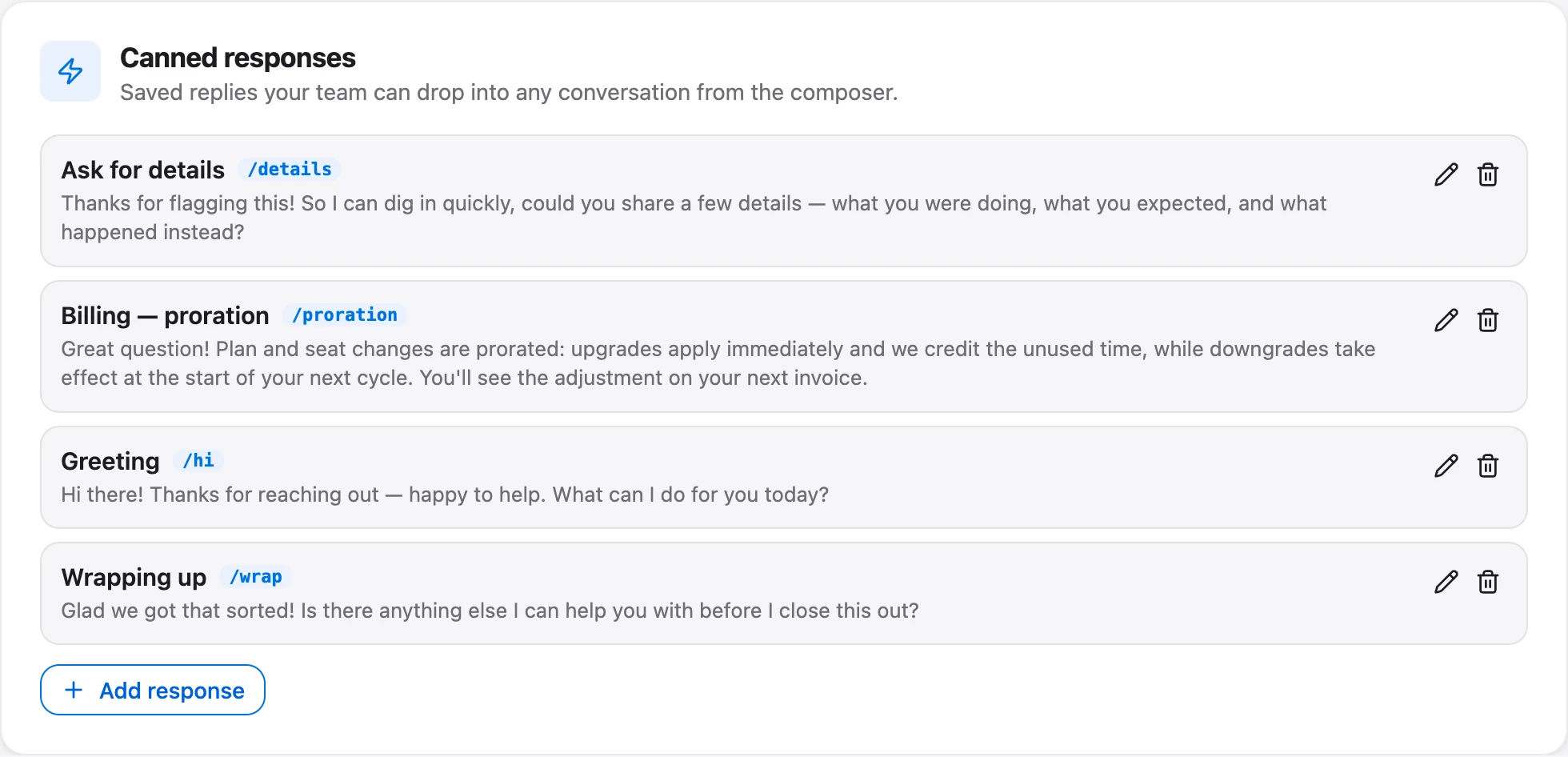
A saved reply should still sound like you. Write the version you'd be proud to send, then add one line of context before you press send. Thirty seconds of personalizing is cheap next to the cost of sounding like a form letter.
Articles are slower to write and pay back longer. Use the customer's wording as the title, put the answer in the first sentence, and keep to one question per article. The week-long plan in how to build a help center walks through it, and writing help articles for AI covers the style that also works for a bot.
Let AI take the repeats you've already written down
An AI agent is only as good as the articles behind it. Talvo's answers come only from your published knowledge base articles, and each answer shows which article it used. If the agent isn't confident, or you have no published article that covers the question, it hands the conversation to you with the thread intact. Drafts are invisible to it.
That's why the order matters. Saved replies first, articles next, AI last. A founder who turns on AI with an empty help center gets a very polite machine that passes everything back to them.
Three details to know before you switch it on:
- It answers any time by default. That's good for the 2 a.m. password question and not good if you'd rather no bot talked to customers at all during your working hours. In Settings → General → AI controls you can set it to answer only outside business hours, or only during them. That choice needs business hours set first; until then the AI answers at any time.
- You can list topics a person always handles. One word or phrase per line, such as "refund", "cancel my account" or "legal". If the customer's latest message contains one of them at the start of a word, Talvo skips the AI and hands off, and a match costs no AI spend. It's a word-start match, so "refund" also catches "refundable". It doesn't read meaning.
- There's no spending cap on paid plans. The Free plan includes 25 AI resolutions a month during the beta and then simply waits for you. On a paid plan there's no cap to set. Your levers are the schedule, the topic list and turning AI off, so check the count weekly at first.
How the hand-off works, including what the customer sees, is in AI to human hand-off. Read it before you promise yourself that the bot will "just handle" billing.

Hours and away messages, so the 30 minutes holds
A routine falls apart the day a customer learns you answer at midnight. If you reply instantly once, they'll expect it again.
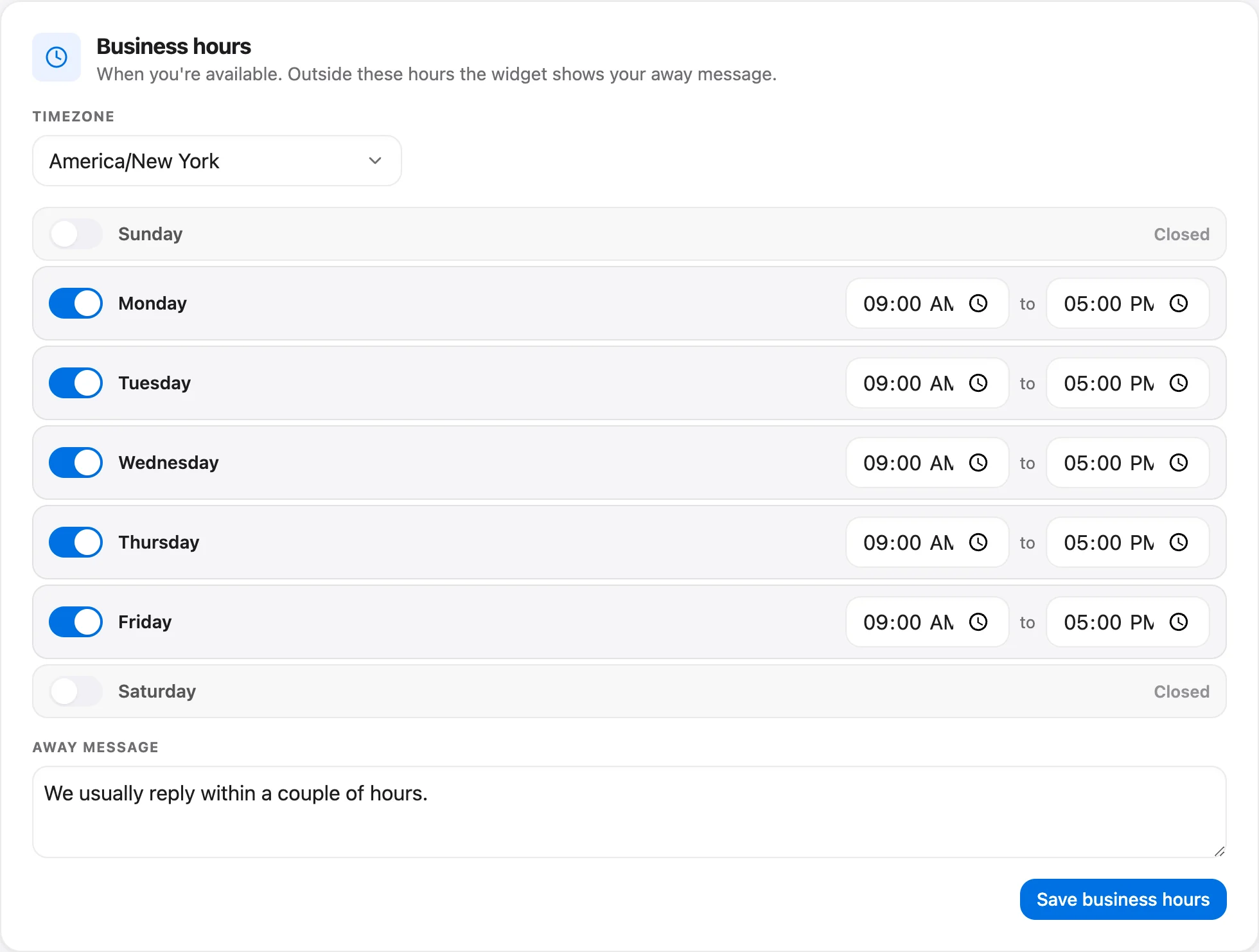
Set your business hours and timezone in Settings → Inbox, and write an away message that names the next time you'll look. Outside your hours, the widget shows that away message in place of "We're online". Both are on every plan. There's also an "expected reply time" setting for the widget, such as "Typically replies in under an hour", that you can match to your promise. Reply reminders (default 12 hours) alert you when a customer has been waiting, so a message that slipped past your windows doesn't disappear.
Talvo works in your phone's browser with push notifications, which is how many founders handle the "Now" pile from a train. It isn't a native app.
For a longer treatment, including covering nights and weekends with AI, see after-hours customer support. If you're deciding between channels, a solo founder's default can be email plus a chat widget. You do the same reading either way, and both land in one inbox, so you don't have to pick one and lose the other.
The 20-minute weekly review
Once a week, spend 20 minutes counting. You don't need a dashboard for this. You need four numbers in a note.
- How many conversations came in this week, and how many were from new customers?
- Which question was asked most? Is there a saved reply and an article for it?
- How long did the three windows really take? Add up the actual minutes.
- Did you break your reply promise? How many times, and on what kind of message?
- Which message did you dread answering? That's the next article or the next fix.
Talvo's analytics page gives you total conversations, average CSAT, median first response and median resolution. On the Free plan the history is 7 days, which is exactly what a weekly review needs, and conversations themselves are never deleted. The tags you added in triage are a quick way to count repeats from the inbox, though analytics can't report by tag.
The last question on that list is the most useful one. If you dread a message, it usually means the product confused someone, and the cheapest support fix is to change the product or the copy that confused them. How to reduce support tickets is about that.
When to stop doing this yourself
The routine works until it doesn't, and you can tell with arithmetic rather than a feeling. Hours of support a week equal conversations a week times minutes per conversation, divided by 60. Forty conversations at eight minutes each is 40 × 8 ÷ 60 = about 5.3 hours.
Compare that figure to your budget. A 30-minute day is 2.5 hours across five working days. If your honest number is double that and climbing, the routine has stopped fitting. Other signs are your own: you've broken your reply promise twice in a week, "Now" messages arrive faster than you clear them, or you're answering support late at night more often than not. These are judgment calls, not benchmarks.
The next step isn't always a hire. When to hire your first support person shows how to decide from your own volume, what to automate first, and the options short of a full-time role. The support staffing calculator does the arithmetic for you.
What this setup doesn't do
Free is the right plan for one founder, plus one other person if you have a partner. It has 2 teammates, chat, two-way email, the shared inbox, a hosted help center, canned responses, business hours and CSAT. The AI copilot, which drafts replies, summarizes threads and translates, starts on Starter at $49 a month ($39 a month billed annually).
A few limits are worth knowing. "Powered by Talvo" can't be removed from the widget or the help center. Talvo has no WhatsApp, SMS, Instagram or Messenger, and no phone calling, so if your customers live there, this routine needs a different tool. It is also new and in beta, with no review-site ratings yet.
Frequently asked questions
How much time should a founder spend on customer support?
There is no benchmark, so set a budget and measure against it. We suggest about 30 minutes a day in three windows, then a weekly check of the real hours: conversations a week times minutes per conversation, divided by 60. If the real number keeps growing past what you can spare, it is time to automate more or get help.
Should founders do customer support themselves?
Early on, usually yes. Every conversation teaches you what confuses people and what they actually want. The goal is to keep that learning while shrinking the typing, using saved replies, help articles and the product fixes your weekly review turns up.
How do I handle customer support alone?
Write a support promise, work in fixed windows instead of reacting all day, sort each morning's messages into Now, Today and Later, and turn every repeated question into a saved reply and then an article. Set business hours and an away message so the schedule is visible to customers.
What's the fastest way to answer repeat questions?
Saved replies. In Talvo they are called canned responses, they are shared across the workspace on every plan, and they accept variables such as the customer's first name with a fallback. If a value is missing and there is no fallback, Talvo blocks the send, so a customer never gets a greeting with a blank name.
Should a solo founder use a chatbot?
Only after you have written the answers it will use. Talvo's AI answers only from published help articles, cites the one it used and hands off when it is not confident. With no articles behind it, everything is handed back to you. Check the AI resolution count each week, because paid plans have no spending cap.
How do I set support hours without losing customers?
Publish the hours and show them. Set business hours and an away message in Settings, say when customers will hear back, and keep one fast lane for urgent problems like billing errors or lockouts. Customers tolerate a clear schedule far better than unpredictable silence.
Is email or live chat better for a one-person business?
You can offer both without doubling the work if they land in one inbox. Chat suits quick questions while you are online, and email suits everything else. Talvo's shared inbox holds both, so one triage pass in the morning covers them.
When should I stop doing support myself?
When your measured hours keep outgrowing your budget, you break your reply promise more than occasionally, or urgent messages arrive faster than you can clear them. These are judgment calls, not fixed thresholds. The staffing math in our hiring guide and the support staffing calculator turn your volume into hours and headcount.
Sources
Other products' prices and features change. We checked these pages; if something is out of date, tell us and we'll fix it.


