
On this page
- Start with when your customers actually write
- The five ways to cover nights and weekends
- What an AI agent should answer at 2 a.m., and what should wait
- The away message, with copy you can paste
- Catch the conversation so nothing is lost
- Don't let nights and weekends wreck your response-time numbers
- What it costs for the same business
- Where this approach loses
- A one-week setup plan
- What to promise customers
- Frequently asked questions
A customer lands on your pricing page at 9:40 on a Saturday night and wants to know whether you ship to Canada. If nobody answers, they don't wait. They open another tab. After-hours customer support is the work of making sure that moment ends in an answer, or at least a believable promise, without hiring a night shift you can't afford.
For a team of two to fifteen people, the goal is rarely "24/7 staffing." It's three smaller things: answer what can be answered, catch everything else so it isn't lost, and tell people honestly when a human will reply. This guide compares the five realistic ways to do that, with costs where we could source them, then walks through the setup. The advice works with most tools. Talvo is the worked example because we know exactly how its settings behave.
Start with when your customers actually write
"After hours" means different things to a SaaS company with customers in four time zones and a plumber with one service area. Before you pick a coverage model, pull your own numbers: conversations by hour of day and day of week for the last 60 days, split by chat, email and phone. Every tool has some version of this chart.
Resist the figures you'll find online about what share of contacts arrive after hours. We looked for a primary source behind the commonly repeated 20 to 45 percent range and couldn't open one, so treat any such number as a guess. Your own chart beats it.
Expectations are rising, though. In its CX Trends 2026 report, Zendesk says 74% of consumers now expect 24/7 service because of AI. That's a survey published by a vendor that sells AI service tools (6,182 consumers in 22 countries, fielded in June 2025), so read it as a direction, not a law. And if your after-hours traffic is mostly pre-sales questions, a 2011 Harvard Business Review study of sales-lead response by Oldroyd, McElheran and Elkington is a useful, if dated, warning. They sent test leads to 2,241 US companies: 37% replied within an hour, 23% never replied, and the average response took 42 hours. Firms that responded within the hour were nearly seven times as likely to qualify the lead. Those were web-form sales leads, not support tickets, but a buyer's question in a chat box behaves the same way.
The five ways to cover nights and weekends
Here is the whole menu in one place. Costs are what we could source; where we couldn't, the cell says so rather than guessing.
| Option | What it costs | What it covers | What it can't do |
|---|---|---|---|
| Away message and email capture | Included in most chat tools (on Talvo, every plan, including Free) | Tells people when you're back and, if you ask in the message, invites an email address | Answers nothing. The customer still waits. |
| AI agent answering from your help articles | Talvo: Free has 25 resolutions a month during the beta; Starter is $49 a month with 100 included, then $0.49 each | Common questions, any hour, with the article cited | Anything not in your published articles; actions like refunds |
| On-call rotation | Staff time and goodwill; no market price to quote | Real judgment for real emergencies | Scales badly. People burn out, and chat doesn't need a phone buzzing at 2 a.m. |
| Answering service (human receptionists) | $50 to $450 a month, or $0.75 to $2.00+ per minute, per a 2026 Hyperleap guide that cites Nextiva and HouseCallPro | Phone calls, with message-taking and sometimes dispatch | Knowing your product. Most are phone-first. |
| Night or offshore team | We found no reliable public price; get quotes | Live human replies across time zones | Cheap onboarding. Someone has to train and QA them. |
Most small teams end up with a hybrid: away message and email capture as the floor, an AI agent for the repeat questions, and a rule for what wakes a human. The two options below deserve a closer look because the trade-offs aren't obvious.
- Answers the repeat questions (shipping, hours, pricing, setup) at any hour
- Cost is per answer finished, so a quiet night costs nothing extra
- Cites the article it used, so you can trace a wrong answer
- Only as good as your published articles; gaps become hand-offs
- Won't take actions such as refunds or account changes
- Customers deserve to know it's an AI, so say so up front
- A human with judgment for real emergencies
- No new vendor and no per-answer cost
- Interrupts sleep for questions that could have waited until morning
- Falls apart the week someone is sick or on vacation
- Hard to keep fair on a team of three
What an AI agent should answer at 2 a.m., and what should wait
The safest overnight AI is a narrow one. It answers from articles you've published, shows which article it used, and steps aside when it isn't sure. That's how Talvo's agent works, and it's the behavior to demand from any tool. If you want the long version of why, see our guide to a knowledge base chatbot.

Two billing facts matter for overnight use. In Talvo, a hand-off doesn't count as a resolution, so a question the AI can't answer costs you nothing and lands in the inbox with the conversation intact. And once a teammate replies, the AI steps aside for the rest of that thread. The help article on how AI auto-resolve works has the details. One more limit worth knowing before you rely on the Free plan: its beta allowance is 25 resolutions a month with no overage, so after the 25th, new conversations wait for your team instead of being answered.
Decide in advance what never gets automated overnight. Write it down, then check your articles don't accidentally cover it.
- Refunds, chargebacks and billing disputes
- Cancellations and anything with a contract attached
- Safety issues and emergencies
- Legal, medical or financial advice
- Complaints from a customer who is already angry
- Anything the customer says is urgent or time-sensitive
The AI will hand off questions your articles don't cover, which is the right outcome. For the sensitive topics on this list, the safer move is not to publish an article that invites an automated answer.
The away message, with copy you can paste
An away message has one job: tell people when a human will reply and what to do meanwhile. In Talvo you set your working hours, timezone and the message in Settings, then Inbox, then Business hours. Outside those hours the widget shows the message. Business hours and the away message are available on every plan.
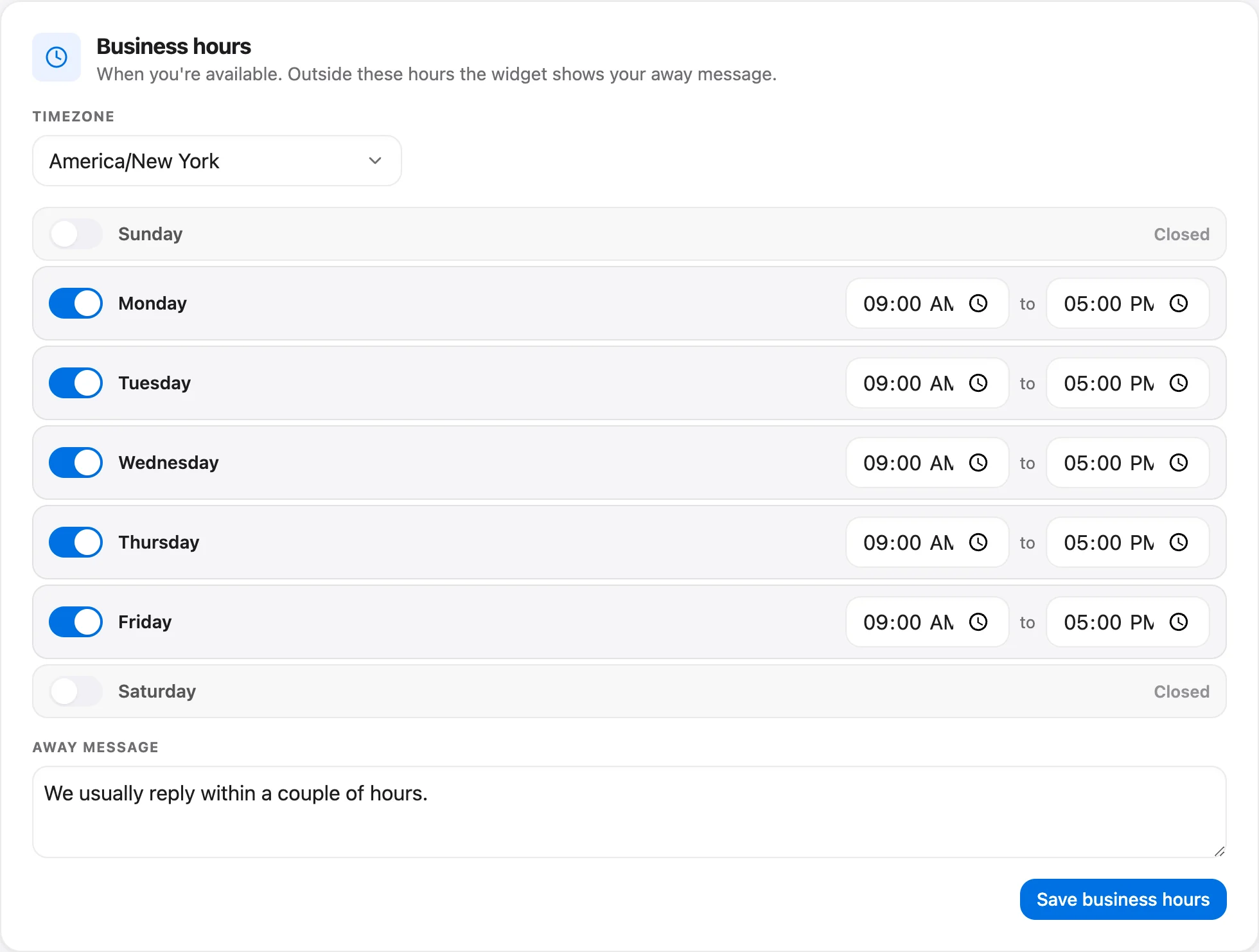
Be specific about the clock. "We'll be back soon" is a promise nobody can check. A good message names a time, a time zone and a fallback.
Notice what it doesn't do: it doesn't say "24/7," it doesn't say "within minutes," and it doesn't pretend the person on the other end is awake. If your AI agent is on, tell people that too, so the first reply doesn't feel like a trick.
Talvo's help text says the widget asks anonymous visitors for an email so you can reply, and signed-in users who've been verified already arrive with a name and address (see identity verification). Business hours don't add a form field of their own. So ask for the email address in the message copy, which is why the sample above does.
You'll also want a saved reply for the morning (in Talvo, a canned response), because the first human message of the day is where overnight goodwill is won or lost:
Catch the conversation so nothing is lost
An overnight chat that ends with the visitor closing the tab is a lost lead. Two habits fix most of that. First, get an email address in the first exchange, which the away message above does. Second, make sure your support inbox and your chat inbox are the same place, so a customer who emails at midnight gets the same treatment as one who chats.
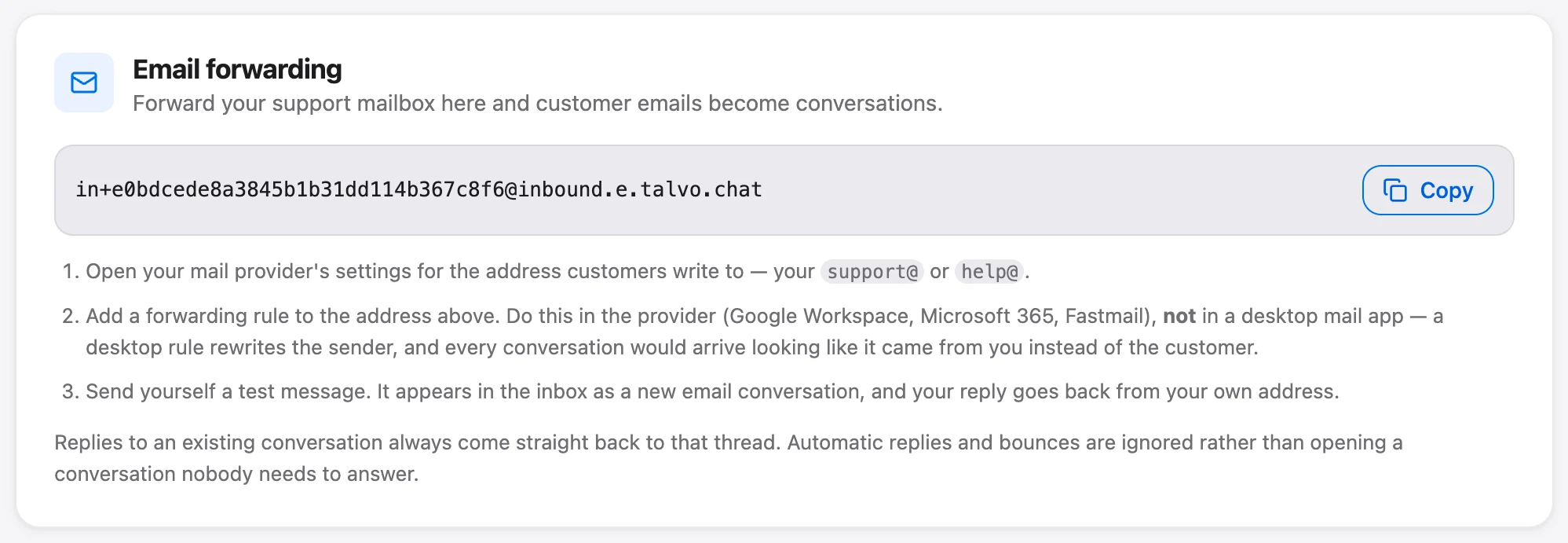
Talvo handles email by forwarding. You point your support address at the forwarding address in Settings, then Inbox, then Email forwarding, and the messages show up as conversations in the shared inbox, threaded with replies. If you use Gmail, a Confirm in Gmail button appears on that card a minute or so after you add the address, because Gmail sends its approval link to the forwarding address rather than to you. The two-way email guide walks through it.
Then give the morning a shape. The first twenty minutes of the day should be the overnight queue: answer the oldest waits first, snooze what needs research, and jot down every question the AI couldn't answer so you can write the missing article. Talvo's inbox lists those hand-offs with a one-line AI brief on each, which makes a cold start quick.

Talvo also has a no-reply reminder (Settings, then Inbox, then Reply reminders; the default is 12 hours) that nudges your team when a customer has been waiting. It's on every plan, and it's a good backstop for the conversation someone snoozed on Friday and forgot.
Don't let nights and weekends wreck your response-time numbers
If you measure first response time, an overnight message that arrives at 11 p.m. and gets answered at 9 a.m. looks like a 10-hour failure. It isn't. It's what you promised. Count only business hours against your targets, or your dashboard will punish the exact behavior you chose.
In Talvo, when you've set business hours, SLA timers count business hours only, so the clock effectively pauses outside them. SLA policies themselves are on the Growth plan and up ($149 a month, with 500 resolutions included). The clock also measures a human reply: an AI answer doesn't stop it, which means an AI hand-off at 2 a.m. still shows as waiting until your team responds. That's the honest version. The SLA policies help article covers the states you'll see, and our first response time guide goes deeper on setting targets.
What it costs for the same business
Take one business: roughly 120 conversations a month arrive outside your hours, and 40 of them are phone calls averaging three minutes. Say your published articles let an AI agent finish half of the chat conversations on its own, which is 40 of the 80 chats. That's an assumption for the arithmetic, not a benchmark. Your number depends entirely on your articles.
| Approach | The arithmetic | Monthly cost |
|---|---|---|
| Away message and email capture only | Included | $0 beyond your tool |
| Talvo Free (beta) | 25 resolutions included, no overage | $0; answers 25 chats, the other 55 wait |
| Talvo Starter, $49 a month | 40 resolutions are inside the 100 included | $49 |
| Same plan in a much busier month (250 AI answers) | $49 + (250 − 100) × $0.49 = $49 + $73.50 | $122.50 |
| Answering service, per minute | 40 calls × 3 minutes = 120 minutes × $0.75 to $2.00 | $90 to $240 |
| Answering service, flat | Per the cited range | $50 to $450 |
The two services solve different problems. An answering service picks up the phone. An AI agent answers the chat box. If your customers mostly call, the cheaper row isn't the right row.
Where this approach loses
Be straight with yourself about the cases a chat-and-email setup can't carry. If your business runs on emergencies (a burst pipe, a broken furnace, a locked-out tenant), customers will call, and they want a person. Hire a phone answering service or a dispatcher and treat chat as the secondary channel. Talvo has no phone calling, SMS, WhatsApp, Instagram or Messenger today, though WhatsApp, SMS and Instagram/Messenger are on the public roadmap. If those are how your customers reach you, the pick is a tool that has them.
And the AI is only as good as what you've written. An empty knowledge base hands off every question. If you haven't written the answers yet, start with the guide to writing help articles an AI can answer from, then switch the agent on. If you're still choosing a tool, our roundup of the best live chat software for small business compares the options, and the guide to adding live chat to your website covers the install. For the money side of AI answers, AI resolution pricing compared shows what other vendors charge per answer, and Talvo's own AI agent page lists what each plan includes.
A one-week setup plan
You can do all of this in a week of small sessions.
- Monday: look at your own hoursPull conversations by hour of day for the last 60 days and decide when "after hours" begins for your customers.
- Tuesday: set business hours and the away messageIn Talvo, Settings, Inbox, Business hours. Name a time, a time zone and a fallback, and ask for an email address.
- Wednesday: connect emailForward your support address into the inbox so chat and email share one queue (guide).
- Thursday: write the ten articlesCover shipping, pricing, hours, setup, returns and anything customers ask you twice. Publish them.
- Friday: turn on the AI agent and test itAsk it your real questions, including ones it shouldn't answer, and confirm it hands off (how it works).
- Next Monday: read the queueCheck what waited overnight, tag what the AI missed, and fix the clock if overnight messages are skewing your numbers.
What to promise customers
Promise the floor, not the ceiling. "We reply by 10 a.m. on business days" is a promise you can keep for years. "Instant support, any time" invites the one night you can't. Put the promise in three places: the widget's away message, the auto-reply on your support address, and the contact page. Make them say the same thing.
Tell people when they're talking to an AI. Tell them how to reach a human, and what counts as urgent. If you offer an emergency line, publish its number where an angry customer will find it, and don't put it behind a chatbot.
Then hold yourself to the clock. If you promise 10 a.m., check at 10:05 how many threads are still open. That check is worth more than any dashboard, and it keeps the system honest.
Frequently asked questions
How do small businesses offer 24/7 customer support?
Most don't staff around the clock. They combine an away message and email capture, an AI agent that answers repeat questions from published help articles, and a clear rule for what wakes a human. Customers get an immediate answer or a specific time when a person will reply.
What should an after-hours away message say?
It should name when your team is back, in a specific time zone, say when the customer will get a reply, and ask for an email address. Avoid vague lines like 'we'll be back soon', and don't promise instant replies you can't deliver at night.
Is an answering service or an AI chatbot better for after-hours support?
It depends on the channel. An answering service picks up phone calls and takes messages; an AI chatbot answers the chat box from your help articles. If most customers call, use an answering service. If they write, an AI agent and email capture cost less and answer faster.
How much does after-hours customer support cost?
An away message is usually free. A 2026 Hyperleap guide, citing Nextiva and HouseCallPro, puts answering services at $50 to $450 a month or $0.75 to $2.00 or more per minute. Talvo's Free plan includes 25 AI resolutions a month during the beta, and Starter is $49 a month with 100 included and $0.49 for each extra one.
Can an AI chatbot handle customer service at night?
It can handle questions your published articles already answer, such as shipping, hours, pricing and setup. It should hand off anything it isn't sure about, and refunds, cancellations, emergencies and legal or medical questions should wait for a person. Talvo's agent cites the article it used, and a hand-off to a person is not billed as a resolution.
Should my live chat be turned off outside business hours?
For most small teams, no. Leave the widget visible with an away message that names a reply time and asks for an email address, so overnight visitors aren't lost. Turn it off only if you can't follow up reliably the next morning.
Do response-time metrics count nights and weekends?
They shouldn't, if you promise business-hours replies. In Talvo, once business hours are set, SLA timers count business hours only, so an overnight message isn't recorded as a failure. SLA policies themselves are available on the Growth plan and up.
Sources
Other products' prices and features change. We checked these pages; if something is out of date, tell us and we'll fix it.
- Zendesk CX Trends 2026 press release (Nov 18, 2025): 74% of consumers expect 24/7 service due to AI
- Oldroyd, McElheran and Elkington, The Short Life of Online Sales Leads, Harvard Business Review, March 2011 (BYU ScholarsArchive record)
- Hyperleap AI, 24/7 Customer Support for Small Business: 5 Real Options (answering-service price range, checked Oct 21, 2026)
- Talvo help: How AI auto-resolve works
- Talvo help: SLA policies and response targets
- Talvo pricing (checked Oct 21, 2026)


