
Pick a trigger, add the conditions that matter, and choose the actions to run. Talvo watches every conversation and does the repetitive work for you — assigning, prioritizing, tagging, replying and more.
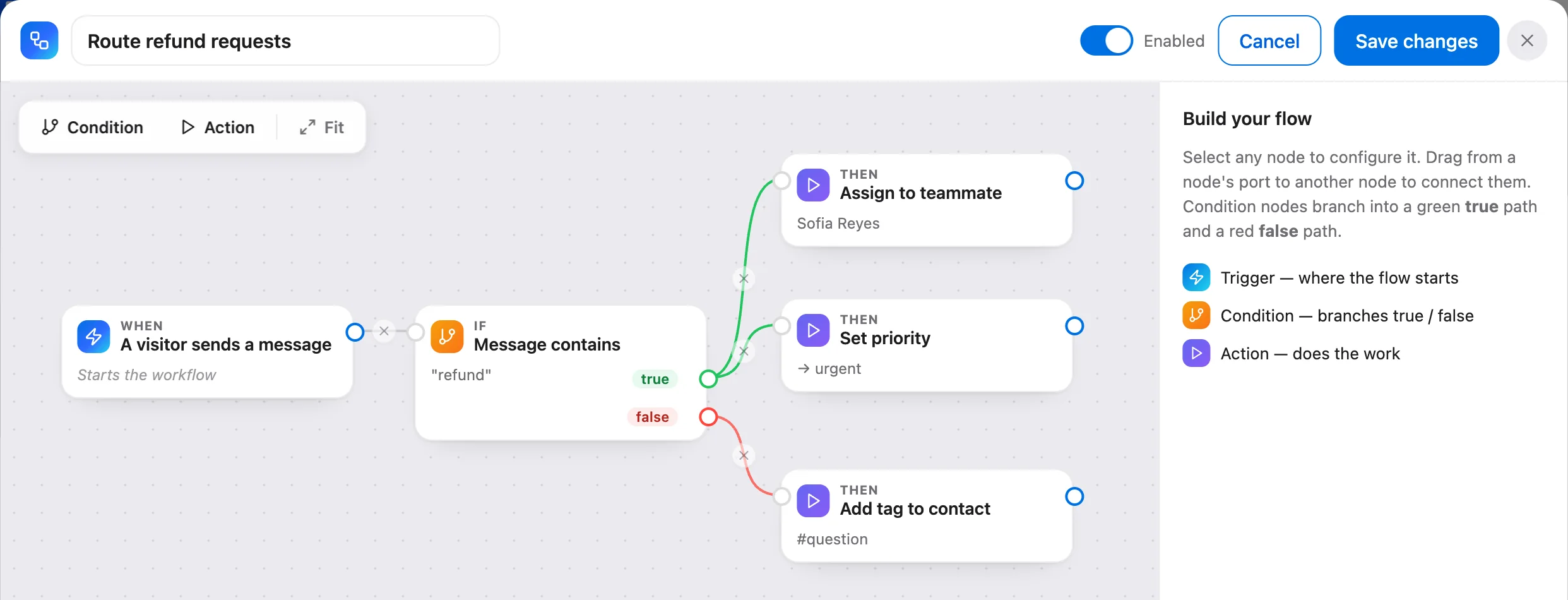
The real Talvo app, shown with our demo workspace.
A drawing of the same kind of workflow. Workflows are built on a computer.
When this happens, do that
A trigger to start, conditions to decide, and a list of actions to run — every workflow keeps a log of exactly when it fired and what it did.
Start from a moment that matters
Run a workflow when a conversation is created, when a visitor sends a message, or when a conversation is resolved. Set it once and Talvo watches for it around the clock.
- Conversation created, message received, resolved
- Evaluated the instant it happens
- Runs 24/7 without anyone watching
Only when it should
Narrow a workflow with conditions that all have to match — the channel, the priority, a tag on the contact, a keyword in the message, or text in the subject. No condition means it runs every time.
- Match on channel, priority or tag
- Match a keyword or subject
- All conditions must match to run
Do the work, in order
Assign a teammate, set priority or status, add a tag to the contact, drop an internal note, send a reply (emailed automatically on email conversations), or enroll the customer in a sequence — chained in the order you choose, with every run logged.
- Assign, prioritize, tag, note or reply
- Enroll into an outbound sequence
- Every run recorded in the history
Which plans include it
- Free$0not included
- Starterfrom $39/monot included
- Growthfrom $119/moincluded
- Scalefrom $249/moincluded
How-to guides
Questions, answered
Let the agent take the first shift.
Three steps, and the agent is answering.
- Add the messengerOne script tag, just before
</body>.Install the chat widget - Import your help centerCrawl your own site, or bring your articles over from your old help desk.Import by crawling your site
- Invite your teamOne flat price for the workspace, up to your plan's teammate cap.Invite your team
<!-- Settings → Chat widget → copy your snippet -->
<script async src="https://talvo.chat/_api/widget/loader?app=your-app-id"></script>
</body>