
On this page
- Ticket volume is a symptom, so treat the cause
- The 30-day plan to reduce support tickets, at a glance
- Days 1 to 3: tag one month of conversations
- Days 4 to 7: rank the reasons and pick three
- Week 2: fix the cause before you write the article
- Week 3: put the answer where the question happens
- Week 4: turn on AI answers, for topics you've actually covered
- Day 30: re-tag and compare honestly
- What counts as a deflection, and what doesn't
- Where Talvo helps, and what its analytics can't do
- After day 30
- Frequently asked questions
Most advice on how to reduce support tickets is a list of fifteen tactics and a vague promise. Almost none of it tells you what to do on Monday morning, with three people, a shared inbox and no analyst.
This is a schedule instead. Thirty days, four phases, one spreadsheet. By day 30 you will know why customers write in, you will have fixed or documented the three reasons that cost you the most, and you will have a before-and-after number you can trust. The tagging template is below, as a table you can paste straight into a sheet. Talvo is the worked example for the tool-specific steps, and the plan works with any inbox.
Ticket volume is a symptom, so treat the cause
A customer who writes in is telling you something didn't work: the setting was hard to find, the policy wasn't stated, the confirmation email never arrived. Bill Price, Amazon's first vice president of global customer service, built a whole book on that idea and called it The Best Service Is No Service. The point isn't to make support harder to reach. It is to remove the reasons people need it.
There is a trap in the other direction, and it is large. Gartner surveyed 5,728 customers in December 2023 and found that only 14% of customer service issues were fully resolved in self-service. Even for issues customers described as very simple, the figure was 36%. When self-service failed, 45% said the company didn't understand what they were trying to do, and 43% couldn't find relevant content (Gartner, August 2024).
So customers will try to help themselves, and they usually fail because the content doesn't match their question. A Harvard Business Review analysis of CEB data found that 81% of customers attempt to take care of matters themselves before they contact a rep (HBR, 2017). That study is nine years old, but the behavior it describes hasn't gone anywhere.
Two things follow. Your best lever is making the do-it-yourself path actually work. And you should never make the human path harder to find: in a 2026 Gartner survey of 3,566 customers, 87% said companies that use generative AI for service must provide access to a human agent (Gartner, August 2026).
The 30-day plan to reduce support tickets, at a glance
- Days 1 to 3: tag a month of conversationsRead the last 30 days of chats and emails and label the reason each customer wrote, using the template below.
- Days 4 to 7: rank the reasons and pick threeSort by count, then by how fixable each is. Three is the number a small team can finish.
- Week 2: fix causes before you write anythingChange the confusing copy, the missing email, the default that trips people up. Give each fix an owner and a date.
- Week 3: write the answers where questions happenOne article per chosen reason, linked from the widget, the product and your email footer.
- Week 4: turn on AI answers for covered topicsLet an AI agent answer only what your published articles cover, and watch what it hands off.
- Day 30: re-tag and compareSame tags, same window length, contacts per 100 customers, with satisfaction alongside.
Days 1 to 3: tag one month of conversations
Export, copy or simply open the last 30 days of conversations and read them. If you handle fewer than about 300 a month, read all of them. If you handle thousands, read a random 300; the pattern will show up well before then.
For each one, add a single row to a sheet. The point of the row is to record why the customer wrote, not what you did about it and not which part of the product they were in. "Customer couldn't find their invoice" is a reason. "Billing" is a department.
The tagging template
Copy this into a spreadsheet, one row per conversation.
| Column | What to enter | Example |
|---|---|---|
| Link | A link to the thread, so anyone can check your call | (paste the thread URL) |
| Date | Date the customer first wrote | 2026-09-14 |
| Channel | Chat or email | |
| Reason tag | One tag in the form area/reason, taken from the glossary tab | billing/invoice-copy |
| Sub-tag | Optional detail, free text, lower case | needs-vat-number |
| Self-serve? | Could this customer have found the answer alone? Y, N or Maybe | Y |
| Article? | Does a published article cover it? Yes, No or Outdated | No |
| Root cause | Who owns the fix: product, policy, docs, ops, customer-error, or none | ops |
| Segment | Optional: trial, paying, new this month | trial |
| Note | One line, only if something is surprising | third time this customer asked |
Here is how three filled rows look:
| Date | Channel | Reason tag | Self-serve? | Article? | Root cause | Note |
|---|---|---|---|---|---|---|
| 2026-09-14 | billing/invoice-copy | Y | No | ops | Wants PDF with company name | |
| 2026-09-14 | chat | account/password-reset | Y | Yes | docs | Article exists, visitor never saw it |
| 2026-09-15 | chat | setup/install-help | Maybe | Outdated | docs | Screenshot in article shows old menu |
The last three columns are where the value is. A tag tells you how often something happens. "Self-serve?", "Article?" and "Root cause" tell you what to do about it.
Naming rules, so two people tag the same thing the same way
Use area/reason and nothing else. Areas are broad (billing, account, setup, how-to, bug, sales) and reasons are specific (invoice-copy, password-reset). Add a second tab as a glossary with one line per tag describing what belongs in it, because that glossary is what stops you tagging the same question three different ways.
Pick one primary tag per conversation. If a customer asked two things, tag the one that took longer and put the other in the note.
Start with 15 to 25 tags. That number is our recommendation, not a research finding; you will see advice online for 30 to 50 tags, but it is vendor opinion with no evidence behind it. Fewer tags that you actually apply beat a fine taxonomy nobody remembers. Use an other/unclear tag as a pressure valve, and if more than about a tenth of your rows end up there after the first pass, that is a sign you need to split it. That tenth is our rule of thumb as well.
| Area | Starter reason tags |
|---|---|
| account | password-reset, change-email, login-error, delete-account |
| billing | invoice-copy, refund-status, failed-payment, plan-change, tax-id |
| setup | install-help, import-data, integration-question |
| how-to | feature-question, permissions, workflow-help |
| bug | bug-report, outage-question |
| sales | pre-purchase-question, pricing-question |
| other | feature-request, praise, spam, unclear |
An online store would swap in shipping/where-is-my-order, returns/start-a-return, order/damaged-item and sizing/fit-question. Rename freely. For orders, Gorgias data put "where is my order" at 18% of incoming requests on average for ecommerce merchants (Gorgias, 2023), but that is one vendor's customer base, so count yours. What matters is that each tag describes the customer's problem in the customer's terms.
Days 4 to 7: rank the reasons and pick three
Sort the sheet by tag and count. Then add the columns that matter: how much of that group was self-serve, what kind of fix it needs, and how much effort the fix takes.
You'll see rules of thumb online that say a handful of questions account for some fixed share of volume. None of them cite a dataset we could find, so ignore them and measure your own. Here is an illustrative month for a small SaaS company, with 400 conversations and 1,000 active customers. These numbers are made up to show the method.
| Reason tag | Count | Self-serve? | Fix | Effort (1 to 3) | Pick |
|---|---|---|---|---|---|
| how-to/feature-question | 66 | Partly | Spread over many features | 3 | Next cycle |
| account/password-reset | 62 | Yes | Help link on the sign-in page, one article | 1 | Yes |
| setup/install-help | 58 | Partly | Fix the setup copy, refresh the article | 2 | Yes |
| billing/invoice-copy | 55 | Yes | Send the invoice by email automatically | 1 | Yes |
| bug/bug-report | 47 | No | Product fix | 3 | Separate queue |
| other/unclear | 43 | n/a | Re-read and split | n/a | n/a |
| sales/pre-purchase-question | 38 | No | Keep human; this is revenue | n/a | Leave |
| billing/refund-status | 31 | Yes | Confirmation email with timeline | 1 | Next cycle |
The biggest group is not the first pick, and that is the point. The 66 feature questions are spread across a dozen features, so no single article would absorb them. The three picks (62 + 58 + 55 = 175 conversations, or 44% of the month) are large, mostly self-serve, and cheap to fix.
Notice what stays untouched. Sales questions are people deciding whether to pay you. Deflecting those would be deflecting revenue.
Week 2: fix the cause before you write the article
This is the step most deflection advice skips, and it is cheaper than anything else on the list. If 55 people a month ask for an invoice copy, the best answer isn't a better article about downloading invoices. It is sending the invoice. If the password reset email lands in spam, no article fixes that.
Walk each picked tag through the root-cause column.
| Root cause | Typical fix | Who owns it |
|---|---|---|
| product | Change a default, rename a confusing button, add an inline hint | Whoever ships the product |
| policy | Decide the rule, then state it where the customer decides | Founder or ops lead |
| ops | Send the missing confirmation, invoice, shipping or renewal email | Whoever runs billing or fulfillment |
| docs | Write or correct the article | Support |
Give every fix one named owner and one date inside the week. Fixes without dates are how this phase quietly turns into a wish list.
Week 3: put the answer where the question happens
Now write the articles for the chosen reasons, and write them for two readers: a person skimming and an AI that will retrieve a few paragraphs and answer from them. How to do that well is its own subject, covered in how to write help articles an AI can answer from. The short version is one question per article, the answer in the first sentence, and every condition stated out loud.
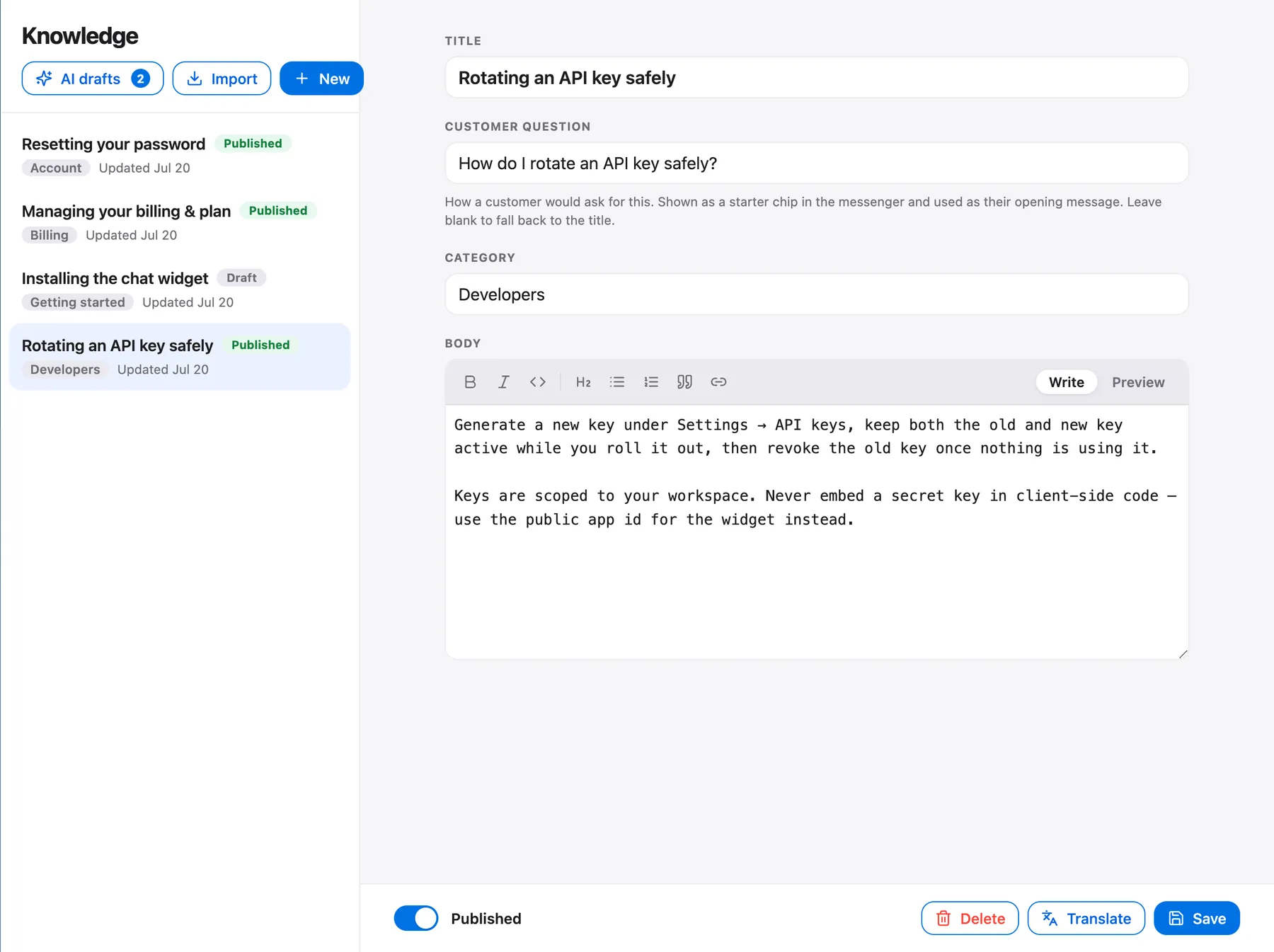
Writing the article is half the job. The other half is putting it where the question arises. Link the password article from the sign-in page. Put the setup guide in the welcome email and in the product's empty state. Make sure the same articles feed the Help tab of your chat widget, so a visitor can find the answer before they start typing. In Talvo, publishing an article puts it in your hosted help center and in the widget at once.
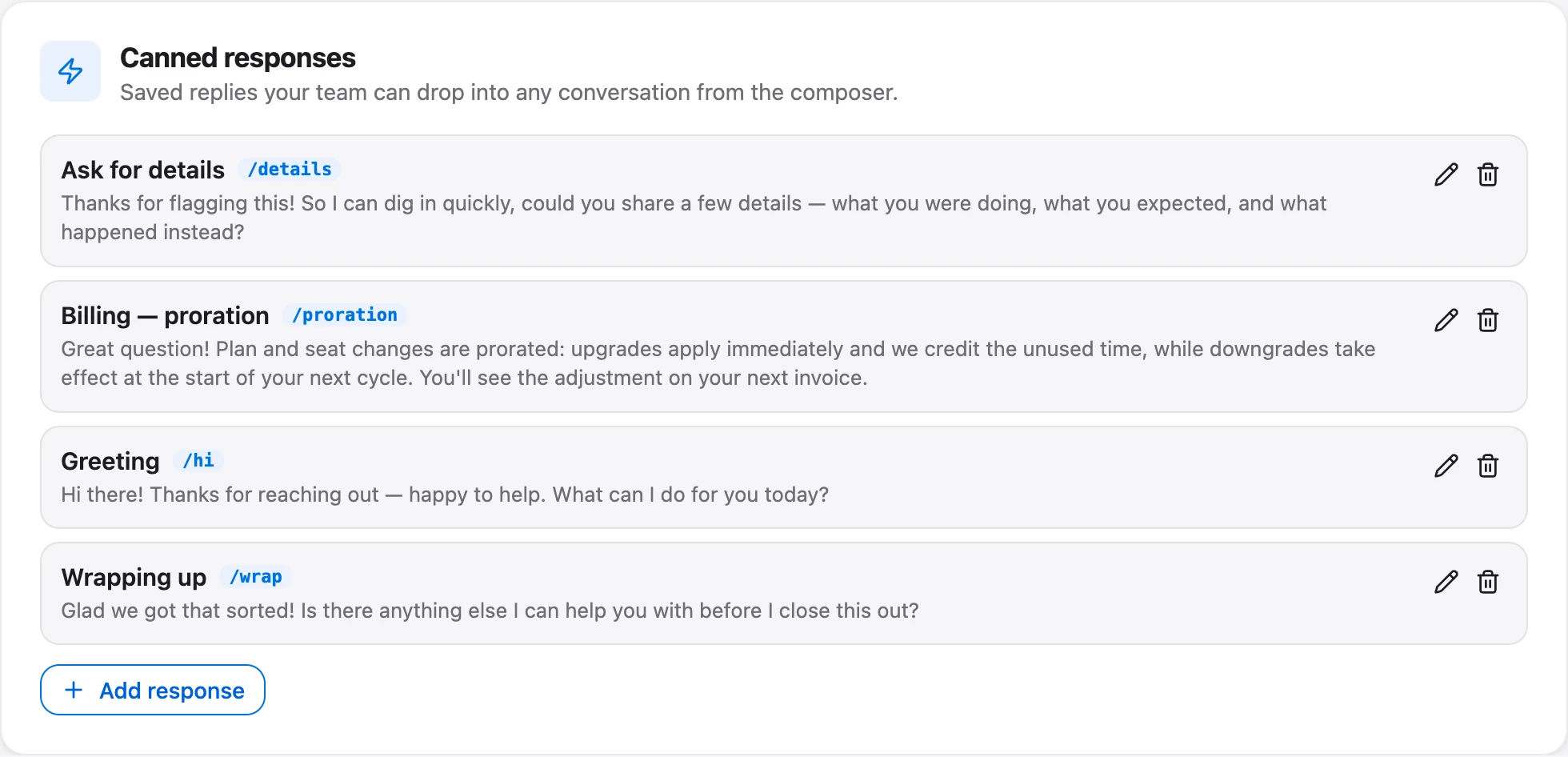
Not every top reason can be deflected, and some are better handled with a fast, good human answer. For those, write a saved reply once so nobody types it twice. Canned responses are shared across a Talvo workspace, and teammates insert them from the composer by shortcut. A saved reply is a draft to edit, not a script to paste.
Week 4: turn on AI answers, for topics you've actually covered
An AI agent is the layer you add last, because its ceiling is your content. A grounded agent answers only from your published articles, cites the one it used, and hands off to a person when it isn't confident. If you have never written the invoice article, the agent can't answer invoice questions, and shouldn't pretend to. The whole mechanism is explained in the knowledge base chatbot guide.
Do not expect a number from a vendor to hold for you. You'll see claims online that an AI agent removes 30 to 70% of tickets in a month; we found no source for them. Gartner's finding that 14% of issues are fully resolved in self-service is the sober counterweight. Measure your own topics.
- Absorb the repetitive questions your articles already answer, at any hour
- Show which article produced each answer, so a wrong answer traces back to a fixable page
- Hand off with the conversation intact, so the customer never repeats themselves
- Cannot answer what you haven't published; a gap in your articles is a hand-off
- Do nothing about the underlying cause: the invoice still never arrived
- Don't remove the need for a quick human path, which customers still expect
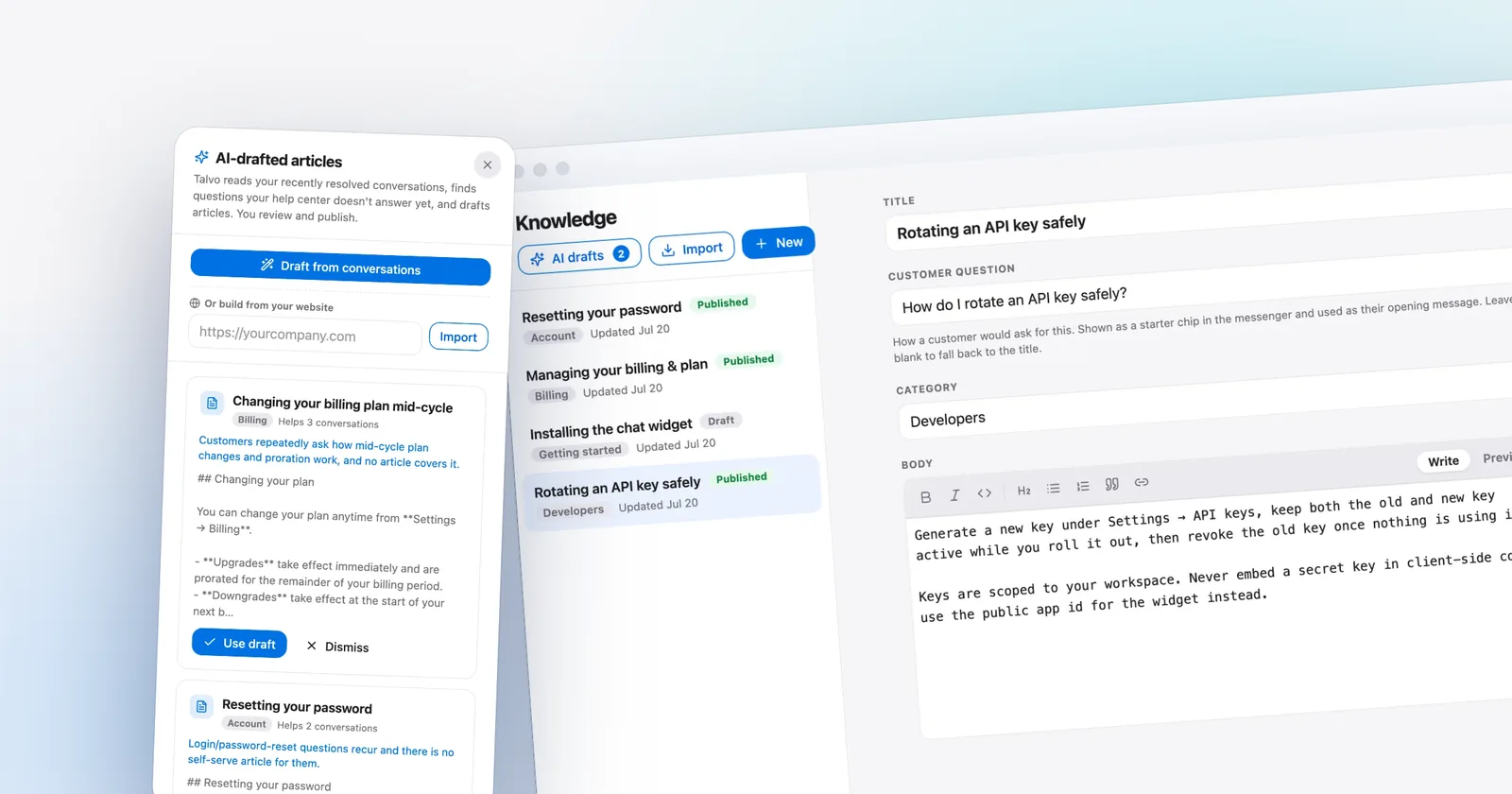
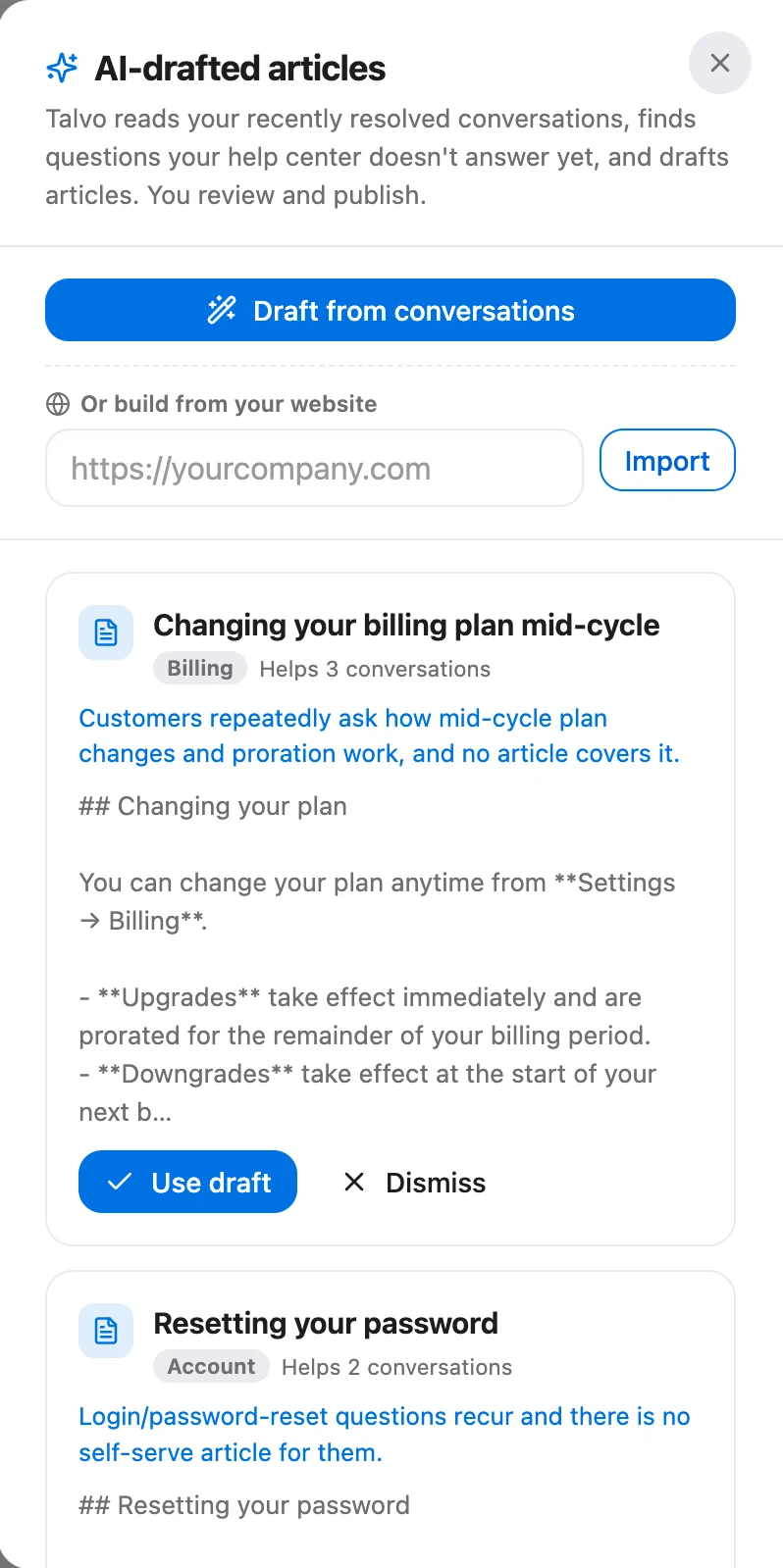
The hand-offs are the most useful data you will get this month. Every question the agent passed on is a missing or thin article. In Talvo's Growth plan ($149 a month), the self-writing knowledge base turns recurring hand-offs into draft articles under AI drafts on the Knowledge page. Nothing publishes by itself: you review, correct and approve, and until you do, the draft is invisible to the AI, the help center and the widget.
Day 30: re-tag and compare honestly
Re-read the new month's conversations with the same tags, over a window of the same length. Then compare rates, not raw counts. If you grew from 1,000 customers to 1,100, 313 conversations is not a 22% drop in effort per customer; it is a drop from 40 conversations per 100 customers to about 28.5.
That arithmetic assumes the three fixes removed half of the 175 conversations in their groups, about 87. It is a hypothetical, not a promise. Your own second month might show a quarter of that or double it. What you're after is a number you can compare against yourself.
- Same tags, same window length, same reader if possible
- Conversations per 100 active customers, before and after
- Count for each of the three picked tags, before and after
- New hand-off topics the AI could not answer
- Satisfaction scores for the month, next to the volume change
- Which three reasons to pick for the second cycle
The satisfaction line is not optional. If volume drops because people gave up, you haven't improved anything. Watch the rating on resolved conversations alongside the count; how to read that score is covered in CSAT vs NPS.
What counts as a deflection, and what doesn't
Deflection is the most inflated number in support. The honest definition is narrow: a customer had a problem, solved it through self-service or an AI answer, and did not contact a person about the same issue afterward.
That rules out a few things vendors like to count. A help-center page view isn't a deflection, because the person may have written in right after. An abandoned chat isn't one either; they may have given up, or gone to a competitor. The test for any topic is the cohort check: did the number of people writing in about it fall, per 100 customers, after the answer went live?
If you want to count AI answers specifically, count conversations the AI resolved where the same customer didn't come back on the same issue within a window you set, say seven days. The window is a choice, so write it down and keep it constant. For the broader question of how to measure an AI agent, see AI resolution rate.
Where Talvo helps, and what its analytics can't do
Talvo's analytics do not report by tag. You can tag conversations, in bulk from the inbox, and routing rules can test a tag while workflows can test or add one, but there is no tag-by-count report to open. That is why the template in this post lives in a spreadsheet.
What Talvo can show you depends on the plan. On Scale ($299 a month), the Voice-of-Customer digest reads every resolved conversation and rolls it into top themes, sentiment and rising issues. Ask-your-data on Scale lets you type a question such as why people are contacting you and get an answer from a fixed set of read-only queries. The AI performance dashboard ranks the topics the agent hands off. Each of these is a machine-grouped view of your data, which is useful, though it's not the same as your own tag list.
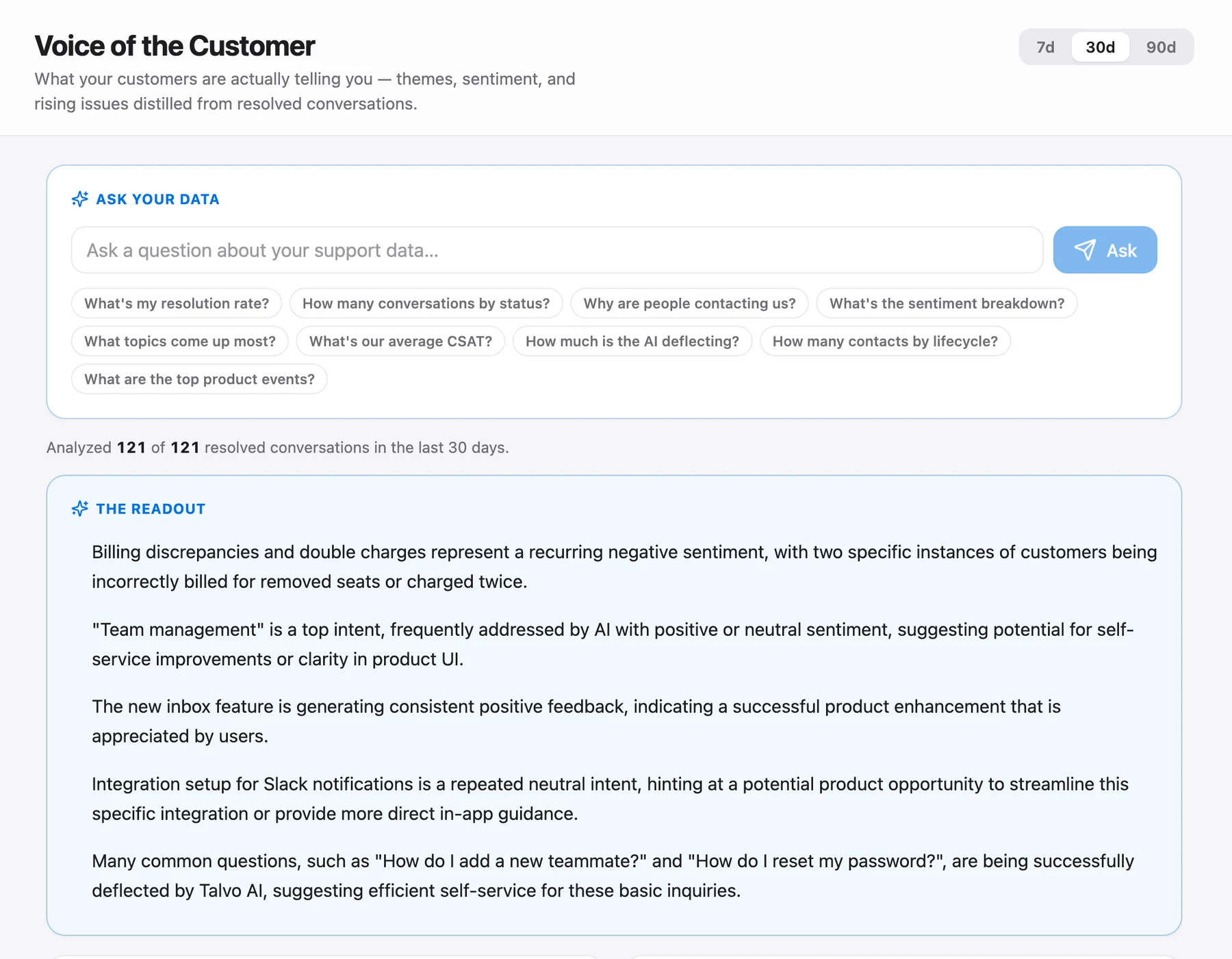
Read themes the way the help article advises: they measure volume, not importance, and rising issues are the ones to act on. Only resolved conversations are analyzed, so a workspace that leaves threads open indefinitely gets a thin digest.
For a first pass on any plan, the spreadsheet is the right tool. Talvo's REST API can read back contacts and conversations, but the help doesn't document a one-click conversation export, so budget an hour of reading rather than an hour of exporting. If you do tag in the inbox, put the same area/reason string in the tag so a routing rule or workflow can act on it. Routing rules and workflows are Growth-plan features.
Two limits worth stating. Talvo has live chat and email only, so conversations that begin on SMS, WhatsApp or the phone won't be in your sheet, and your picture of why customers contact you is missing those. And Talvo is in beta; there are no customer results to point to here. The plan works because of the method, not because of the tool.
After day 30
The second cycle is faster. The glossary exists, the sheet exists, your team knows what a "reason tag" is, and you have a baseline. Pick the next three tags, fix causes first, then content, then automation. Re-measure at the end of the month.
Do the whole thing four times a year and your ticket count stops being a number that happens to you.
Frequently asked questions
How do I reduce the number of support tickets?
Find out why customers write in, then remove the cause. Tag a month of conversations by reason, pick the three biggest reasons that customers could have solved themselves, fix the product copy or missing email behind each one, and then add help articles and AI answers for the rest. Measure conversations per 100 customers before and after.
What is ticket deflection, and how is it measured?
Ticket deflection means a customer solved a problem through self-service or an automated answer instead of contacting a person. The honest way to measure it is to count a deflection only when the customer did not come back about the same issue within a window you choose, such as seven days. Help-center page views and abandoned chats are not deflections.
What is a good ticket deflection rate?
There is no reliable universal benchmark. Gartner's survey of 5,728 customers found that only 14% of customer service issues were fully resolved in self-service, which suggests that high claims deserve skepticism. Set your own baseline for each topic and compare against it month to month.
How many tags should a support team use?
Start with 15 to 25 reason tags in an area/reason format, such as billing/invoice-copy. That number is our recommendation, since no independent study sets the right count. A small set that every teammate applies the same way is more useful than a detailed taxonomy nobody remembers.
Does adding a chatbot reduce support tickets?
It can, but only for questions your published content answers. A grounded AI agent answers from your articles, cites them and hands off when it is unsure, so its ceiling is your coverage. Fix the underlying causes and write the articles first, then add the agent and review what it hands off.
How long does it take to see fewer tickets?
You can tag a month of conversations in the first week and ship the cheapest fixes in the second, so a re-measurement at day 30 is realistic. How much volume drops depends on how much of it was avoidable, which your own tagging will show. Treat any vendor percentage as unproven until you see it in your own data.
Can you reduce tickets without hurting customer satisfaction?
Yes, if you remove causes rather than hide the support path. Keep a clear route to a person, since 87% of customers in a 2026 Gartner survey said companies using generative AI must offer access to a human agent. Track satisfaction scores alongside volume so you can tell fewer problems from fewer people giving up.
Can Talvo report on tags?
No. Talvo's analytics cannot report by tag, so keep the tagging template in a spreadsheet. On the Scale plan, the Voice-of-Customer digest groups resolved conversations into themes and sentiment, which works as a cross-check on your own tag counts.
Sources
Other products' prices and features change. We checked these pages; if something is out of date, tell us and we'll fix it.
- Gartner: only 14% of customer service issues are fully resolved in self-service (Aug 2024)
- Gartner: 87% say companies using GenAI must provide access to a human (Aug 2026)
- HBR: Kick-Ass Customer Service (2017)
- Gorgias: automate WISMO requests (2023)
- Talvo: the Voice-of-Customer digest
- Talvo: your self-writing knowledge base


