
On this page
- Published AI resolution rate benchmarks run from 14% to 98% because they measure different things
- Deflection, containment, resolution: definitions side by side
- Measure your own AI resolution rate in an afternoon
- What a good AI resolution rate looks like
- What the rate costs: one example
- How to raise your AI resolution rate
- Ways to raise it that make it worse
- Where Talvo fits, and where it doesn't
- Frequently asked questions
Search for an AI resolution rate benchmark and you will find figures from 14% to 98%. Nobody is quite lying. A Gartner survey says 14% of service issues are fully resolved in self-service. Fin's benchmarks page says its top ten performers in an industry average as high as 98.2%. Both are published, both are real, and they answer different questions about different denominators.
So this isn't another table of "good" ranges. It's a guide to reading the numbers vendors publish, measuring your own rate in an afternoon so you have one that means something, and raising it in ways that make your customers' experience better instead of making the chart look better. Where we cite a figure, we say who published it and what kind of source it is. Where nobody has a trustworthy number, we say that too.
Published AI resolution rate benchmarks run from 14% to 98% because they measure different things
Start with who is counting. A figure from a customer survey asks the person who needed help whether they got it. A figure from a vendor's dashboard counts conversations that ended without a human, which includes the customers who gave up. Neither is wrong. They just can't sit in the same chart.
| Source | Figure | What it measures | Kind of source |
|---|---|---|---|
| Gartner, survey of 5,728 customers (fieldwork December 2023, published August 2024) | 14% of service issues fully resolved in self-service; 36% for issues customers called very simple | The customer's view, across all self-service, not only AI | Independent survey |
| Ada and NewtonX, 2,000 consumers and 500 CX leaders (fieldwork December 2025 to February 2026) | 24% said AI alone fully resolved their most recent AI service interaction | The customer's view of AI specifically | Survey commissioned by an AI vendor |
| Freshworks Customer Service Benchmark Report 2025 (2024 data from 32,000+ companies) | AI agent "deflection" of 45% to 53% by industry; 48% for companies of 1 to 250 employees | Labeled deflection; the report doesn't state its definition | Vendor-published |
| Help Scout's pricing-page calculator | 73% average resolution rate | Help Scout's own AI Answers customers | Vendor-published |
| HubSpot pricing page | Customer Agent resolves "65%+ of conversations… automatically" | HubSpot's own product claim | Vendor-published |
| Fin homepage | Average 76% across 12,000+ customers, "many seeing over 85%" | Conversations Fin handled, with confirmed and assumed resolutions | Vendor-published |
| Fin benchmarks page (data refreshed May 20, 2026) | 85% top-10 average; 89.6% to 98.2% by industry | The average of the top 10 performers in each industry | Vendor-published, top performers only |
| Fin "AI resolution rate" guide | "60 to 80%" good, 80%+ best in class, 40% to 60% at first deployment | Fin's own estimates; no source cited | Vendor-published, unsourced |
| Tidio Premium plan | "Guaranteed 50% Lyro AI resolution rate" | A contract term on the Premium plan | Vendor-published |
Read it from the top and the story is plain. Customers report 14% to 24%. Vendors report 45% to 98%. The people in the surveys were asked how it went for them; the vendors counted what their own system classed as finished.
Two more observations from the table. First, vendor numbers move quickly and the pool behind them changes with them: in October 2025, Fin's blog reported an average of 66% across 6,000+ customers, and today's homepage says 76% across 12,000+. A number that rises while the customer base doubles may reflect the vendor's mix of customers as much as the product. Second, Fin's industry figures are an average of the top ten in each industry. That's a ceiling, not a typical result. We didn't find an independent audit of any vendor's published rate.
One more figure turns up in every roundup: Gartner's prediction that agentic AI will autonomously resolve 80% of common customer service issues by 2029. It's a forecast published in March 2025, not a measurement, and it shouldn't be used as a benchmark for anything you can check today.
Deflection, containment, resolution: definitions side by side
These terms are used loosely, and different vendors use the same word for different things. This is the way we use them in this post, and the way they most often appear in vendor material.
| Term | Formula | Counts as success when | The catch |
|---|---|---|---|
| Deflection | Customers who never reached a person ÷ customers who visited or started a chat | Nobody on your team had to answer | Counts people who gave up; often higher than the other measures |
| Containment | AI-only conversations ÷ conversations the AI engaged | No human joined the thread | Same problem: a customer who leaves is "contained" |
| Resolution, confirmed | Conversations where the customer said it helped ÷ AI-engaged | The customer says so | Answering is voluntary, so the sample is small and skews toward people who felt like replying |
| Resolution, assumed | AI-only conversations where the customer didn't ask for more help ÷ AI-engaged | Silence after an answer | Silence also means "I gave up" |
| Verified resolution | Resolution, assumed, minus same-issue recontacts within a window you choose | The customer didn't come back about the same thing | Needs a lookup, which is why most dashboards skip it |
| Share of all conversations | Verified resolutions ÷ all conversations | The AI actually closed it, out of everything that came in | Smaller than any resolution rate, and the one that matches your workload |
Billing makes this messier, because the vendors that charge per resolution have each written their own rule. Here are four of them, from their own pages.
| Vendor | Their rule for a billable resolution |
|---|---|
| Fin | Customer confirms it's resolved, or doesn't ask for more help after Fin responds, or Fin completes a Procedure, including hand-offs. Once per conversation |
| Zendesk | A model reads the transcript and verifies the AI resolved it; conversations that fail the check don't count |
| Help Scout | Resolved by AI without a human; the charge is voided if the customer escalates, keeps searching the help docs or asks for more help |
| Talvo | The AI answered end to end from a published article and no teammate sent a message. Once per conversation; hand-offs never count |
None of these is a quality score. They're billing rules. Talvo's sits in the same family as Fin's "nobody objected" definition, and we aren't claiming it's stricter; it counts a conversation as resolved when the AI answered from your content and no human stepped in, and, as the help article describes it, it doesn't check whether the customer came back an hour later. That check is yours to add, which is the next section. For prices per rule, see AI resolution pricing compared.
Measure your own AI resolution rate in an afternoon
You need a window of time, a way to count conversations, and about an hour with a spreadsheet. Nothing here needs a dashboard, though a dashboard makes the first two steps quicker.
- Pick one window and keep itThirty days is enough. Use the same window length every month so the numbers are comparable.
- Count the conversations the AI engagedThat's your denominator: every conversation where the AI replied, whether it finished or handed off. On Talvo's Scale plan the AI performance dashboard shows the engaged count. On other plans, count from the inbox.
- Count the ones it closed with no human messageThis is your raw numerator. In Talvo the month's AI resolution count is under Settings → Billing.
- Remove the recontactsIf the same customer wrote back about the same issue within 72 hours, take that conversation out of the numerator. Seventy-two hours is a choice, not a standard; pick a window and write it down.
- Read 50 of the "resolved" conversationsMark each correct, partly right or wrong. Under 50 resolved? Read them all. This catches wrong answers the customer accepted.
- Report the numbers togetherThe verified rate of engaged conversations, the share of all conversations, accuracy from your sample, and CSAT on AI versus human.
Here is how those steps turn into numbers. The figures are invented to show the arithmetic and aren't a benchmark of anything.
| Step | Count | Calculation |
|---|---|---|
| All conversations in the month | 1,000 | |
| AI engaged | 600 | 60% of all conversations |
| Closed with no human message | 330 | Raw rate: 330 ÷ 600 = 55% |
| Same-issue recontacts within 72 hours | 30 | |
| Verified resolutions | 300 | Verified rate: 300 ÷ 600 = 50% |
| Share of all conversations | 300 | 300 ÷ 1,000 = 30% |
| Sample of 50 read: correct / partly right / wrong | 41 / 6 / 3 | 82% fully correct |
The same month produces a 55% resolution rate, a 50% verified rate, a 30% share of all conversations, and about 25% of all conversations closed with an answer a reader judged fully correct (300 × 0.82 ≈ 246, out of 1,000). Every one of those is true, and a vendor would pick the first.
The share of all conversations deserves the most attention, because it connects to your workload. If the AI only touches 60% of what comes in, even a perfect resolution rate leaves 40% of your volume untouched.
If you want the worksheet, this layout works in any spreadsheet:
conversation_id | date | AI replied (Y/N) | human message (Y/N) | customer returned
within 72h on same issue (Y/N) | in my read sample (Y/N) | verdict (correct /
partly / wrong) | article cited | what was missing
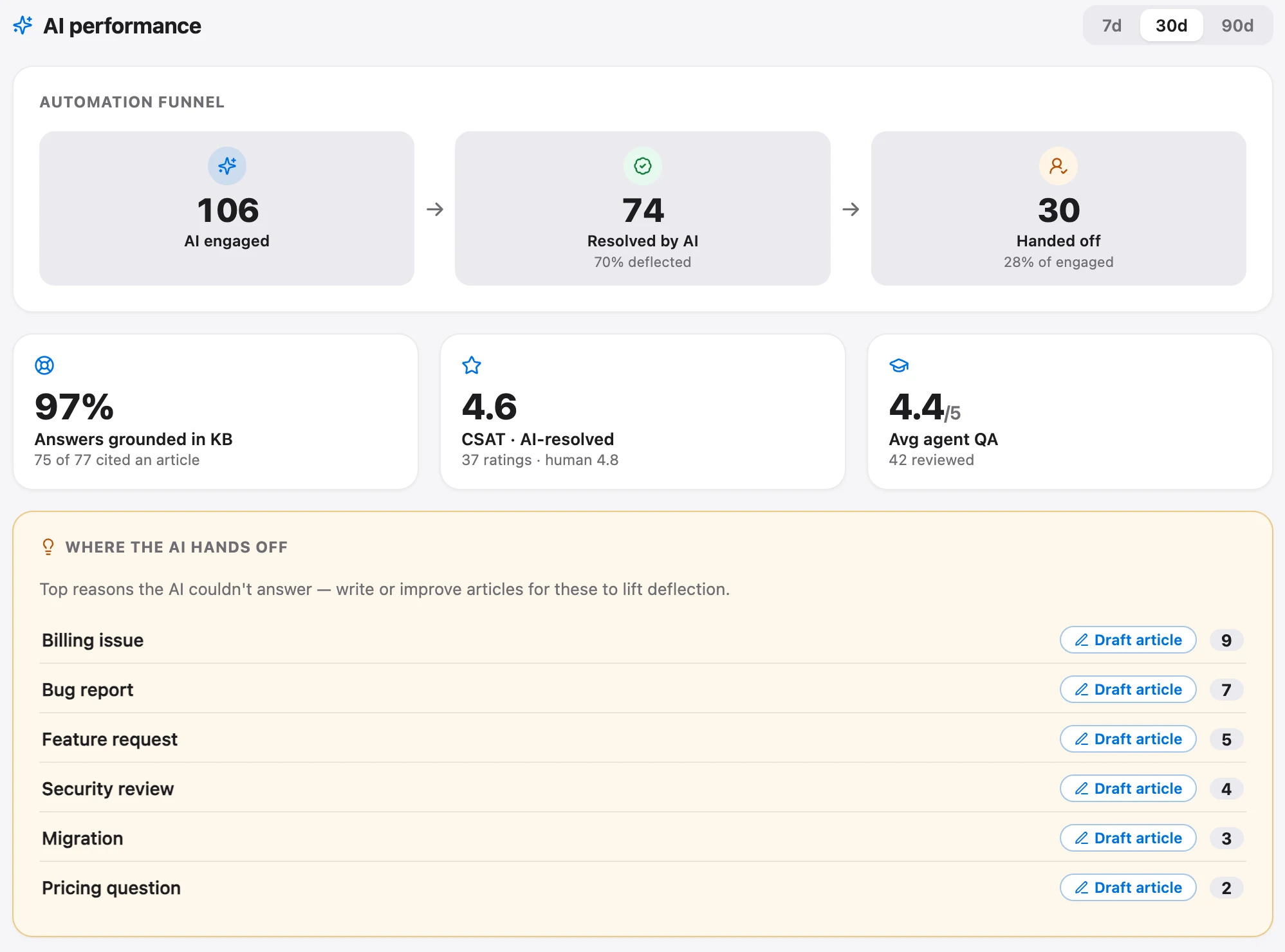
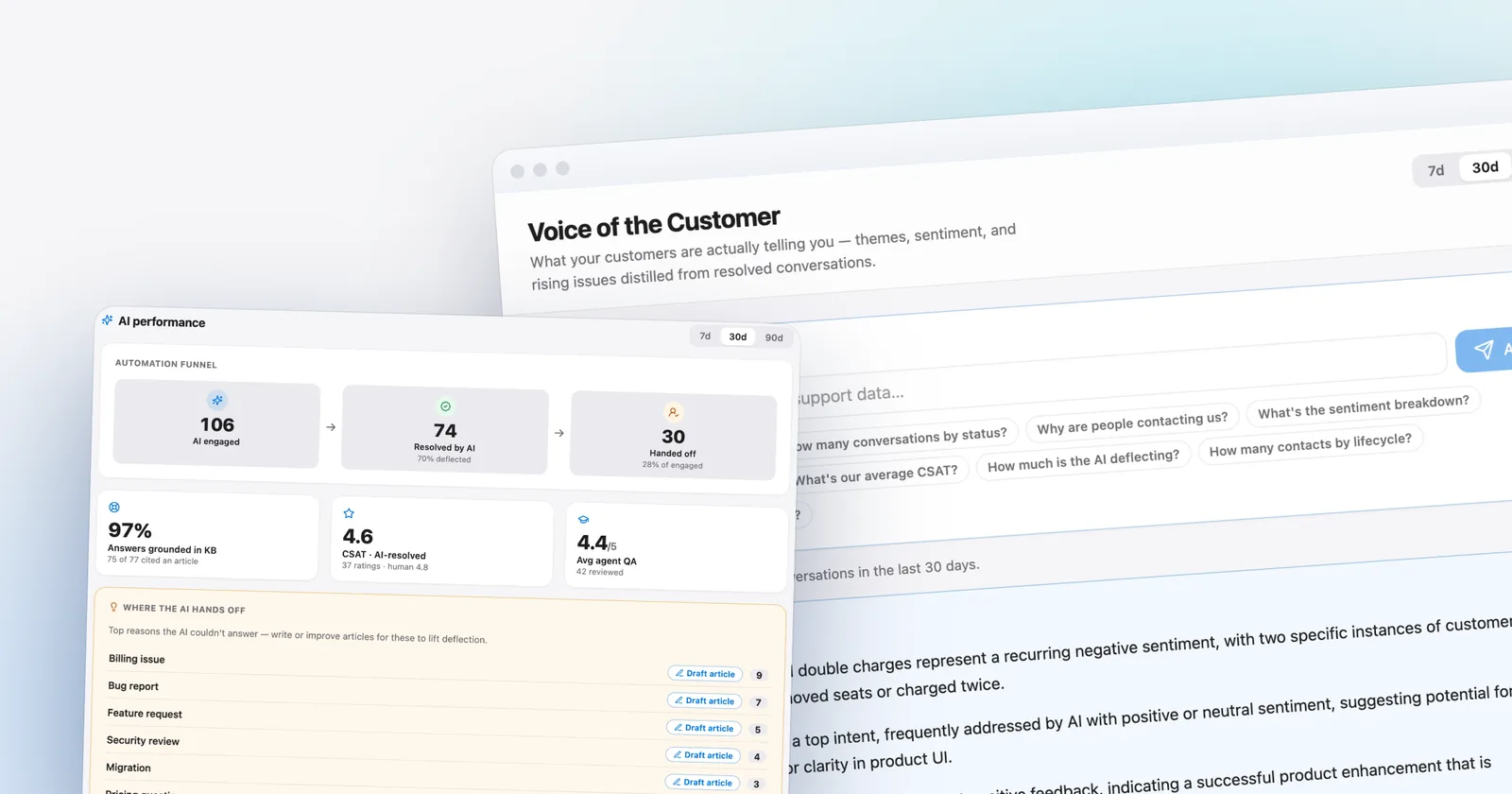
That dashboard does steps two and three for you. It shows the engage, resolve and hand-off funnel, how often answers were grounded in a cited article, and the hand-off topics ranked by how often they occur. It's on the Scale plan ($299 a month, or $249 billed annually). On every plan you still get the billing count, the total conversation volume and the average CSAT split by AI-resolved versus human-resolved in Analytics, plus the conversations themselves, which is why the hand-read is worth doing even if you have the dashboard.
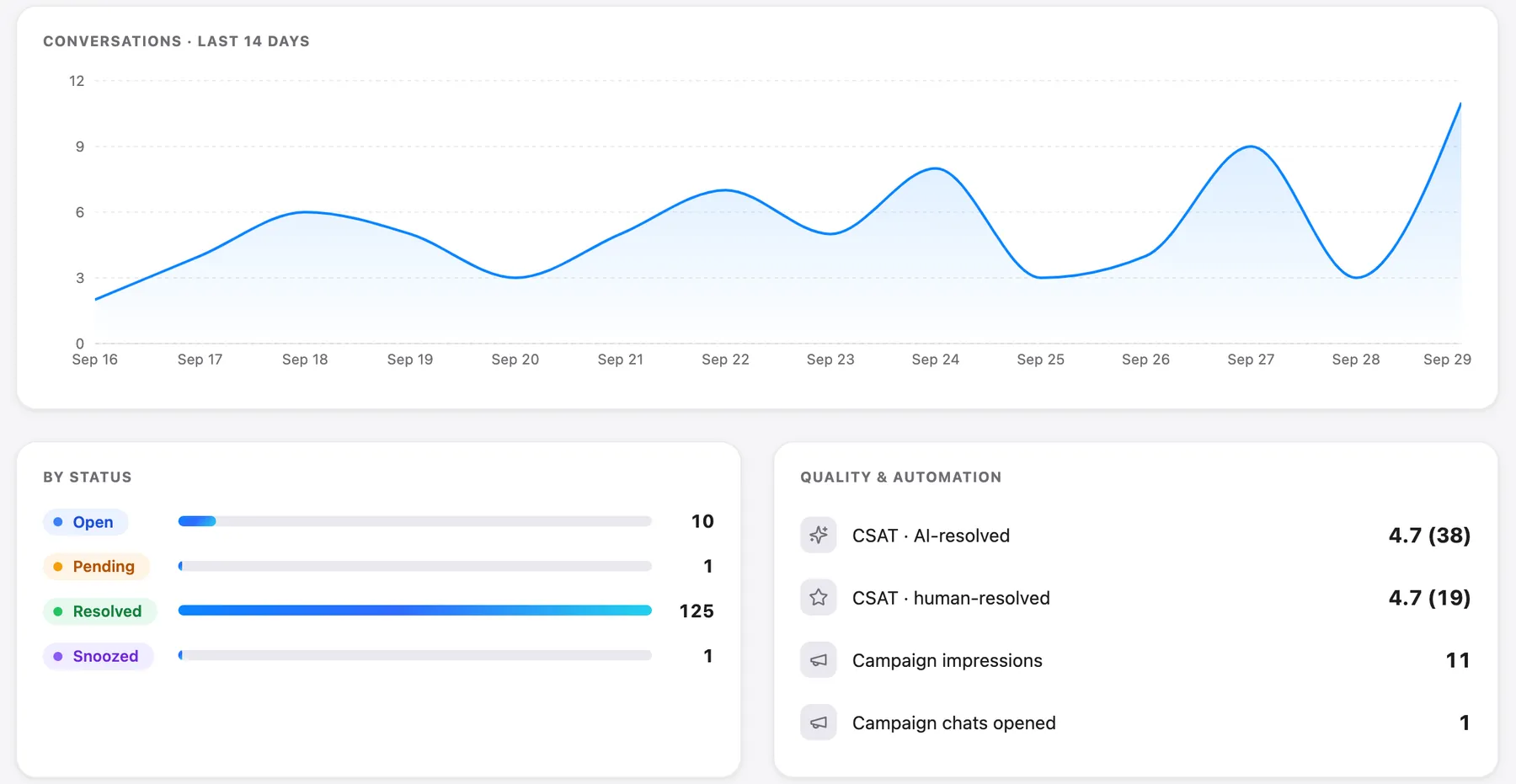
A note on CSAT before you compare it to anyone else's. Talvo's CSAT is a star rating shown when a conversation is resolved, and Talvo reports the average (for example 4.69), not the "percent of customers who gave 4 or 5" that many tools report. The two aren't interchangeable, so compare AI conversations against human ones inside the same tool.
What a good AI resolution rate looks like
Nobody can honestly give you a target for your business, because the ceiling is set by what you've written down. An AI that answers only from your published articles can't resolve a question your articles don't cover. A shop with thirty precise articles that cover its top thirty questions can have a better rate than a SaaS company with a thousand contradictory pages.
What you can do is judge your rate on direction and on the things around it. A rate that's good looks like this:
- The verified rate is rising month over month while the sample accuracy holds up. A rate that rises because the AI answers more wrong things isn't improvement.
- CSAT on AI conversations sits close to CSAT on human ones. A big gap points at topics where the AI shouldn't be answering yet.
- The hand-off rate is not zero. Hand-offs show you where the content is thin; a number near zero should make you suspicious.
- Recontacts within your window are flat or falling.
- Hand-offs reach your team with the conversation intact, so nobody asks the customer to repeat themselves.
For outside context, the only sourced ranges are the ones in the table above, and they should be used as context. If a vendor like Fin reports 76% on its own system, compare it against your assumed rate (the raw 55% in our example), not your verified one. And remember what the surveys say: when customers are asked, they're far less impressed than the dashboards. Fin's own help center defines a resolution as a customer who confirms or leaves without asking for more, and the Ada research found 24% of consumers said AI alone fully resolved their last interaction.
How long does it take to get higher? There's no sourced answer, and anyone quoting one is guessing. Fin says its own average rises about 1% a month across its customer base, which is vendor-published and says nothing about your content. The part you control is how quickly you close gaps: each hand-off topic you turn into a published article takes that topic off the list the next week.
What the rate costs: one example
The rate matters to the bill on every per-resolution plan, so here is one worked case. Say 1,000 conversations a month reach the AI, and the AI resolves 40% in one scenario and 70% in the other. Seats are left out for Fin and Help Scout so you can see the AI line alone; Talvo's number is the whole bill because Talvo has no per-seat charge (this assumes the team fits within the plan's 15 teammates).
| 400 resolutions (40%) | 700 resolutions (70%) | |
|---|---|---|
| Talvo (Growth, $149 includes 500; extra $0.49) | $149 | $149 + 200 × $0.49 = $247 |
| Help Scout AI Answers, $0.75 | $300 | $525 |
| Fin, $0.99 per outcome | $396 | $693 |
Moving from 40% to 70% adds $98 a month on Talvo, $225 on Help Scout and $297 on Fin. A better rate costs more on every plan, and that's the intended trade: each of those extra 300 resolutions is a conversation a person didn't have to answer. The sibling post on AI resolution pricing has the vendor-by-vendor rates and the human-cost comparison. If you are choosing a replacement, Fin AI alternatives priced for a real team puts these rates next to seats.
How to raise your AI resolution rate
Only one lever raises the rate in a way that holds up: the AI has to find a clear answer where it used to find none. Talvo's AI answers only from published articles, so the playbook is content work.
- Rank your hand-off topicsList the questions the AI handed off, grouped by topic, most frequent first. On Scale the dashboard ranks them for you. Elsewhere, read a month of hand-offs and tally by hand.
- Write the article at the top of the listOne question per article, answer first. Our guide to writing help articles an AI can answer from has the rules and before-and-after rewrites.
- Let the gaps draft themselves (Growth and up)The self-writing knowledge base drafts articles from recurring hand-offs. You edit and publish; nothing goes live automatically.
- Fix thin and contradictory articlesA two-line article gives the agent almost nothing to retrieve. Two articles that disagree produce confident wrong answers. Merge them and retire the old one.
- Put conditions in the textState plan, date, region and exception in the article itself, not in a screenshot or a footnote.
- Re-ask the original questionAsk your own widget the question in the customer's words and check that the right article is cited.
- Measure again in two weeksSame window length, same steps. Compare verified rate, share of all conversations and sample accuracy.
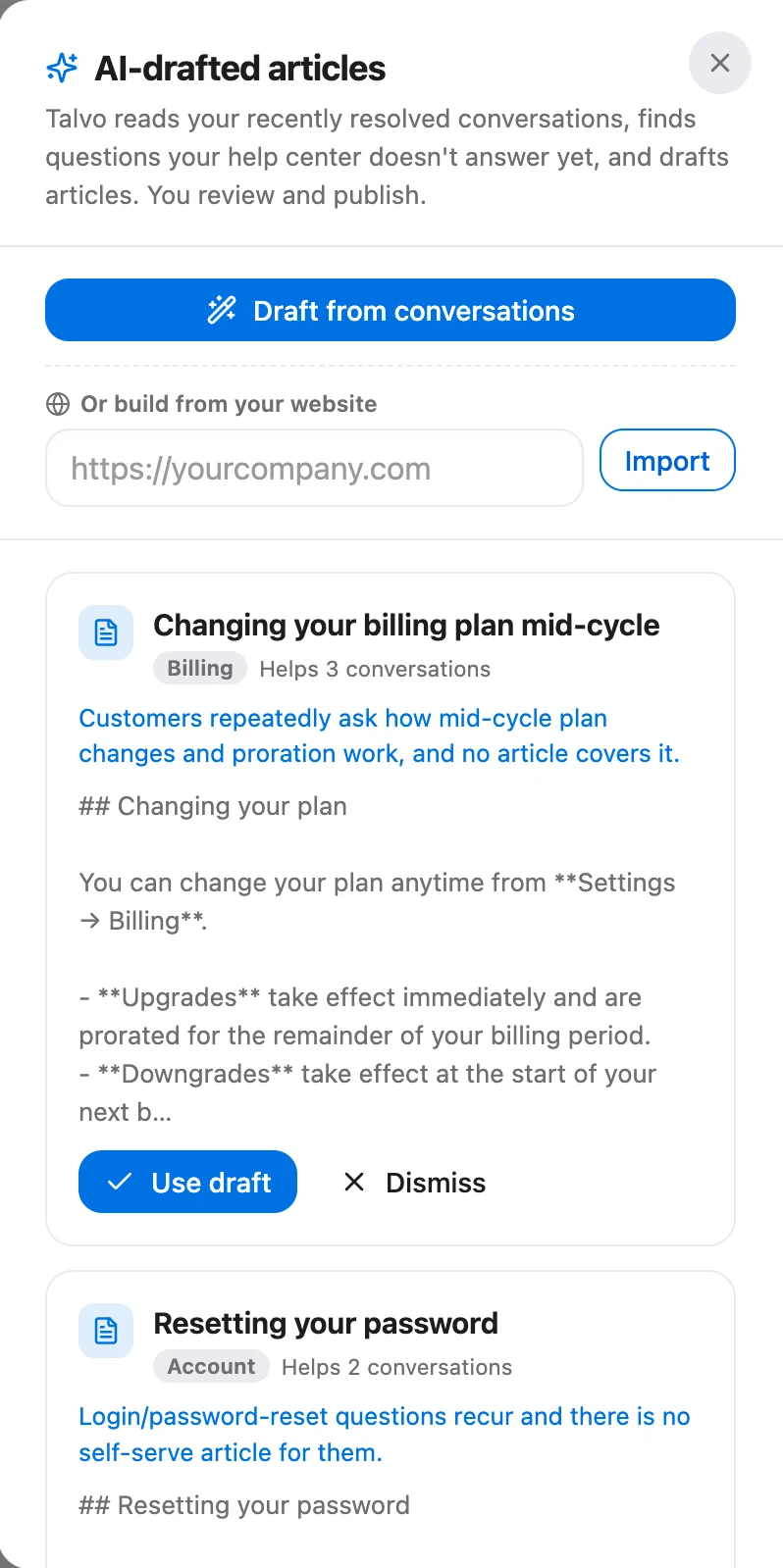
Picking the model won't fix a content gap. Talvo's own help text says what determines answer quality, in order: whether a published article covers the question, how clearly it's written, and only then the model. A low grounding rate points at your articles, not at the model. The same logic applies to brand voice: it changes how the AI sounds, not what it's willing to say, so it can't push the rate up.
Ways to raise it that make it worse
Every metric can be improved by making the system worse. These are the common ones.
Counting silence as success without checking. A customer who stops replying might be satisfied, or might have given up. Unless you look at recontacts and sample the threads, you're measuring departures.
Making the human harder to reach. Hiding the option to talk to a person raises containment and lowers trust. In a Gartner survey of 3,566 customers (February and March 2026), 87% said companies that use generative AI for customer service must provide access to a human agent. The option isn't a flaw in the metric; it's what customers expect.
Shrinking the denominator. Excluding hard topics from "engaged" conversations makes any rate look better. Keep the denominator as every conversation the AI replied to.
Pushing the AI past what you've written. Talvo's agent answers only from published articles and hands off when it's unsure, which is the property that lets you audit it. A tool that fills gaps from general knowledge raises the resolution count and the wrong-answer count together.
Where Talvo fits, and where it doesn't
Talvo gives you the pieces for this: AI resolutions counted per conversation, hand-offs that are never billed, citations on every answer, drafts built from hand-offs, CSAT split by AI-resolved versus human-resolved on every plan, and (on Scale) a funnel with the grounding rate.

Where it falls short is worth saying out loud. The AI performance dashboard is Scale-only, so smaller plans measure by hand. Talvo's billing definition counts unchallenged answers, so the recontact check is yours to run. And Talvo is new and in beta: we haven't got customer data, so we don't publish a resolution rate for it and you shouldn't trust anyone who does for a product this young. The only rate that matters is the one in your workspace, which the free plan lets you measure before you pay for anything. The knowledge base chatbot guide covers what to look for in the first weeks.
- Pull the month's AI-engaged count and the number closed with no human message
- Remove same-issue recontacts inside your window
- Read 50 resolved conversations and score them correct, partly right or wrong
- Compare CSAT on AI conversations with CSAT on human ones
- List the top five hand-off topics and assign an article to each
- Retire or merge any two articles that disagree
- Record all four numbers in the same sheet, with the window length
Frequently asked questions
What is a good AI resolution rate?
There is no neutral benchmark. Vendors publish figures such as Fin's 76% average and Freshworks' 45% to 53% deflection, while customer surveys find far lower numbers, 24% for AI in Ada and NewtonX's research and 14% for self-service in Gartner's. A good rate for you is a verified rate that rises over time while sample accuracy and CSAT on AI conversations hold up.
How do you calculate AI resolution rate?
Divide the conversations the AI closed without a human message and without a same-issue recontact inside a window you choose by the conversations the AI engaged. Then read a sample of 50 of the 'resolved' conversations to check they were actually right. Also report the share of all conversations the AI resolved, which is smaller and matches your workload.
What's the difference between deflection rate and resolution rate?
Deflection counts customers who never reached a person, including those who gave up. Resolution counts conversations where the AI answered and the issue was settled, either confirmed by the customer or assumed because they didn't ask again. Deflection is usually the more flattering number, and vendors that publish it often don't state their definition.
What is containment rate in customer service?
Containment is the share of AI-engaged conversations that ended without a human joining. It measures whether the AI kept the conversation, not whether it solved the problem, so a customer who abandons the chat is counted as contained. Treat it as an upper bound on resolution.
Why is my AI chatbot's resolution rate low?
Usually the content is the cause. In Talvo's case the AI answers only from published articles, so a missing, thin or contradictory article means a hand-off. Rank your hand-off topics, write or fix the top articles, and measure again in two weeks; changing the model rarely fixes a content gap.
How long does it take to reach a high AI resolution rate?
There is no sourced timeline, and it depends on how well your articles cover real questions. Fin says its own average rises about 1% a month across its customer base, which says nothing about your content. The part you control is closing gaps: each hand-off topic turned into a published article stops that topic handing off.
Does a customer not replying count as a resolution?
It depends on the vendor. Fin counts a resolution when the customer confirms it or doesn't ask for more help after the answer. Talvo counts a conversation the AI answered from a published article with no teammate message. Silence can mean satisfied or gave up, so check recontacts and read a sample.
Are vendor resolution rates comparable?
No. Vendors differ on the denominator (all conversations or only those the AI engaged), on the rule (confirmed, assumed or verified) and on the population (all customers or top performers). Fin's industry figures, for example, are averages of the top 10 performers. Compare your own rates measured the same way, not vendors' headline numbers.
Sources
Other products' prices and features change. We checked these pages; if something is out of date, tell us and we'll fix it.
- Fin: average resolution rate on the homepage (checked Oct 21, 2026)
- Fin benchmarks (data refreshed May 20, 2026)
- Fin: AI resolution rate guide
- Intercom blog: What's new with Fin 3 (Oct 15, 2025)
- Gartner: only 14% of customer service issues are fully resolved in self-service (Aug 19, 2024)
- Gartner: 87% of customers say companies using GenAI for service must provide access to a human (Aug 4, 2026)
- Gartner: agentic AI forecast for 2029 (Mar 5, 2025)
- Ada and NewtonX consumer AI study (Mar 24, 2026)
- Freshworks Customer Service Benchmark Report 2025 (PDF)
- HubSpot Service Hub pricing (checked Oct 21, 2026)
- Help Scout pricing (checked Oct 21, 2026)
- Tidio pricing (checked Oct 21, 2026)
- Zendesk: about automated resolution tiers
- Talvo: how AI auto-resolve works
- Talvo: what counts as an AI resolution
- Talvo: the AI performance dashboard


