
Reach the right customer at the right moment.
Trigger proactive in-app messages by the page a visitor is on, how long they've stayed, and whether they're returning — to onboard, upsell and re-engage, with impressions and opens counted automatically.
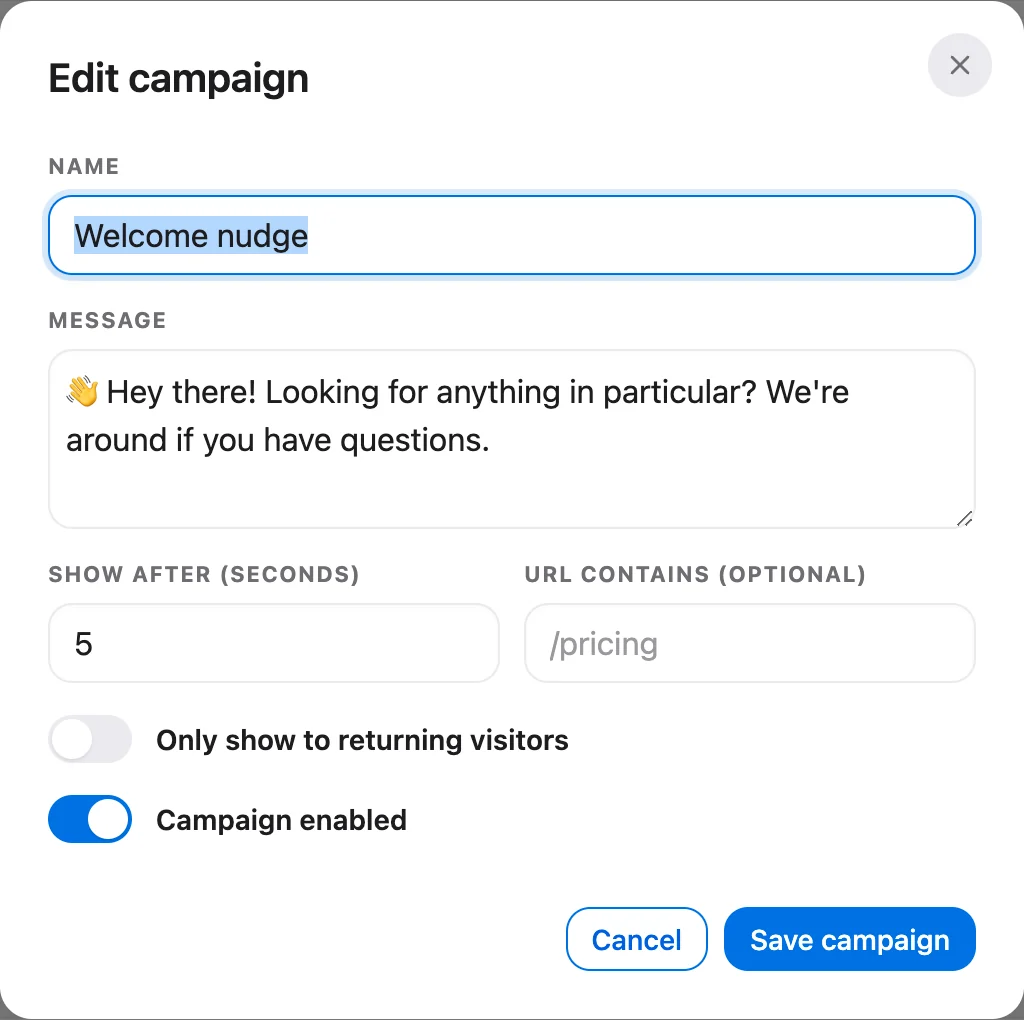
A real campaign, from our demo workspace.
The right nudge, exactly when it lands
Proactive messaging triggered by what a visitor is doing right now — and a count of how many it reached and how many opened it.
Trigger on what they're doing now
Show a campaign when a visitor lands on a page whose URL matches, once they've spent enough time on the site to signal intent, and optionally only to returning visitors — the moment to onboard, upsell or re-engage.
- Match the current page by URL
- Fire after a minimum time on site
- Optionally returning visitors only
Proactive in-app messages
Compose a friendly message that appears right in the messenger at the perfect moment — to onboard, upsell or re-engage — in a composer that previews exactly what the customer sees.
- In-app messages in the messenger
- Live preview as you write
- Onboard, upsell & win back
See what was shown and opened
Every campaign counts how many matching visitors it was shown to and how many opened it into a chat — so you can double down on what draws people in and retire what doesn't.
- Impressions: who it was shown to
- Opens: who started a chat from it
- Compare campaigns at a glance
Which plans include it
- Free$0not included
- Starterfrom $39/moincluded
- Growthfrom $119/moincluded
- Scalefrom $249/moincluded
How-to guides
Questions, answered
Let the agent take the first shift.
Three steps, and the agent is answering.
- Add the messengerOne script tag, just before
</body>.Install the chat widget - Import your help centerCrawl your own site, or bring your articles over from your old help desk.Import by crawling your site
- Invite your teamOne flat price for the workspace, up to your plan's teammate cap.Invite your team
<!-- Settings → Chat widget → copy your snippet -->
<script async src="https://talvo.chat/_api/widget/loader?app=your-app-id"></script>
</body>