
On this page
- What Talvo's round robin does, and what it leaves out
- Round robin, load-balanced and skills-based, defined
- How five major tools define assignment
- Five ways round robin backfires
- Which method fits your team
- Setting it up in Talvo for a three-person team
- How to tell if it's working
- The honest summary
- Frequently asked questions
Round robin assignment sounds like a fairness feature. In practice it's a counting feature: it hands the next conversation to the next person in line, whether that person is about to leave for lunch, is the only one who understands billing, or has already been sitting on a hard ticket for an hour.
This guide explains round robin against load-balanced and skills-based assignment, shows how Zendesk, Front, HubSpot, Freshdesk and Help Scout each define them (with links to their own docs), and says where round robin breaks. We make Talvo, which has a round-robin option too, so we'll start with exactly what it does and doesn't do.
What Talvo's round robin does, and what it leaves out
Talvo's round robin is an action on a routing rule, available on the Growth plan ($149 a month, or $119 on annual billing) and above. It does five things:
- It runs on new conversations, when a matching rule is found. The first matching enabled rule wins, and all of a rule's conditions must match.
- It rotates strictly by who was assigned least recently. People who've never been assigned go first.
- It skips Viewers and anyone who has marked themselves Away (a toggle in the account menu).
- Two chats arriving at the same moment go to two different people.
- If everyone is Away, the conversation stays unassigned and the team is alerted as usual.
And here is what it doesn't do:
- Simple, predictable rotation that's easy to explain to a team
- Skips Viewers and anyone marked Away
- No double assignment when two chats arrive together
- Flat workspace price, not another per-seat upgrade
- It does not check who is online. Someone logged off but not marked Away still gets chats.
- No limit on open chats per person, so it can't act as load balancing
- No skills-based routing and no team pools; the rotation is the whole workspace
- If someone goes Away after being assigned, their chats are not moved
- No queue: when everyone is Away, nobody picks the chat up automatically
- Growth plan and up only
That list is the honest summary. If it matches how your team works, round robin in Talvo will do the job. If any of those minuses is a deal-breaker, the rest of this article will help you decide what to use instead.
Round robin, load-balanced and skills-based, defined
The three terms get blurred, mostly because vendors use "round robin" for slightly different things. The plain meanings:
Round robin gives each new conversation to the next person in a fixed order. It counts conversations handed out, not work in progress. Everyone gets about the same number of new chats over time, however hard those chats are.
Load-balanced (also called balanced or capacity-based) gives each new conversation to whoever has the most spare room right now, usually the fewest open conversations, often with a cap per person. It reacts to what people are doing. Round robin doesn't.
Skills-based routes by what the conversation needs: language, product area, plan tier. The person with the right skill gets it. It usually works alongside one of the other two for people who share a skill.
There's a fourth option that small teams forget: no assignment at all. Everything lands in a shared Unassigned view and people pick conversations up. For two or three people sitting in the same inbox, that is often better than any rule, because a human can see which chat looks hard and who's free.
How five major tools define assignment
"Available" means something different in every tool, and so does what happens to a conversation when a person stops being available. The table below comes from each vendor's own documentation, checked on October 21, 2026.
| Tool | Round robin | Load-balanced | Skills-based | Unavailable agents | Plan |
|---|---|---|---|---|---|
| Zendesk | Longest time since the agent's last assignment, per channel. Still needs some spare capacity. | Default method: highest spare capacity, set per channel. | Yes | Agents need an "eligible status". Auto-reassign moves up to 50 of the most recently updated open email and messaging tickets, 1 minute after the status change. | Round robin and capacity rules on Team and up; skills and reopened-ticket reassignment on Professional and up. |
| Front | Cycles through available teammates and skips offline ones. If everyone is offline, the conversation isn't assigned and there is no queue. | Assigns up to a limit; queues while everyone is offline, then oldest unreplied first. | Not documented | Out-of-office pauses automatic assignment. New replies on their conversations return to the inbox, unless an inbox setting keeps assignments. | The pricing page doesn't name round robin or load balancing per plan; it caps rules at 10 on Starter, 20 on Professional and unlimited on Enterprise. |
| HubSpot | Rotates in sequence. Also offers Load Balanced and Random. | Fewest open tickets assigned in the last 30 days, plus separate capacity limits. | Yes | "Assign to available users only" is on by default. Availability comes from working hours, out-of-office hours or a manual status. If all are away, the ticket stays unassigned. | Service Hub Professional or Enterprise, with a paid Service seat. |
| Freshdesk | Circular order among available (online) agents in a group; agents at capacity are skipped. | Least occupied agent across channels, with a global cutoff. | Yes | Only agents set to Available get tickets, and assignment happens during business hours. | Pro or Enterprise. |
| Help Scout | One by one in alphabetical order. | "Balanced": fewest active assignments, with a limit up to 100 per person. | Not mentioned | Teammates must be Active and under their limit. If nobody is available, conversations wait unassigned, then are picked up longest-waiting first. | Round robin on Plus; Balanced on Pro. |
| Talvo | Least recently assigned, among non-Viewers who aren't Away. | None | None | Only the manual Away toggle is checked. Nothing is reassigned. | Growth and up. |
A few details are worth pulling out:
- Zendesk has the most machinery for people who leave mid-shift. Its auto-reassign has limits (50 tickets, a delay) and is configured per status, so read the docs before assuming it will empty a departing agent's queue. Zendesk's own pages are the best place to see capacity rules: routing configuration and capacity rules.
- Front and Help Scout both have a queue of some kind, but Front's round-robin rule has none: if everyone is offline, nothing is assigned. Its load-balancing mode does queue.
- HubSpot and Freshdesk gate this behind their upper-middle plans, per seat. HubSpot's rotation docs are also on a workflow page, and its capacity limits are a separate setting.
- Help Scout's manual and workflow assignment ignore eligibility, so a person set to Away can still be assigned by hand.
None of these docs describe what happens to conversations already assigned to someone who goes Away, except Zendesk and Front. For HubSpot, Freshdesk and Help Scout, check with the vendor if that matters to you.
What the same team pays for round robin
Take a 4-person team that wants round robin. Each tool's cheapest plan that includes it, at list prices on October 21, 2026:
| Tool and plan | Annual billing | Monthly billing |
|---|---|---|
| Talvo, Growth (flat, up to 15 teammates) | $119 | $149 |
| Help Scout Plus (4 × $45 or 4 × $54) | $180 | $216 |
| Freshdesk Pro (4 × $55 or 4 × $66) | $220 | $264 |
| HubSpot Service Hub Professional (4 × $90 or 4 × $100) | $360, plus $1,500 required onboarding | $400, plus $1,500 required onboarding |
These aren't the same products. Freshdesk and HubSpot are ticketing suites, Help Scout is email-first, and all three have more routing options than Talvo does. We're showing price to make the trade-off visible, not to say they're equivalent. Talvo's Growth plan also includes 500 AI resolutions a month; the others meter AI usage on top of seats (HubSpot's Professional plan includes some credits). For the longer version of this math, see per-seat vs flat pricing and Help Scout pricing.
Five ways round robin backfires
Published research on round-robin outcomes is scarce, so what follows is operating experience and the vendors' own caveats, not measured results.
It counts conversations, not effort. Three quick password resets and one angry refund dispute look the same to a rotation. Over a week the counts even out, and the person who drew the disputes is the one who's exhausted.
It sends work to people who are "here" but not working. In a tool that checks availability, a signed-in-but-idle agent still gets chats. In Talvo, which doesn't check online status at all, it goes further: someone who closed their laptop without setting Away keeps getting assigned.
Time zones. A rotation treats someone at the end of their day the same as someone at the start of theirs. If your team spans zones, you want availability or shifts. Freshdesk assigns only during business hours and Front has shifts on its Enterprise plan; Talvo has neither.
The specialist gets it all anyway. If one person is the only one who can answer billing questions, everyone else will pass those chats to them by hand. At that point the rotation is fiction. Skills routing, or a rule that sends billing-keyword chats straight to that person, is more honest.
Everyone is away at once. Tools differ here: Help Scout sweeps up waiting conversations when someone becomes eligible, and Front's load-balanced mode queues them. In Talvo, the conversation stays unassigned and the team is alerted; nothing assigns it later on its own, so someone has to claim it.
Which method fits your team
| Your situation | What to use |
|---|---|
| 1 person | No rule. Everything is yours already. |
| 2 or 3 people, same hours, watching the same inbox | A shared Unassigned view that people pick from. Collision indicators ("X is replying…") help. |
| 3 to 6 people, same hours, similar conversations | Round robin |
| Same group, but chat difficulty varies a lot, or people carry long tickets | Load-balanced |
| Distinct specialties (billing, technical, languages) | Skills-based, or separate inboxes/teams |
| People across time zones or on shifts | A tool with availability or shift handling |
Treat those boundaries as rules of thumb, not data. If you aren't sure how many people you need, the support staffing calculator turns conversation volume and handling time into a headcount, which is the better first question.
When Talvo's version is the wrong fit
Skip Talvo's round robin if you need any of: a cap on open chats per person, assignment only to people who are online, routing by skill or language, separate pools for different teams, or automatic reassignment when someone goes Away. Those are exactly the things it leaves out. For a small team on the same hours with similar conversations, none of them may matter. For a ten-person team across three time zones, they all will.
Setting it up in Talvo for a three-person team
- Start on GrowthRouting rules are a Growth feature, $149 a month or $119 on annual billing. See routing rules for the basics.
- Sort out rolesEveryone who answers should be an Agent, Admin or Owner. Round robin skips Viewers, so make anyone who shouldn't get chats a Viewer.
- Pin your specialist firstIn Settings → Inbox → Routing rules, add a rule on top: if the first message contains "invoice", assign to your billing person. A rule's conditions must all match, so add a second rule for "refund" rather than stacking keywords. The first matching rule wins.
- Add the rotationAdd a second rule below it, for example when the channel is chat, with the assign action set to "Round robin (available teammates)". Add a similar one for email.
- Teach the Away toggleIt's in the account menu. Tell the team to set it before lunch and at the end of the day, because it's the only availability signal round robin reads.
- Test itSend two test chats at the same time and confirm they go to two different people.
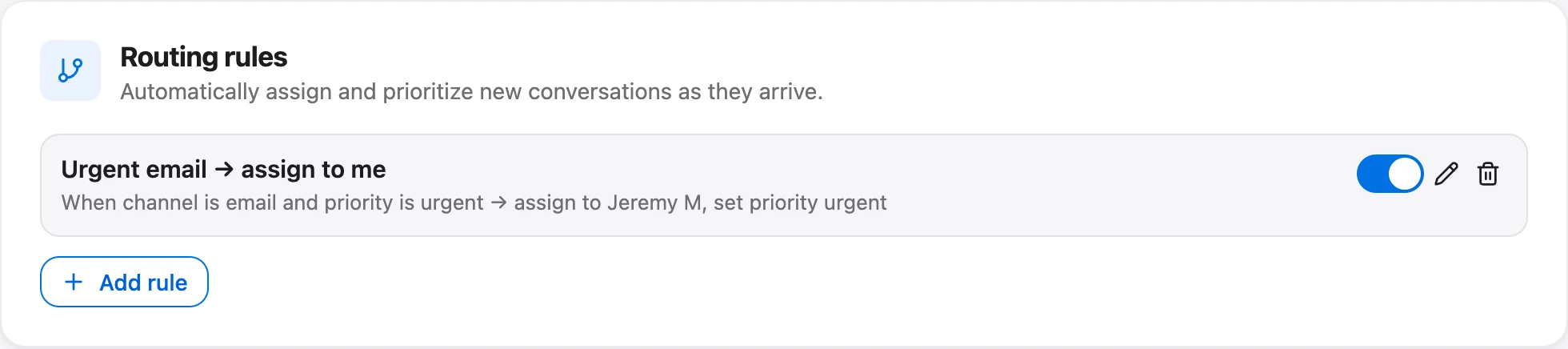
Round robin runs when a conversation is created, so it won't redistribute chats later. Teammates can still reassign by hand from the inbox. For the daily routine, read work your shared inbox.
How to tell if it's working
Three weekly checks are enough for a small team:
- Count each person's new assignments and divide by the total. A person well above or below an equal share needs an explanation (Away time, leave, manual reassignments).
- Compare first response time by person. If one person is consistently slower, the rotation isn't the problem; the conversations or their availability are.
- Look at conversations reopened per person. A high number suggests that person is getting the hard ones or closing too early.
- Look at how many chats sat unassigned. Every one is a moment when everybody was Away.
Talvo's analytics shows team-wide numbers (median first response, median resolution, SLA attainment, CSAT), but the analytics page doesn't show a per-teammate breakdown, so a spot check in the inbox does the job for now. First response time SLAs covers what to track.

The honest summary
Round robin is a good default for a small team on the same hours handling similar conversations, because it's predictable and takes the "who's got this?" question off everybody's plate. It is a poor fit for uneven work, specialist knowledge or scattered time zones. Talvo's version is the plain one: strict rotation, skip anyone Away, nothing more. That suits a lot of 3-to-6-person teams and none of the larger or more specialized ones.
Comparing a larger set of tools? Zendesk pricing, Freshdesk alternatives and Talvo vs Help Scout go through the prices and plan gates in more detail.
Frequently asked questions
What is round robin ticket assignment?
Round robin gives each new conversation to the next person in a fixed order, so everyone receives about the same number of new conversations over time. It counts conversations handed out, not the work people already have, which separates it from load-balanced assignment.
What is the difference between round robin and load balancing?
Round robin rotates through people regardless of their current workload. Load balancing assigns to whoever has the most spare capacity, usually the fewest open conversations, often up to a per-person limit. Zendesk, Freshdesk and HubSpot offer both; Talvo offers only round robin.
Does round robin skip agents who are offline or away?
It depends on the tool. Zendesk, Front, HubSpot, Freshdesk and Help Scout each skip agents who aren't available under their own definition. Talvo skips Viewers and anyone who marked themselves Away, but it does not check whether someone is online.
What happens if everyone is away?
In Talvo the conversation stays unassigned and the team is alerted as usual. In Help Scout conversations wait unassigned and are picked up, longest waiting first, when someone becomes eligible. Front's round-robin rule leaves the conversation unassigned with no queue, while its load-balanced mode queues.
What is skills-based routing?
Skills-based routing sends a conversation to someone with the right skill, such as a language or product area. Zendesk (Professional and up), HubSpot and Freshdesk document it. Talvo has no skills-based routing; a rule can send chats containing a keyword to a fixed teammate instead.
How do I set up round robin in Talvo?
On the Growth plan or higher, go to Settings → Inbox → Routing rules, create a rule with your conditions and set the assign action to Round robin (available teammates). Rules run on new conversations and the first matching rule wins. Teammates mark themselves Away from the account menu.
Is round robin fair if tickets take different amounts of time?
Not by itself. It evens out the count of conversations, not the effort, so one person can draw all the hard ones. If the difficulty varies widely, use load-balanced assignment, skills routing or a shared Unassigned queue where people choose.
How many agents do you need before auto-assignment makes sense?
There's no researched threshold. For two or three people on the same hours, a shared Unassigned view often works as well. Round robin starts to help when about three to six people share hours and handle similar conversations. This is a rule of thumb, not a finding.
Sources
Other products' prices and features change. We checked these pages; if something is out of date, tell us and we'll fix it.
- Zendesk: round robin (checked Oct 21, 2026)
- Zendesk: managing omnichannel routing configuration
- Zendesk: creating capacity rules
- Front: round robin vs load balancing
- HubSpot: route tickets in help desk
- HubSpot: ticket capacity limits
- Freshdesk: understanding automatic ticket assignment
- Help Scout: use Routing to automatically assign conversations
- Help Scout pricing page (checked Oct 21, 2026)
- Talvo help: Routing rules


