On this page
You switched on an AI agent and you still have a quiet worry: what is it actually telling people? The way to audit AI chatbot answers without building a QA department is boring and reliable. Read 20 conversations a week, grade each answer on one six-grade scale, trace every bad answer to the article (or missing article) behind it, and fix the source rather than the symptom. Reading and grading takes about 20 minutes; fixes are extra.
Pick the 20 conversations on purpose
Twenty isn't magic. It's roughly what a busy founder will keep reading, and it finds problems if you split it into three slices.
| Slice | How many | How to choose | What it's for |
|---|---|---|---|
| Random AI-resolved | 10 | A rule fixed in advance, e.g. every third conversation the AI closed on Tuesday and Wednesday | Your honest read on a typical answer |
| Handed off | 5 | The most recent hand-offs, skipping plain "can I talk to a person" requests | Gaps in your content, and hand-offs that weren't needed |
| Low-rated or reopened | 5 | Any conversation with a 1 or 2 rating, or where the customer came back about the same issue | Where the damage is |
The random slice is the only one that tells you how often the AI is wrong. The other two are biased on purpose toward where problems cluster. Count them separately and never blend the three into one "accuracy" figure.
If the AI handled fewer than about 20 conversations this week, skip the sampling and read all of them. If you can't find five low-rated conversations, fill the slot with more random ones.
What 10 random answers a week can and can't tell you
Small samples are good at noticing a problem that happens often and bad at proving a problem is rare. If a fraction p of answers are wrong, the chance that a sample of n answers contains at least one is 1 − (1 − p)^n.
| Answers read | Wrong 2% of the time | Wrong 5% of the time | Wrong 10% of the time |
|---|---|---|---|
| 10 (about one week's random slice) | 18% | 40% | 65% |
| 20 | 33% | 64% | 88% |
| 40 (four weeks) | 55% | 87% | over 98% |
| 80 (eight weeks) | 80% | 98% | over 99% |
Each cell is the chance you'll see at least one wrong answer. The rows count answers: if your conversations hold more than one AI answer each, count answers for n, and remember that the random slice only covers conversations the AI closed. So one week of ten random answers will usually miss a problem in one answer in twenty. Four weeks of the same routine will usually catch it.
The reverse matters just as much. With zero errors in 20 random answers, the true error rate could still be as high as about 14% at 95% confidence (the exact one-sided binomial bound is 1 − 0.05^(1/20)). With zero in 40, it's about 7%. That's why the tracking table below keeps a rolling four-week total for the random slice, and why you should say "no wrong answers in the last 40 we checked", never "the AI is accurate".
The NIST handbook's section on proportions explains the Wilson and exact methods behind intervals like these. Our NPS and CSAT calculator uses the two-sided Wilson interval, which runs a little wider: for 0 wrong in 20 it puts the upper limit near 16%, and for 0 in 40 near 9%. The point is the same either way.
Six grades for every AI answer
Grade each AI message that tried to answer something, not the conversation as a whole.
The examples below come from an invented business, so treat them as illustrative: Kiln & Co., a seven-person online store selling pottery clay, glazes and small kilns.
1. Correct and sourced. The answer is right, complete, and points to the article it came from. A customer asks whether Kiln & Co. ships glaze to Canada. The AI says yes, mentions duties, and cites the "International shipping" article, which says the same thing. Nothing to do.
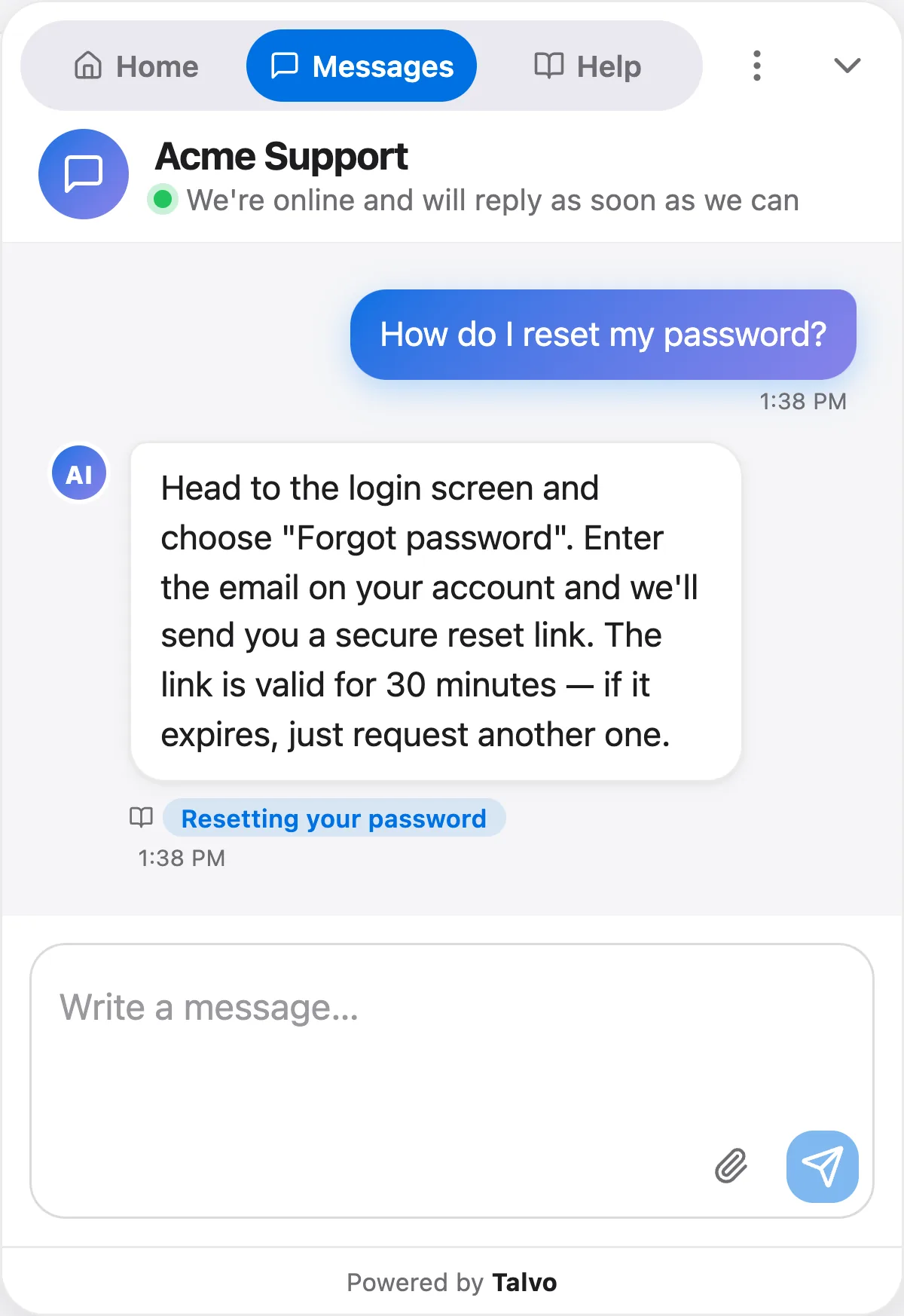
2. Correct but unsourced. The answer is right, but nothing shows where it came from. Asked how to store opened clay, the AI gives sound advice (wrap it, keep it out of frost) with no article attached. Next quarter you can't check it, and neither can the customer. Find out what it was drawn from; if customers keep asking, give it a public article.
3. Outdated. The answer matches an article, but the article is stale. Kiln & Co. raised its free-shipping threshold from $75 to $99 in September. Nobody edited "Shipping rates", so the AI tells a customer that a $80 order ships free, and cites the article to prove it.
4. Wrong. The answer says something false. Asked "Can I return an opened bag of clay?", the AI says yes, within 30 days. The real policy is unopened bags only, but that condition sits in a separate "Return exceptions" article, while "Returns" leads with "30-day returns" and never mentions it. This is the grade that costs money.
5. Should have handed off. The AI answered something a person needed to handle. A customer writes that their new kiln arrived with a cracked element. The AI offers troubleshooting steps. The customer needed a damage claim and a replacement, which no article can do.
6. Handed off when it could have answered. A customer asks, "Do you do will-call?" The AI hands off. The answer is in the "Local pickup" article, but the article never uses the customer's words, so the AI didn't find it. Each one is a conversation your team handled for nothing.
Grades 3, 4 and 5 are the ones to fix this week. Grade 4 about money, safety or legal terms is the one to fix today.
Trace each bad answer to its cause
Correct the customer, then find the cause, because the same answer is going out to everyone who asks. Nearly every bad answer comes from one of six causes.
| Cause | What you'll see | The fix |
|---|---|---|
| Missing article | A hand-off, or an answer stitched together from loosely related articles | Write one article that answers that question, titled the way customers ask it |
| Contradictory articles | The AI cites one article while another says the opposite, or cites both | Merge them into one, then unpublish the loser |
| Outdated article | The right article is cited, but it's stale | Edit it, then search for every other article that repeats the old fact |
| An internal note or file the AI shouldn't use | The answer contains something no public article says: a wholesale price, a staff-only workaround | Remove the file or snippet, or rewrite it so it holds only what customers may hear |
| A question that needs a person | Any answer here is wrong, however well-sourced | Add the topic to your vendor's always-hand-off list, and write an article that says how to reach you |
| The article exists but uses different words | A hand-off on a question your help center already answers | Put the customer's phrase in the title or first sentence |
Two of these deserve a closer look.
Contradiction is the classic failure. In the Air Canada case, the airline's chatbot said a reduced bereavement fare could be claimed within 90 days of the ticket being issued, while the page it linked to said the policy doesn't apply after travel is completed. The tribunal found that Air Canada "did not take reasonable care to ensure its chatbot was accurate" (Moffatt v. Air Canada, 2024 BCCRT 149, para 28). Our breakdown of the Air Canada chatbot ruling goes through it. For an audit, the lesson is practical: when you find one wrong answer, search your help center for the topic and read every article that mentions it.
Internal material is the one people forget: if an answer contains something you'd never publish, the source is almost certainly a private file or saved answer, not your help center. For the wording fix in the last row, our guide to writing help articles an AI can answer from goes into detail.
How to audit AI chatbot answers in 20 minutes
- Pull the sample (3 minutes)Ten random AI-resolved conversations using your fixed rule, five hand-offs, five low-rated or reopened. Note the slice next to each one.
- Read and grade (12 minutes)One grade per AI answer from the six above. Don't fix anything yet. Write the question and the grade in one line.
- Mark the causes (3 minutes)For every grade 3, 4, 5 or 6, write which of the six causes it is and which article, file or topic is involved.
- Assign the fixes (2 minutes)Money, safety or legal answers get fixed today. Everything else gets an owner and a day this week.
- Re-test after fixingA fix you haven't tested is a guess. Ask the exact question again in your own widget, in the customer's words, check the answer and its source, and record the result. This sits outside the 20 minutes.
A table you can copy
One row per week. Only the random columns measure accuracy; the rest count work.
| Week | Random wrong (3–5) / read | Rolling 4 wks random | Hand-offs that weren't needed | Should have handed off | Outdated | Fixes shipped | Fixes re-tested OK |
|---|---|---|---|---|---|---|---|
| Oct 26 | 1 / 10 | 1 / 10 | 2 | 0 | 1 | 3 | 3 |
| Nov 2 | 0 / 10 | 1 / 20 | 1 | 1 | 0 | 2 | 1 |
| Nov 9 |
The figures are illustrative. Add a notes column for which questions failed: the same question returning in week three is the most useful thing the table shows.
When to read more than 20
- Any answer about money, refunds, safety or legal terms was wrong
- A fix failed its re-test
- You changed prices, policies, shipping or plans this week
- You imported or rewrote a batch of help articles
- You changed the AI model or its settings
- AI conversation volume roughly doubled
- The rolling four-week random slice shows two or more wrong answers
When one of these fires, read every AI conversation on the affected topic that week rather than a bigger random sample. Searching the topic finds more than sampling does.
What not to do
Don't steer by resolution rate. A rising rate can mean the AI is answering more questions correctly, or that it's answering more questions it shouldn't, and the number looks the same either way. The rate needs an accuracy check beside it, as our piece on what a good AI resolution rate is explains, and this routine is that check.
Don't change the model first. A different model reading the same contradictory articles will contradict itself just as confidently. The cause is almost always content, and content is cheaper to fix.
Don't fix tone to fix facts. Brand-voice settings change how an answer sounds, not whether it's true.
Don't treat a good rating as a correct answer. Customers rate how the whole conversation felt, often before they find out the refund didn't go through. Ratings tell you what to read, not whether it was right.
And don't shrink the hand-off list to make the numbers look better. A hand-off on a refund dispute is the system working. Our guide to AI-to-human hand-off rules covers where the line should sit.
Running the audit in Talvo, as it works today
Here's what Talvo gives you for this routine and what it doesn't, as of October 2026. Talvo is new and in beta, so check the current version.
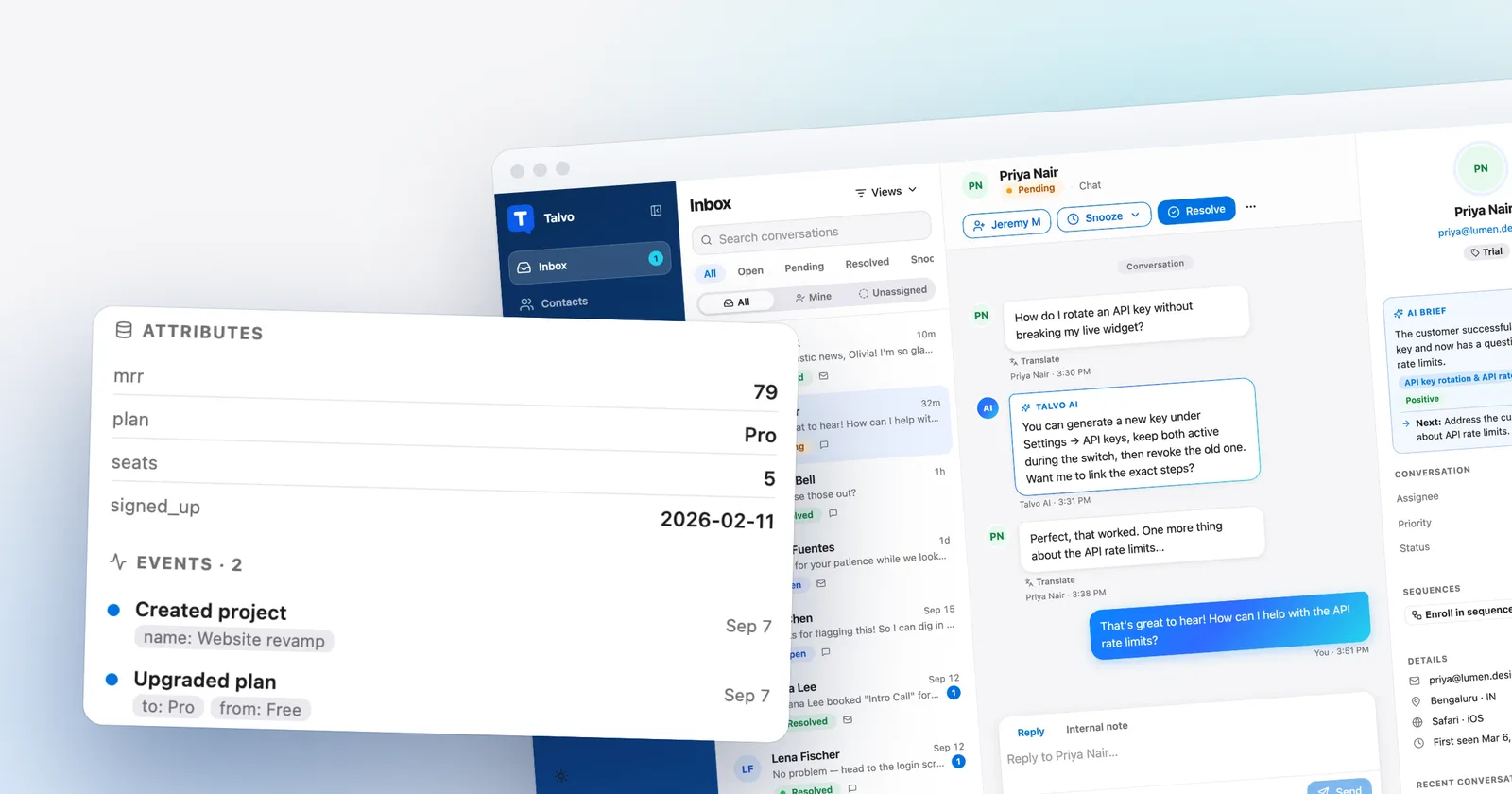
Seeing the source of each answer. In the inbox thread, every AI reply shows the titles of the articles it cited as small chips. The customer sees the same chips under the AI's reply in the widget. That makes grades 1, 3 and 4 quick to check. The chips show the title only and aren't links, so open the article from the Knowledge page and compare.
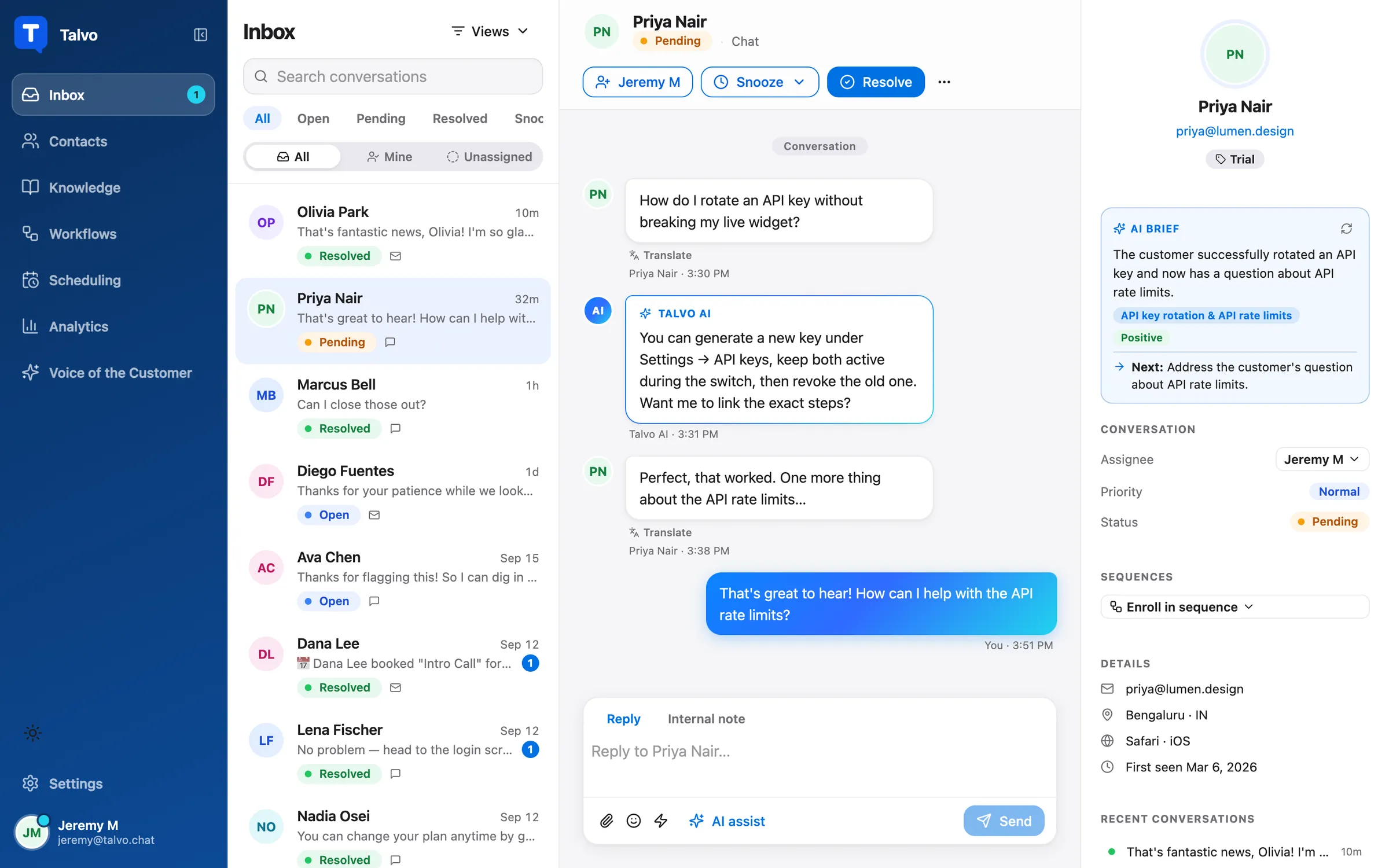
The blind spot: private files and snippets. Talvo's AI can also answer from internal knowledge files and private snippets (Settings → General → AI knowledge files). Those are never shown as sources, to customers or your team: an answer drawn only from a file or snippet has no chip, and nothing tells a teammate which file or snippet was used. Talvo turns an uncited answer to a real question into a hand-off, so an AI reply with no chip is either a greeting or thanks, or it came from a file or snippet. That makes a substantive answer with no chip your cue to check your files and snippets by hand. Keep that list short so the check stays quick.
Finding the conversations. There is no list of all AI answers, and no inbox filter that shows only AI-handled conversations. You open conversations one at a time, which is why the fixed random rule matters. Conversation tags work on every plan, so tag each one you've graded (say ai-audit) and filter by the tag to find them again next week.
You can't mark an AI answer wrong or correct it in place. There's no thumbs-down, flag or rating on AI messages, and customers rate the whole conversation, 1 to 5 stars, when it's resolved ("How was your support experience?"), not individual answers. Your grades live in your table or an internal note. "Teach the AI" sits under a teammate's own reply, not under the AI's messages: you reply to the customer yourself, then use Teach the AI on your reply, which saves the question and answer as a private snippet the AI and copilot use from then on. It's on every plan. Snippets carry no chip, so answers taught this way look unsourced in later audits. When a fact belongs in your help center, edit the article instead.
Reading a hand-off. Every AI hand-off leaves an internal note that starts "AI handed off:" and names the reason: no published articles, related articles that don't contain the answer (up to three are linked on the note), only internal files came close, no article covers the question, the AI budget is used up, or the AI couldn't be reached. The first four map straight onto the cause table above, so for the hand-off slice the note often tells you which fix to make.
Forcing a person. Settings → General → AI controls has an "Always hand these topics to a person" list. A message that matches a listed word or phrase goes to your team before the AI tries an answer. That's the fix for grade 5.
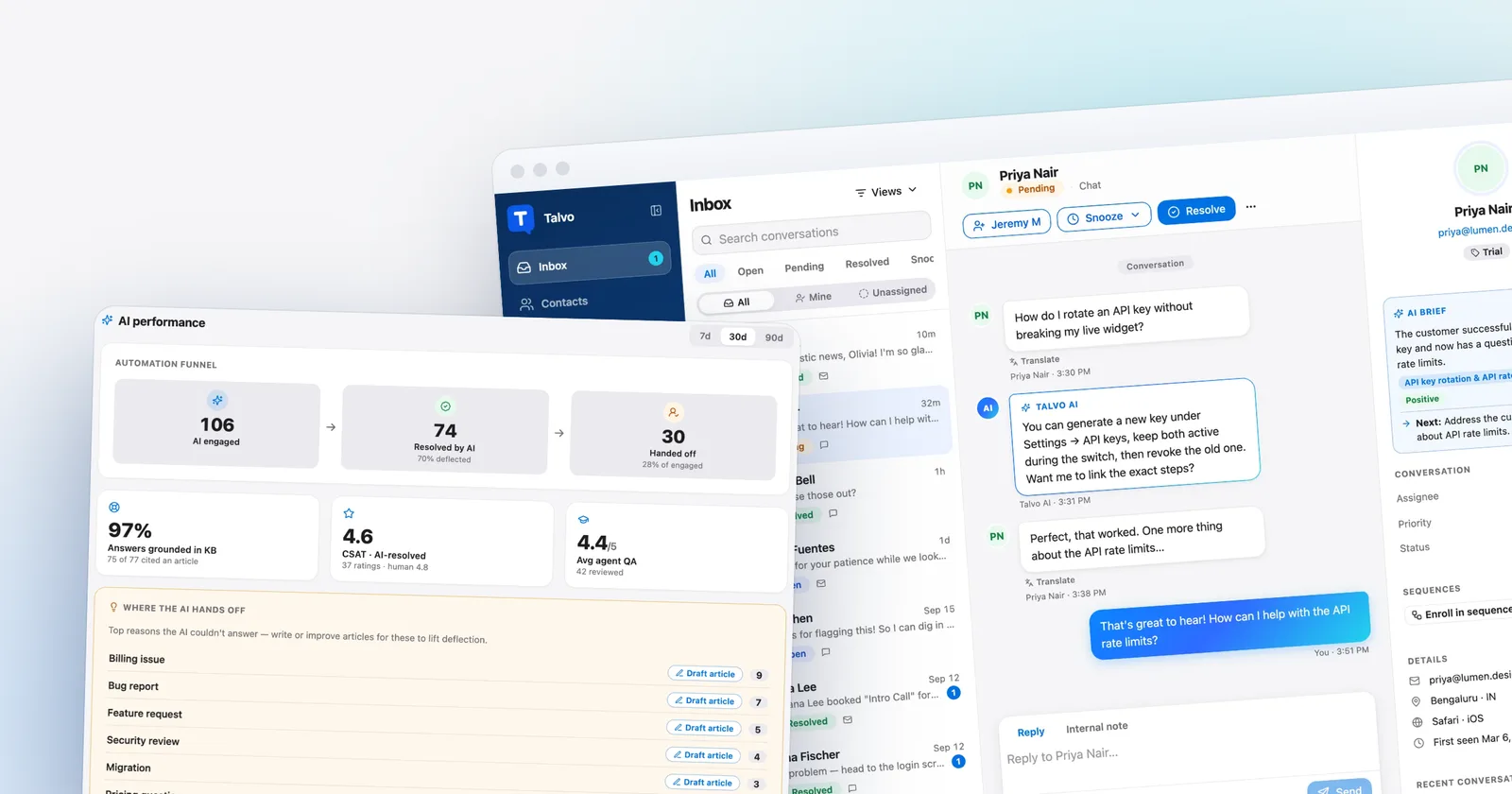
The AI performance panel (Scale only). On Talvo's Scale plan, $299 a month or $249 a month billed annually, the Analytics page adds an AI performance panel with 7, 30 and 90-day views. It shows the engaged, resolved and handed-off funnel, CSAT for conversations the AI handled alone next to conversations your team replied in, and "Answers grounded in KB": the share of AI answers that cited at least one article. An answer drawn only from a file or snippet cites no article, so it counts against that percentage. "Where the AI hands off" lists the most common topics of handed-off conversations, each with a "Draft article" button that writes a draft from customers' questions into Knowledge → AI drafts for review. That button relies on the AI drafts feature (Talvo's Growth plan, $149 a month, and up, so it's included on Scale).
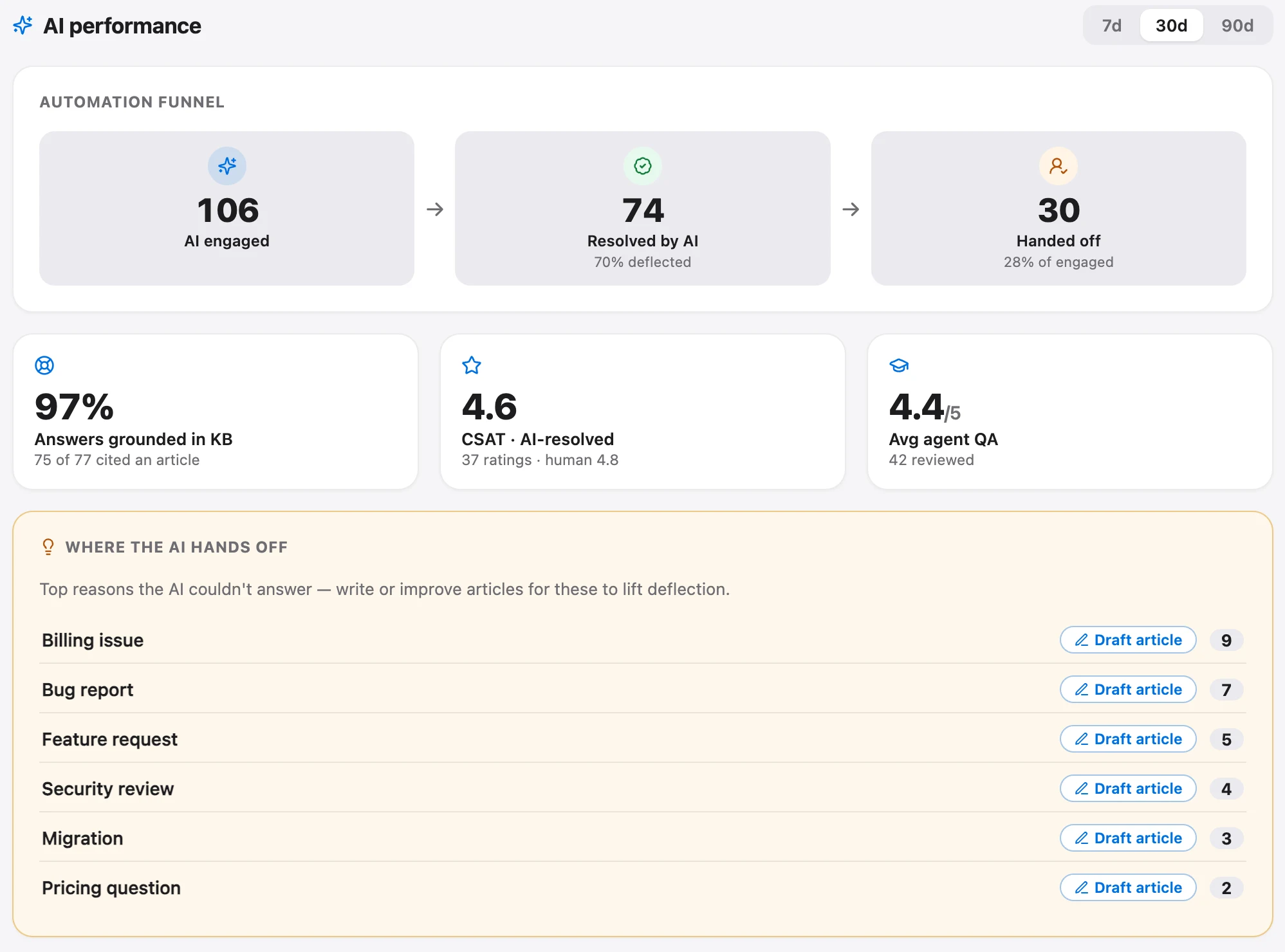
Read that panel as a pointer, not the audit itself. A high grounding percentage says answers had a source, not that the source was current. On Talvo's Free, Starter ($49 a month) and Growth ($149 a month) plans there is no panel, and the routine above is the whole method. See the AI performance dashboard help article and how AI auto-resolve works for the details.
Choosing a tool? Ask every vendor this audit's questions: can I see the source, flag a bad answer, find every AI conversation? Our knowledge base chatbot guide covers the rest, and the customer service QA scorecard does this job for your team's own replies. For how AI customer service tools bill and hand off, see AI customer service software.
Frequently asked questions
How do you audit AI chatbot answers?
Read a fixed sample of AI conversations every week, grade each AI answer on a short rubric, and trace every bad answer to the content behind it. A workable sample for a small team is 10 random AI-resolved conversations, 5 hand-offs and 5 low-rated or reopened ones. Fix the article, file or hand-off rule that caused the answer, then ask the same question again to confirm the fix.
How many AI chatbot conversations should I review each week?
About 20 a week is a sample a small team will actually keep up, split into random, handed-off and low-rated slices. If the AI handled fewer than about 20 conversations that week, read all of them. Read more when a money or legal answer was wrong, after a price or policy change, or after you change the AI's settings.
Can a small sample tell me how accurate my AI agent is?
Only roughly, and only from the random part of the sample. Finding no errors in 20 random answers still leaves the true error rate as high as about 14% at 95% confidence, and about 7% after 40. Small samples are good at catching frequent problems, so keep a rolling four-week total rather than judging one week.
Why does my AI chatbot give wrong answers?
Usually because of the content it reads, not the model. The common causes are a missing article, two articles that contradict each other, an article that is out of date, a private document the AI shouldn't be using, or a question that needs a person. Each has a specific fix, from editing or unpublishing an article to adding the topic to an always-hand-off list.
Should I switch AI models if my chatbot answers wrong?
Not first. A different model reading the same contradictory or outdated articles will repeat the same mistakes. Trace the wrong answer to its source and fix the content; change the model only if answers stay wrong when the content is clearly right.
Is customer satisfaction a good measure of AI answer quality?
Not on its own. Customers usually rate the whole conversation, often before they discover an answer was wrong, so a good rating can sit on a bad answer. Use low ratings to choose which conversations to read, and grade the answers yourself.
Can I see which source Talvo's AI used for an answer?
For help articles, yes: each AI reply shows the titles of the articles it cited, in the inbox and in the widget. Answers drawn only from private knowledge files or snippets show no source, and a teammate can't see which file or snippet was used. Check those by hand when an AI answer has no source chip.
Sources
Other products' prices and features change. We checked these pages; if something is out of date, tell us and we'll fix it.