On this page
- Does the GDPR apply to a US company with a chat widget?
- Your lawful basis for chat probably isn't consent
- What the privacy notice has to say, and when
- Cookies and browser storage: the part nobody has settled
- Vendor paperwork: the DPA and sending data to the US
- Records, retention and the requests you'll get
- A GDPR live chat checklist you can copy
- A sample privacy-notice paragraph for chat
- What Talvo does and doesn't give you here
- Frequently asked questions
A visitor in Lyon opens your chat widget, asks whether you ship to France, and leaves an email address. That one exchange touches four separate sets of rules: the GDPR itself, the EU's cookie law, the EU AI Act if a bot answered first, and the GDPR's rules for your contract with the chat vendor. GDPR live chat compliance for a 2–20 person company isn't a certification you buy. It's a short list of decisions you make, write down and keep doing.
This guide takes those decisions in the order you'll hit them. It is not legal advice. It's a practical reading of the law as of late October 2026, and your sector, customers and location can change the answer, so check with a privacy professional for your situation.
Does the GDPR apply to a US company with a chat widget?
Not automatically. Under Article 3(2), a company with no EU office is in scope when it offers goods or services to people in the EU, or monitors their behavior there.
Recital 23 makes the first test concrete. Being reachable isn't enough: an EU visitor opening your widget doesn't, alone, pull you in. Signs of aiming at EU customers do, such as a European language or currency you can order in, or mentions of customers there. A US SaaS company with euro pricing and a German landing page is very likely inside.
Whether a chat tool's page-view trail counts as monitoring under Article 3(2)(b) isn't spelled out; ask an adviser if you're outside the targeting test.
If you are in scope, Article 27 adds a step small teams miss: appoint an EU representative in writing. The exemption covers processing that is "occasional" and low risk, and a chat channel that runs every day is hard to call occasional (our reading, not a regulator's).
Your lawful basis for chat probably isn't consent
Every use of personal data needs one of the six bases in Article 6(1). Three matter for chat, and consent is often the weakest fit.
| What you do with chat data | Basis that usually fits | Watch for |
|---|---|---|
| Answer a pre-sales or support question | 6(1)(b), steps taken at the person's request before or under a contract, or 6(1)(f), legitimate interests | (f) needs a written balancing test |
| Follow up with marketing after a chat | 6(1)(a), consent, or (f) with a balancing test | Asking in the chat is not consent to newsletters; check the separate email-marketing rules too |
| Analyze transcripts or visitor behavior to improve the product | 6(1)(f) or (a) | The more it looks like tracking, the harder (f) gets |
| The widget storing an ID in the visitor's browser | Not a GDPR basis question at all | Governed by the ePrivacy rules, covered below |
That table is our analysis. The EDPB's draft guidelines on legitimate interests (1/2024) went to consultation in late 2024, and no final version had been published by late October 2026, so the regulator view on (f) is still provisional. And a GDPR basis doesn't settle whether the widget may write to the visitor's device; that's a different law.
What the privacy notice has to say, and when
Article 13 requires you to tell people, among other things, "at the time when personal data are obtained": who you are, your purposes and basis, who receives the data, any transfer outside the EU and its safeguard, how long you keep it, and their rights.
For chat, that means a short line near the widget's email field linking to a privacy notice with a chat section.
If an AI answers first, two more rules come into play
The EU AI Act's Article 50 says AI systems that talk directly with people must tell them they're dealing with AI, unless that's obvious, in a "clear and distinguishable" way by the first interaction. It applies from 2 August 2026 under Article 113; the July 2026 Digital Omnibus on AI moved other deadlines but not this one.
The duty sits on the provider that builds the chatbot; Article 50 puts no chatbot-disclosure duty on deployers like you. But the label appears on your site, so check it, and if it isn't obvious, add it to the welcome message.
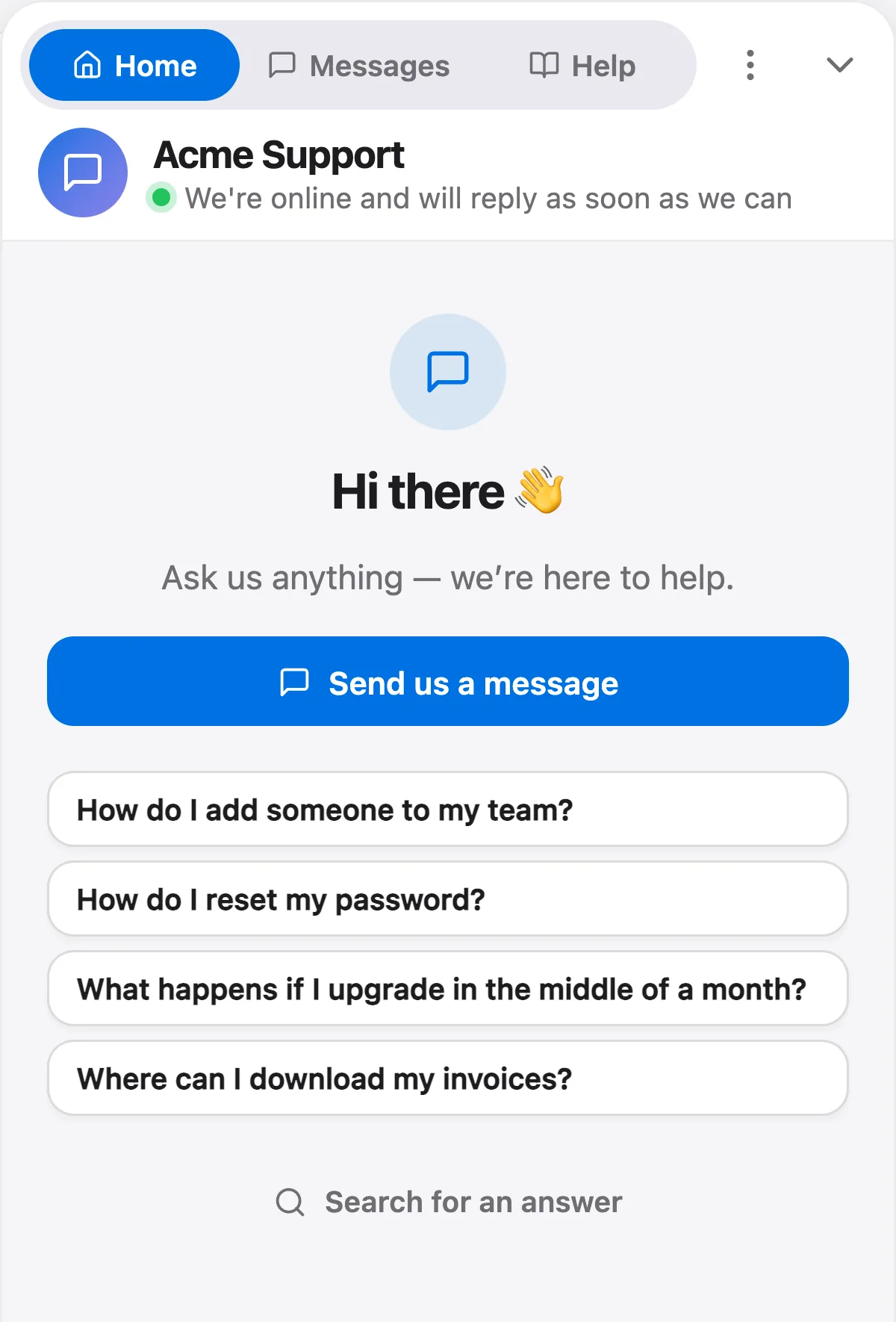
GDPR Article 22 is the other rule: a right not to be subject to solely automated decisions with legal or similarly significant effects. A bot answering "do you ship to France?" isn't that; one that refuses refunds or closes accounts on its own might be. Keep those with a person, as our guides to AI-to-human hand-off and the Air Canada chatbot ruling also recommend.
Cookies and browser storage: the part nobody has settled
Article 5(3) of the ePrivacy Directive covers storing information on, or reading it from, a visitor's device, cookies or not. Under the EDPB's Guidelines 2/2023 (version 2.0, October 2024), local storage becomes "access" once it, or anything derived from it, is sent off the device (paragraphs 34 and 44). A widget that writes a visitor ID to local storage and sends it to the vendor is in scope.
What the guidelines deliberately don't say is whether you need consent. Paragraph 4 leaves the exemptions to national law and regulators, and being in scope doesn't automatically mean consent is required.
So the exemption question goes back to the Article 29 Working Party's Opinion 04/2012 (WP194), which the EDPB hasn't replaced. Its "strictly necessary" test has two parts: the user explicitly asked for the service, and it can't work without the storage. Section 3.1 exempts "user-input" cookies that track entries "in a series of message exchanges", which sounds like chat, but it pictures first-party session cookies; third-party persistent storage is much less likely to qualify.
That reading is ours, built on WP194. No EDPB, CNIL or ICO text addresses chat widgets by name; the CNIL's list of exempt trackers covers carts, logins and consent storage but not chat.
For an EU-facing site, the cautious options are loading the widget only after consent, or a tool that sets nothing until the visitor opens chat. Gating costs you chats from people who decline.
The UK changed its rules in February 2026
The Data (Use and Access) Act 2025 changed PECR's storage rules on 5 February 2026, and the ICO updated its guidance in April. Its exceptions keep "communication" and "strictly necessary" and add three, two of which matter here: first-party statistics, and adapting how the service appears or functions, both with clear information and a free way to object (the third covers emergency assistance). The ICO doesn't mention chat. Our reading: a UK-only site has more room to argue an exception; a site that also faces the EU can't borrow them for EU visitors.
Vendor paperwork: the DPA and sending data to the US
Your chat vendor is your processor, and Article 28 requires a binding contract with it (the data processing agreement, or DPA), including processing only on your documented instructions. The vendor needs your authorization to use sub-processors and must tell you about changes so you can object. Read that list; for an AI chat tool it usually includes the AI model providers that see your transcripts.
A US vendor also needs a legal route for the transfer. The first is the EU-US Data Privacy Framework, an adequacy decision (2023/1795) from July 2023 covering vendors certified under it. The EU General Court upheld it on 3 September 2025 in Latombe v Commission (T-553/23). The appeal (C-703/25 P, filed 31 October 2025) was still pending in late October 2026. And on 31 July 2026, the EDPB Chair wrote to the Commission about the US Supreme Court's June 2026 ruling in Trump v. Slaughter on FTC independence. The decision leans on that independence, and the letter asks the Commission to "closely assess" the effect. It doesn't say the framework is suspended.
The second route is the Commission's standard contractual clauses (SCCs) under Article 46. Our suggestion, a judgment call rather than a legal requirement: check the vendor is on the official Data Privacy Framework list, and ask for a DPA that also includes SCCs as a fallback.
Records, retention and the requests you'll get
Records of processing (Article 30)
Article 30 asks controllers to keep a written record of processing. Organizations under 250 employees are exempt, unless (Article 30(5)) the processing is risky, "not occasional", or involves special-category data. A chat channel open every day isn't occasional, so our reading is that most small teams running chat can't rely on the exemption. (A pending November 2025 Commission proposal would raise the threshold; plan under the current rule.)
A chat entry might look like this:
| Article 30(1) item | Example entry for a chat channel |
|---|---|
| Purposes | Answering support and pre-sales questions |
| Categories of people | Website visitors, prospects, customers |
| Categories of data | Name, email, chat transcripts, files sent, pages viewed, browser, approximate location |
| Recipients | Chat vendor and its listed sub-processors, including AI model providers |
| Transfers | United States; safeguard: Data Privacy Framework and/or SCCs (name which) |
| Erasure time limits | Your retention schedule (below) |
| Security | Vendor's measures plus your access controls |
Retention: no regulator gives you a number
Article 5(1)(e) says keep data identifiable "for no longer than is necessary". Neither the GDPR nor any regulator sets a period for chat transcripts, so you choose, write the reasoning down and put the result in your privacy notice. An example schedule to adapt, not a rule: anonymous visitor data (page views from people who never chatted) for 30 days; transcripts with people who never became customers for 12 months after their last message; customer transcripts for the life of the relationship plus a period you can justify, such as the window in which a dispute or chargeback could still come up. The hard part is actually deleting on schedule.
Access and erasure requests: one month
Under Article 12(3), you must act on access, erasure and other rights requests within one month. You can extend by two months for complex or numerous requests if you tell the person within the first month and say why, and a refusal must be explained within a month too (Article 12(4)). Transcripts are covered, so know how to find every conversation tied to an email address before the first request.
Breaches: 72 hours
Article 33 requires notifying your supervisory authority within 72 hours of becoming aware of a personal-data breach where feasible, unless it's unlikely to create a risk. Your processor must tell you without undue delay; check your DPA's breach clause.
A GDPR live chat checklist you can copy
- Decide whether Article 3(2) applies: EU language, currency or customers on your site?
- If it does and you have no EU office, appoint an EU representative (Article 27)
- Write down your lawful basis for answering chats, and for any marketing follow-up
- Add a chat section to your privacy notice: vendor, purposes, basis, US transfer, retention
- Put a one-line notice with a link next to the chat's email field
- Make sure visitors are told when an AI is answering, from the first message
- Keep refunds, account closures and other significant decisions with a person
- Find out what the widget stores in the browser and when: on page load or on open
- Decide on consent-gating for EU visitors, and check the UK exceptions separately
- Sign the vendor's DPA, read its sub-processor list and note how changes are announced
- Check the transfer route: Data Privacy Framework listing and SCCs
- Add a chat entry to your Article 30 record
- Set a retention schedule and a calendar reminder to carry it out
- Practice an access request and an erasure request on a test contact
- Know your 72-hour breach steps and where the vendor's breach clause is
A sample privacy-notice paragraph for chat
This is a template to adapt, not finished legal text. Swap in your own details and delete what doesn't apply.
What Talvo does and doesn't give you here
Here is what Talvo does as of October 2026, gaps included. We don't call it "GDPR compliant"; no tool makes you compliant on its own.
What's on the visitor's device. The install script sets no cookies and writes nothing to your page's storage. The widget's iframe, on talvo.chat's own origin, uses that origin's local storage for the open conversation, a random visitor ID and similar. The iframe loads as soon as your page is ready, not on click, and writes the visitor ID on that first load and sends it with its first ping: storage set on page load, the weaker side of the WP194 argument.
There's no built-in way to load the widget only after consent. There's no consent setting, and Talvo("hide") only hides the widget while it keeps running. To gate it, your site must add the script tag itself after consent, a general web technique rather than a Talvo feature.
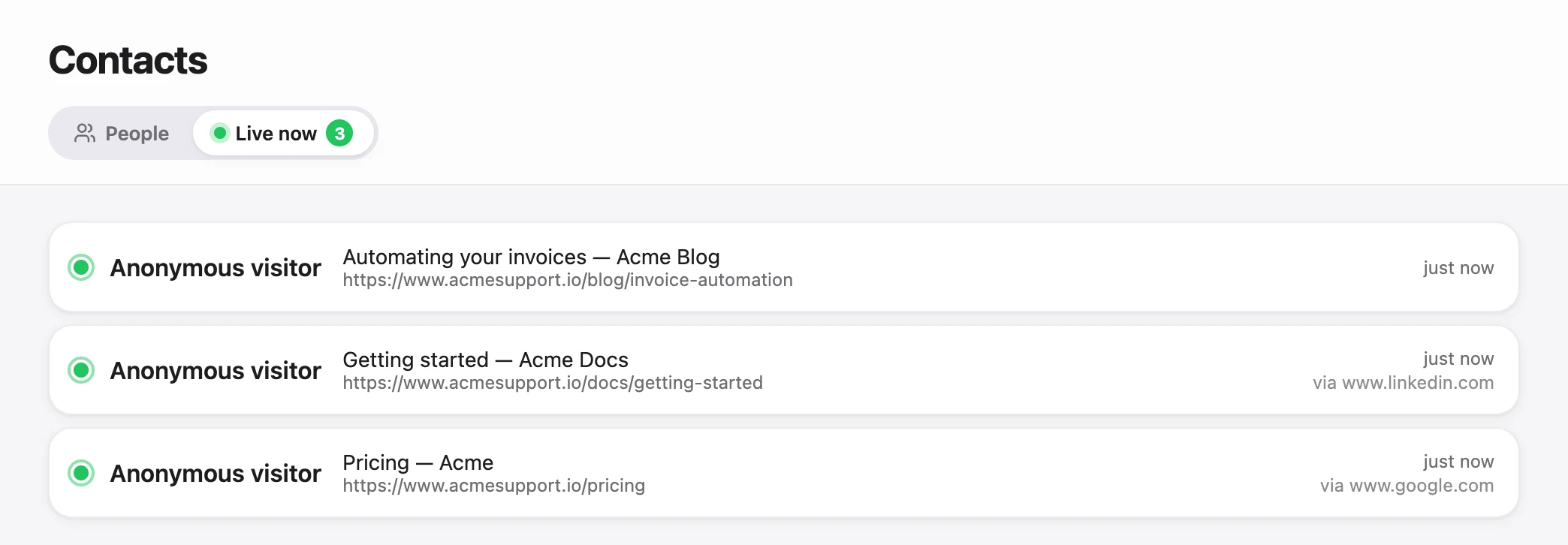
Every visitor is tracked, whether or not they chat. On every page with the widget it records the URL and title, referrer, browser, timezone, and a city, region and country derived from the connection, for the live visitors view. The IP address isn't stored there. Page views from visitors who never start a conversation are deleted after 30 days. Once someone chats, the trail joins their contact record, with a location rounded to about 10 km. Disclose this in your privacy notice.
Retention is manual. Talvo keeps conversations, messages and contacts until you delete them, with no retention settings, so you carry out your schedule yourself:
- Export your contact listIn Contacts, Export downloads a CSV with name, email, location, tags, conversation count and last activity for the contacts in the current list.
- Sort by last activityAnyone past your retention period is a candidate for deletion. Check for open issues first.
- Delete each contactOwners and admins open the contact, choose Delete contact…, and type "delete" to confirm.
- Log the runNote the date and count in your Article 30 record so you can show the schedule is real.
Contact delete is permanent: it removes the profile, conversations, messages, ratings, page views and other activity; billing and workflow records are kept but unlinked. Two caveats: files attached in their conversations may not be removed by this action, and "Teach the AI" snippets made from their conversation (which hold question and answer text) may remain. Review those snippets yourself, and email support@talvo.chat to have the files removed.
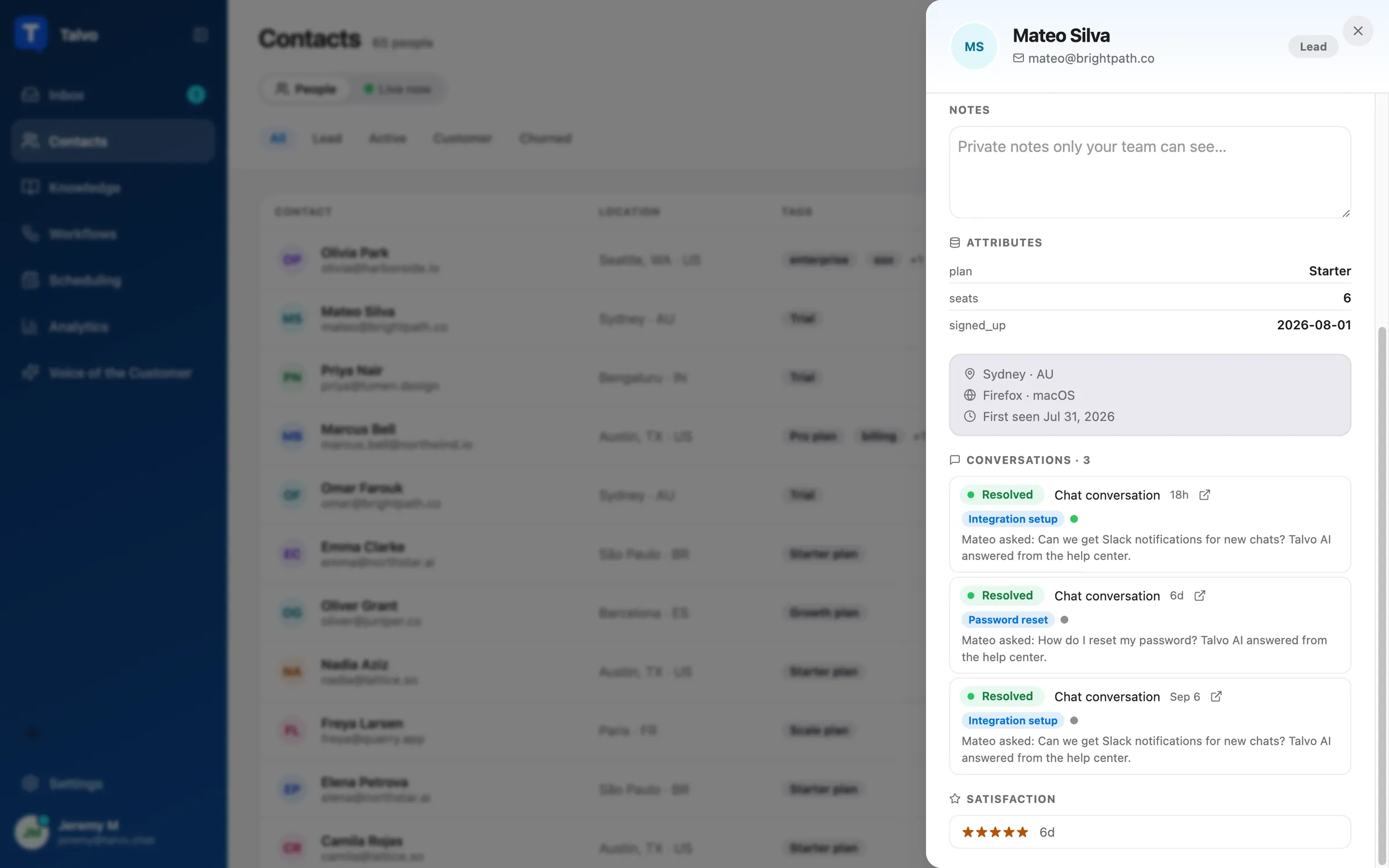
There's no full workspace export and no one-click export of one person's data. Use the contacts CSV and, on Talvo's Starter plan ($49 a month) and up, the REST API, or email support@talvo.chat as our privacy page says.
Data is hosted in the United States, with no region choice yet. A DPA with SCCs and the UK Addendum is available on request through the security contact form, not as a self-serve download. Sub-processors, including AI model providers, are in section 6 of our privacy policy; our security page lists what's missing, such as a SOC 2 report. For the AI disclosure, write it into the widget's welcome message, for example: "You'll chat with our AI assistant first; if it can't help, it passes you to our team."
Setting chat up for the first time? Our guide to adding live chat to your website covers the install, and once an AI is answering, a weekly AI answer audit keeps what it tells people in check.
Frequently asked questions
Does GDPR apply to live chat on a US website?
Only if you offer goods or services to people in the EU or monitor their behavior there, under Article 3(2). Recital 23 says being reachable from the EU is not enough, while EU languages, euro pricing or mentions of EU customers point toward targeting. If you are in scope with no EU office, you will usually need an EU representative under Article 27.
Do I need cookie consent for a live chat widget?
It depends, and the law is not settled for chat. The EDPB's Guidelines 2/2023 put most widgets that store an ID and send it back within the ePrivacy rules, but they do not decide whether consent is needed. Our reading of the older WP194 opinion is that storage set after a visitor opens the chat has the strongest exemption case, while storage set on page load is much harder to justify.
What lawful basis should I use for live chat?
For answering questions, most small teams rely on Article 6(1)(b), steps a person asks for before or under a contract, or 6(1)(f), legitimate interests with a written balancing test. Marketing follow-up after a chat is a separate purpose that may need consent. Choosing a GDPR basis does not answer the separate question of whether the widget may store data in the visitor's browser.
Do I have to tell visitors they are chatting with an AI?
From 2 August 2026, Article 50 of the EU AI Act requires AI systems that talk directly with people to be designed so people know they are dealing with AI, unless it is obvious. The duty is placed on the provider that builds the chatbot, but the disclosure appears on your site. Check that your widget makes it clear from the first message, and add a line to the welcome message if not.
How long can I keep chat transcripts under GDPR?
The GDPR sets no fixed period; Article 5(1)(e) says no longer than necessary for the purpose, and no regulator publishes a number for chat. You choose a period, record your reasoning, state it in your privacy notice and delete on schedule. One reasonable approach is to tie customer transcripts to the relationship plus a dispute window and keep non-customer chats for a shorter time.
How fast must I answer a GDPR access or deletion request about chat data?
Within one month of receiving it, under Article 12(3). You can extend by two more months for complex or numerous requests, but you must tell the person within the first month and explain why. Chat transcripts are personal data, so an access request covers them.
Is it legal to use a US-hosted chat tool for EU visitors?
Yes, with a valid transfer route: the EU-US Data Privacy Framework if the vendor is certified, or standard contractual clauses. The framework was upheld by the EU General Court in September 2025, but that ruling is under appeal and the EDPB asked the Commission in July 2026 to assess a US Supreme Court decision affecting it. Asking for SCCs in the DPA as a fallback is a sensible precaution.
Do small businesses need a record of processing for chat?
On our reading, usually yes. Article 30(5) exempts organizations under 250 employees only when processing is occasional, low risk and excludes special-category data, and a chat channel used every day is ongoing rather than occasional. The record can be short: purposes, people, data, recipients, transfers, retention and security.
Sources
Other products' prices and features change. We checked these pages; if something is out of date, tell us and we'll fix it.
- Regulation (EU) 2016/679 (GDPR), Arts. 3, 5, 6, 12, 13, 15, 17, 22, 27, 28, 30, 32, 33, 44–46 (Publications Office text, checked Oct 23, 2026)
- GDPR on EUR-Lex (ELI)
- EDPB Guidelines 2/2023 on the technical scope of Art. 5(3) ePrivacy Directive, version 2.0
- Article 29 Working Party Opinion 04/2012 on Cookie Consent Exemption (WP194)
- CNIL, Cookies et autres traceurs: que dit la loi ?
- EDPB Guidelines 1/2024 on legitimate interests (public consultation page)
- EU AI Act Article 50 (AI Act Service Desk)
- EU AI Act Article 113, entry into force and application (AI Act Service Desk)
- Regulation (EU) 2026/1744, the Digital Omnibus on AI (EUR-Lex)
- CJEU Press Release No 106/25, Latombe v Commission (T-553/23)
- Official Journal notice of appeal, Case C-703/25 P
- EDPB letter of 31 July 2026 on Trump v. Slaughter and the EU-US Data Privacy Framework
- The Data (Use and Access) Act 2025 (Commencement No. 6) Regulations 2026, SI 2026/82
- ICO, Guidance on the use of storage and access technologies (updated Apr 29, 2026)
- ICO, What are the exceptions?