On this page
- Help desk emails going to spam: why it starts after the switch
- What SPF, DKIM and DMARC each prove
- Alignment: the three addresses in every reply
- What Gmail, Yahoo and Outlook.com require now
- Fixing it, step by step
- How Zendesk, Help Scout and Freshdesk document their records
- Forwarding: where incoming mail goes missing
- When a customer says they never got your reply
- How Talvo handles email: no DNS to set up, and no own-domain sending
- The short version
- Frequently asked questions
You moved support@yourdomain into a help desk, the team loves the shared inbox, and then a customer writes back through your contact form: "I never got your reply." Another finds three of your answers in their spam folder. If your help desk emails are going to spam, the cause is almost never the wording. It is usually that the receiving mail server can't confirm your help desk is allowed to send as your domain.
Three DNS records answer that question: SPF, DKIM and DMARC. This guide explains what each one proves, why "SPF passes" can still mean DMARC fails, what Gmail, Yahoo and Outlook.com now require, and the order to fix things in. There's a diagnosis checklist near the end for the "never got it" emails specifically.
Help desk emails going to spam: why it starts after the switch
Before the switch, your replies went out from your own mail provider. That provider is already listed in your domain's DNS as an allowed sender, and it signs your mail with your domain's key. Everything lined up without you thinking about it.
After the switch, the reply is written in the help desk and sent from the help desk's servers, still wearing your address in the From line. To Gmail or Outlook.com, that's a stranger's server claiming to be you. Unless your DNS vouches for it, the message looks exactly like spoofing, and it gets treated that way.
So the fix is not "write less spammy replies." It's telling the world, in DNS, that the help desk is allowed to send for you, in a way that lines up with the address your customers see.
What SPF, DKIM and DMARC each prove
SPF is a list of servers allowed to send mail for a domain. The catch, and it's the one that trips up help desks, is which domain it checks. SPF checks the envelope sender, the address used behind the scenes for bounces (the SMTP "MAIL FROM"), not the From address your customer sees (RFC 7208, §2.2–2.4).
DKIM is a cryptographic signature on the message. The sending server signs it, and the signature carries a d= tag naming the domain that takes responsibility for the message (RFC 6376, §3.5). The receiver looks up the public key in your DNS and checks that the message wasn't altered on the way.
DMARC ties the two to the address people actually see. It asks: did SPF or DKIM pass for a domain that matches the visible From? That matching is called alignment. DMARC also lets you say what receivers should do when the answer is no, and where to send reports (RFC 7489, §3.1, §6.3).
Alignment: the three addresses in every reply
Every email from your help desk carries three identities. Here's what they might look like for a reply from a help desk vendor we'll call helpdesk.example:
| Identity | Where it lives | Example | What checks it |
|---|---|---|---|
| Visible From | The From header your customer sees | support@example.com | DMARC compares the other two against this |
| Envelope sender | The SMTP MAIL FROM, used for bounces | bounce-8f2a@mail.helpdesk.example | SPF |
| DKIM signing domain | The d= tag in the signature | d=helpdesk.example or d=example.com | DKIM |
Now picture the common failure. The help desk sends with its own envelope sender, so SPF checks mail.helpdesk.example. The vendor's servers are on the vendor's list, so SPF passes. But helpdesk.example isn't example.com, so the pass doesn't align with your From address and DMARC can't count it. If the DKIM signature also says d=helpdesk.example, nothing aligns, and DMARC fails even though both checks "passed."
That is why "it passes SPF" means very little on its own. Help Scout's documentation spells out exactly this case: it sends with a return path on its own domain, so SPF passes but does not align with yours, and it tells customers to use DKIM for alignment instead (Help Scout SPF docs).
Alignment has two modes. The default, relaxed, only needs the same organizational domain, so a signature from d=support.example.com aligns with From: help@example.com. Strict mode needs an exact match, and that same message would fail (RFC 7489, §3.1.1–3.1.2). Unless you have a reason, leave alignment relaxed.
What Gmail, Yahoo and Outlook.com require now
All three big consumer mailbox providers split senders into everyone and bulk senders. The bulk line is the one people misread, so read it twice.
| Provider | Every sender | Bulk senders | Bulk threshold and dates |
|---|---|---|---|
| Gmail (personal accounts) | SPF or DKIM; valid forward and reverse DNS; TLS; spam rate under 0.3%; properly formatted mail | SPF and DKIM and DMARC (p=none is enough); From aligned with SPF or DKIM; one-click unsubscribe on marketing mail | More than 5,000 messages a day. Rules took effect February 1, 2024; Google says enforcement ramps up from November 2025, with temporary or permanent rejections |
| Yahoo | SPF or DKIM; valid DNS; complaint rate under 0.3%; DMARC strongly urged | SPF and DKIM; DMARC at least p=none and passing; aligned From; one-click unsubscribe | Yahoo doesn't publish a number. Enforcement began February 2024 and rolled out through the first half of 2024 |
| Outlook.com (hotmail, live, outlook) | Microsoft says enforcement targets large senders first, and every sender benefits from the same practices | SPF pass, DKIM pass, DMARC at least p=none aligned with SPF or DKIM | More than 5,000 a day. Announced April 2, 2025; failing mail rejected from May 5, 2025 |
Sources: Google's sender guidelines and FAQ, Yahoo's sender best practices, and Microsoft's announcement.
Two details matter for a small team. First, Google counts volume per primary domain, and a domain that crosses roughly 5,000 messages in a day even once stays a bulk sender permanently. Your support replies and your newsletter share a domain, so a big marketing send can put your whole domain in the bulk category. Second, Microsoft's post has been updated more than once. Its April 29 update says failing mail is rejected with the error 550; 5.7.515 Access denied, sending domain [SendingDomain] does not meet the required authentication level, but the page still contains an older paragraph about sending failing mail to Junk first. Expect rejection, and treat the exact behavior as something to confirm on Microsoft's page.
Under 5,000 a day, the rules ask for SPF or DKIM, not all three. Do all three anyway. It's an afternoon of DNS work, Google says full alignment will likely become a requirement later, and a domain without DMARC gives you no reports, so you're fixing problems blind.
Fixing it, step by step
Do this in order. Each step makes the next one safer.
- Look at what you haveRun your domain through Google's free Check MX tool. It checks MX and SPF, and checks DKIM if you enter a selector. Note every service that sends as your domain: your mail provider, the help desk, the newsletter tool, invoices from billing.
- Merge into one SPF recordA domain may have only one SPF record. If there are two, the result is a
permerrorand SPF fails for everyone (RFC 7208, §3.2). Add the help desk'sinclude:to the record you already have instead of creating a new one. - Count your lookupsSPF allows at most 10 DNS lookups per check.
include,a,mx,ptr,existsandredirecteach count;ip4,ip6andalldon't. Over 10 is apermerror. - Add the help desk's DKIM recordsUsually two to four CNAME records that point to keys the vendor hosts. Add them, wait until they resolve, then switch DKIM on inside the help desk.
- Publish DMARC at p=noneA TXT record at
_dmarc.yourdomain.comsuch asv=DMARC1; p=none; rua=mailto:dmarc@yourdomain.com. Google suggests having SPF and DKIM in place at least 48 hours first. - Read the reportsGoogle suggests about a week at
p=none, checking reports daily. Look for any service that sends as you and fails. - Tighten the policyMove to
p=quarantine, then, once reports are clean, considerp=reject. Google and Microsoft both describe this none, quarantine, reject order.
A few of those steps hide traps worth slowing down for.
The 10-lookup limit is easier to hit than it looks
The limit applies to the whole check, so lookups inside a vendor's include count against you too. A record like v=spf1 include:_spf.yourmailhost.example include:mail.zendesk.com include:news.example ~all looks like three lookups, but each include may contain several more. Freshdesk's documentation acknowledges this and offers smaller, region-specific includes if you hit the limit. RFC 7208 also says checkers should stop after two lookups that come back empty, so delete includes for services you no longer use rather than leaving them to rot.
-all or ~all
The ending matters less than people think. -all is an explicit "not authorized"; ~all is a soft "probably not," and receivers shouldn't reject on a softfail alone (RFC 7208, §8.4–8.5). With DMARC in place, DMARC is what decides what happens to failing mail, so either works. Zendesk's example uses -all; Freshdesk's uses ~all.
DKIM CNAMEs, and why you want them
When a vendor asks for CNAME records instead of a pasted key, your DNS points at a key the vendor hosts. They can rotate keys without asking you to touch DNS again; Zendesk rotates quarterly. Keys should be at least 1024 bits, and RFC 8301 says signers should use 2048. Google requires 1024 for personal Gmail and recommends 2048. Separate selectors for different systems are fine, so your mail provider and your help desk can each sign with their own.
About pct
Google's rollout guide uses a percentage tag, for example v=DMARC1; p=quarantine; pct=5; rua=mailto:dmarc@example.com, to apply a policy to a slice of failing mail at first. The updated DMARC standard, RFC 9989, published in 2026, removes pct. How each receiver now treats it isn't documented in what we checked. Treat it as optional: you can include it while ramping up, but don't rely on it, and plan your move from none to quarantine to reject around your reports instead.
What the reports are for
The rua address receives aggregate reports from receiving mail systems such as Outlook.com. Point it at a mailbox set aside for them, not a person's inbox. What you're looking for is simple: a sending source that fails alignment. If the help desk shows up failing, its DKIM isn't set up for your domain yet. If a tool you'd forgotten shows up failing, add it before you tighten the policy, or p=reject will block it. Outlook.com sends aggregate reports but says it has no plans to send the per-message failure kind.
How Zendesk, Help Scout and Freshdesk document their records
Copy values from your own vendor's admin screen when you set this up; the table is for knowing what to expect.
| Zendesk | Help Scout | Freshdesk | |
|---|---|---|---|
| SPF | Add include:mail.zendesk.com, e.g. v=spf1 include:mail.zendesk.com -all. It must sit directly in your record, not nested inside another include. smtp.zendesk.com and support.zendesk.com includes are outdated | No include needed; include:helpscoutemail.com can be removed. SPF passes on Help Scout's own return path but won't align with your domain | v=spf1 include:email.freshdesk.com ~all, merged into your existing record. Region-only includes (US fdspfus.freshemail.io, EU fdspfeuc.freshemail.io, India fdspfind.freshemail.io, Australia fdspfaus.freshemail.io) if you hit the lookup limit |
| DKIM | Two CNAMEs: zendesk1._domainkey → zendesk1._domainkey.zendesk.com and zendesk2._domainkey → zendesk2._domainkey.zendesk.com | Two CNAMEs: strong1._domainkey → strong1._domainkey.helpscout.net and strong2._domainkey → strong2._domainkey.helpscout.net | Four CNAMEs generated per domain under Admin > Channels > Email > Advanced Settings > Configure DKIM, e.g. fwdkim1 → spfmx1.domainkey.freshemail.io |
| Gotchas | Turn on "Custom domain for DKIM" only after the CNAMEs resolve, or delivery fails | On Cloudflare, set the records to DNS only (proxy off) | Verification can take up to about 48 hours |
| Plans | All Suite and Support plans, per Zendesk | Not stated in the article | Not stated in the article |
Sources: Zendesk's SPF and DKIM articles, Help Scout's SPF and DKIM articles, and Freshdesk's SPF and DKIM articles, all checked October 23, 2026.
Help Scout's position is the clearest illustration of everything above. It doesn't ask for an SPF include at all, because an SPF pass on its domain would never align with yours. DKIM is the part that does the work. Freshdesk makes a similar point from the other side: its SPF page says SPF isn't required once DKIM is set up.
Forwarding: where incoming mail goes missing
Most help desks receive email by having support@ forward to a private address at the vendor. That direction has its own failure modes.
SPF breaks on forwarding. A forwarder re-sends the message from its own servers, and those servers aren't in the original sender's SPF record. Unless the forwarder rewrites the envelope sender, SPF fails at the next hop (RFC 7208, §10.3). DKIM survives only if the signed headers and body aren't changed, which is why Google's forwarding guidance tells forwarders to leave them alone. Google also says DMARC alignment isn't required for forwarded messages.
ARC exists for this. ARC (RFC 8617, an Experimental standard from 2019) lets each server in the chain record the authentication results it saw, so the last receiver can trust a message whose SPF broke along the way. Microsoft recommends ARC for forwarding. Google's sender pages don't mention it, and we couldn't confirm from Google whether Gmail uses it.
Forward at the mail server, not in a mail client. A forwarding rule inside a mail app on someone's computer re-sends the message rather than relaying it at the server. Zendesk says forwarding must be automatic and set at the server level, that client-side forwarding produces suspended tickets, and that multi-hop forwarding isn't supported (Zendesk forwarding article).
Loops. Your help desk sends a reply as support@, support@ forwards everything to the help desk, and the help desk receives its own mail. Help desks guard against this. Zendesk suspends mail sent directly from one of your own support addresses, and blocklists a sender for an hour after a burst of messages in a short time. Help Scout won't send notifications to a teammate whose address matches an inbox address, because that "would create a loop." Don't forward a teammate's personal address into the help desk if it's also their login.
Gmail wants confirmation. Gmail won't forward anything until someone clicks a verification link, and it sends that link to the forwarding address, which is the help desk, not you (Gmail help). In Zendesk the verification mail arrives as a ticket, possibly in Suspended tickets. And note one line on that Gmail page: spam isn't forwarded. Anything Gmail files as spam in your support mailbox never reaches the help desk.
When a customer says they never got your reply
Work through this in order. The first items take seconds; the later ones take DNS access.
- Confirm the reply actually went out from the help desk, with no bounce or error on the conversation
- Check the address on the conversation for a typo
- Ask the customer to look in spam, junk and any other folders or tabs their mail app uses
- If they're on Outlook.com, ask whether a bounce came back with 5.7.515; adding you to Safe Senders doesn't bypass Microsoft's enforcement
- Run your domain through Check MX: exactly one SPF record, with your help desk's include if it needs one
- Count SPF lookups, including the ones inside includes; more than 10 fails
- Confirm the help desk shows DKIM as verified or active for your domain
- Read your DMARC aggregate reports for the help desk failing alignment
- Check whether marketing mail from the same domain has pushed you over 5,000 a day at Gmail
- If the customer's original message is missing too, check your support mailbox's spam folder, your help desk's suspended or spam view, and that forwarding is set on the server
Microsoft's own FAQ is the source for the Safe Senders point, and it's useful when a customer offers to "whitelist" you: that won't fix an authentication failure at Outlook.com.
How Talvo handles email: no DNS to set up, and no own-domain sending
Talvo takes a different route from the three help desks above, and it's worth being plain about what that buys and costs.
Replies from the Talvo inbox go out from Talvo's own sending address, with your business name as the sender name. The Reply-To is a per-conversation address, so when the customer answers, the reply threads back into the same conversation. Talvo doesn't send from your domain at all. There's no custom sending domain, and no SPF, DKIM or DMARC setup for you to do. The two-way email article covers the setup.
- Nothing in your DNS can break Talvo's replies: no include to add, no lookup limit to hit, no CNAMEs to forget
- Your own DMARC can go to p=reject without accidentally blocking your help desk
- Customer replies thread back into the conversation through the Reply-To address
- Customers see a Talvo address next to your business name, not support@yourdomain
- Authentication of those replies depends on Talvo's sending domain, which you don't control
- If you need replies to come from your own domain, Talvo doesn't do that today
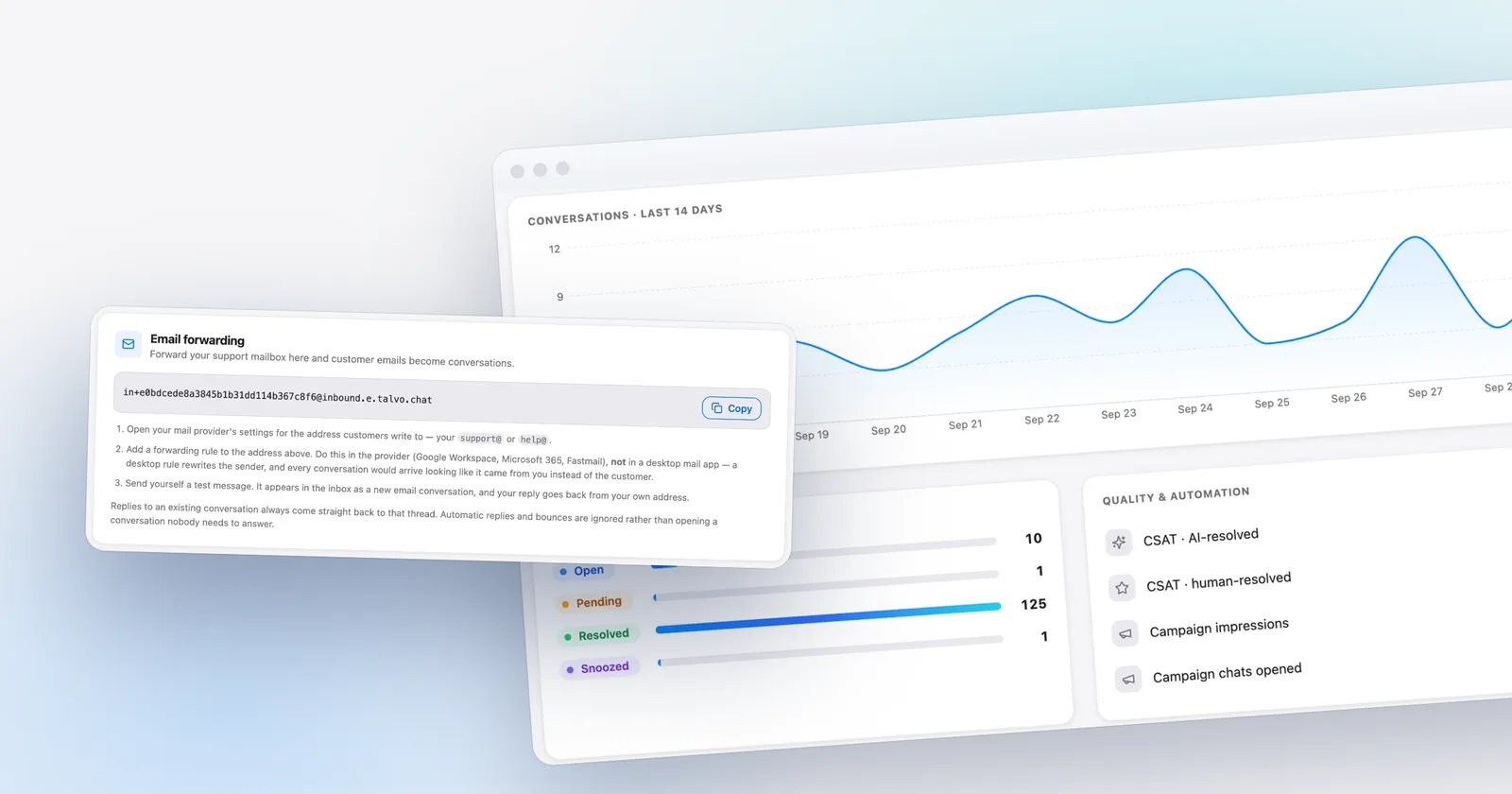
For inbound mail, you forward your support address to a private forwarding address shown in Settings → Inbox. It's a private random value per workspace, not the public ID that appears in your widget code.
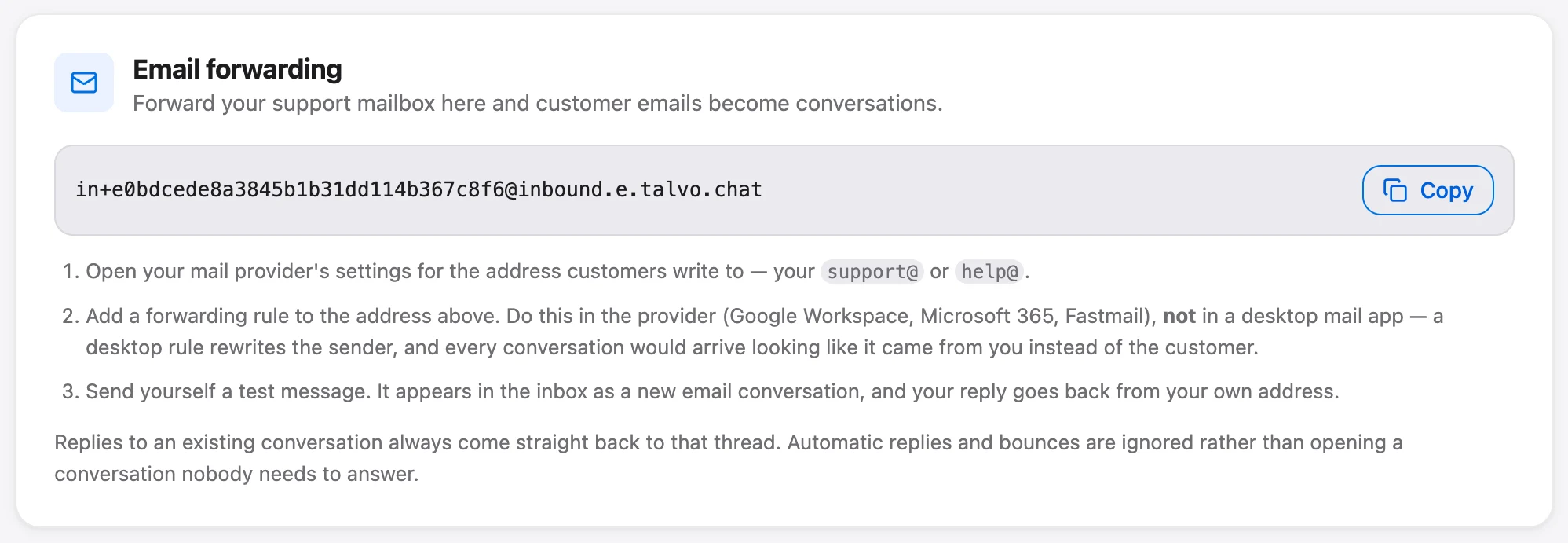
The setup steps on that card say to forward at your provider, such as Google Workspace, Microsoft 365 or Fastmail, and not in a desktop mail app, for the reason in the forwarding section above: a desktop rule rewrites the sender.
Gmail's confirmation step is handled the same way as on any help desk, with one difference in presentation. Talvo recognizes Gmail's verification email, sets it aside instead of opening a conversation, and shows "Gmail is asking you to confirm forwarding" with a Confirm in Gmail button. Click it while signed in to the support mailbox's Google account. Talvo never opens the link itself, and the notice clears when the first forwarded email arrives. The same prompt shows on the setup checklist.
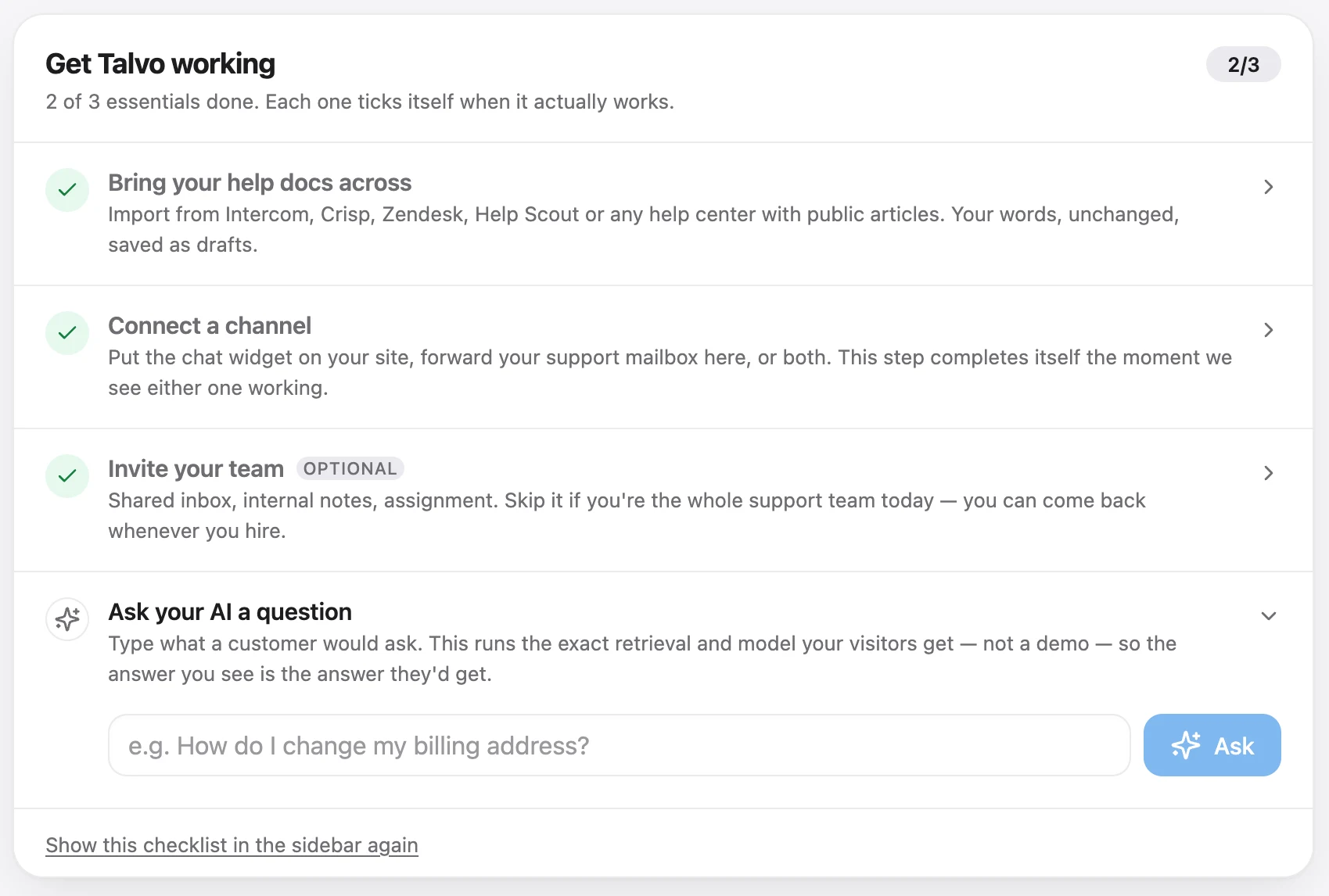
Two loop and spoofing guards are built in. Automatic replies (including most bounces), newsletters and marketing mail that arrive as new emails go to a separate Filtered view instead of the inbox, with no notifications, and Talvo's own automated emails are marked as automatic so other systems can ignore them too. And if a reply arrives on a conversation from an address that doesn't match the customer, Talvo files it as a staff-only note headed "Unverified sender" rather than attributing it to the customer. That's an address match, not an SPF or DKIM check, so treat it as a guard against mix-ups rather than proof of who sent something.
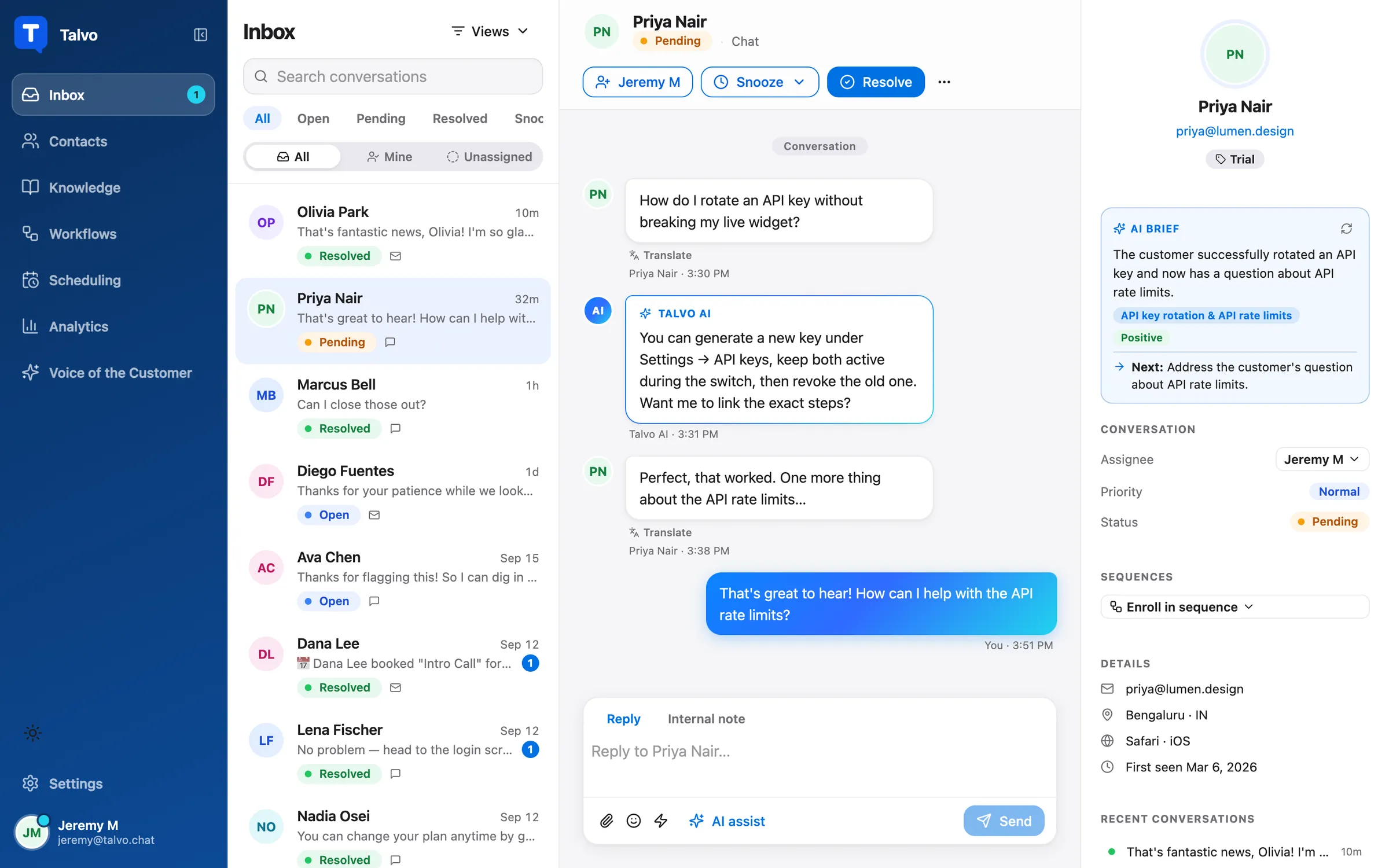
So who is this right for? A small team that wants email in a shared inbox without touching DNS, and doesn't mind customers seeing a Talvo address beside the business name. If your brand or your customers need every reply to come from support@yourdomain, use a help desk that signs with your domain and set up the records above. For a broader look at the options, see shared inboxes for small teams, or the comparisons with Zendesk, Help Scout and Freshdesk.
The short version
If replies land in spam, find every service that sends as your domain, give it one merged SPF record and, more importantly, DKIM signing with your own domain. Add DMARC at p=none, read the reports for a week or two, and only then tighten it. For missing incoming mail, look at forwarding first: server-side, confirmed, and not filtered as spam before it leaves your mailbox.
Once mail is arriving and leaving reliably, the next thing customers notice is how long they wait. Setting a first response time target is a good place to go from here.
Frequently asked questions
Why are my help desk emails going to spam?
Usually because the help desk sends from its own servers while using your address in the From line, and your DNS doesn't vouch for it. Receivers check SPF, DKIM and DMARC, and if nothing aligns with your domain the reply looks like spoofing. Adding the help desk's DKIM records for your domain, plus an SPF include if the vendor asks for one, is the usual fix.
Do I need SPF, DKIM and DMARC if I send fewer than 5,000 emails a day?
Gmail and Yahoo require SPF or DKIM from every sender, and the full set of SPF, DKIM and DMARC from bulk senders. Gmail counts the 5,000-a-day line per primary domain, so marketing mail from the same domain counts too, and crossing it once makes you a bulk sender permanently. Setting up all three is still worth it, because DMARC reports are how you find failing senders.
Why does my email pass SPF but fail DMARC?
SPF checks the envelope sender, the bounce address, not the From address customers see. Many help desks use their own domain for the envelope sender, so SPF passes for their domain but doesn't align with yours. DMARC needs SPF or DKIM to pass for a domain matching the visible From, which is why DKIM signed with your domain usually solves it.
Can I have two SPF records for one domain?
No. RFC 7208 allows only one SPF record per domain, and if receivers find more than one the result is a permanent error, so SPF fails. Add each vendor's include to the single record you already have, and keep the total under 10 DNS lookups, counting the lookups inside each include.
Should I use pct in my DMARC record?
Treat it as optional. Google's rollout guide still uses pct to apply a policy to a percentage of failing mail, but the updated DMARC standard, RFC 9989, removes the tag, and how receivers now treat it isn't clearly documented. Plan your move from p=none to quarantine to reject around your aggregate reports instead.
Why does forwarding support@ to a help desk break SPF?
A forwarder re-sends the message from its own servers, which aren't listed in the original sender's SPF record, so SPF fails at the next hop unless the forwarder rewrites the envelope sender. DKIM survives if the message isn't changed. Set forwarding on the mail server rather than in a desktop mail app, and confirm Gmail's forwarding verification.
Does Talvo send email from my own domain?
No. Talvo sends replies from its own sending address with your business name as the sender name, and a per-conversation Reply-To brings the customer's answer back into the thread. That means no SPF or DKIM setup and nothing in your DNS can break it, but customers see a Talvo address rather than yours. Teams that need replies from their own domain should use a help desk that signs with their domain.
Sources
Other products' prices and features change. We checked these pages; if something is out of date, tell us and we'll fix it.
- Google: Email sender guidelines (checked Oct 23, 2026)
- Google: Email sender guidelines FAQ (checked Oct 23, 2026)
- Google: Recommended DMARC rollout (checked Oct 23, 2026)
- Google: Best practices for forwarding email (checked Oct 23, 2026)
- Gmail Help: Automatically forward Gmail messages (checked Oct 23, 2026)
- Google Admin Toolbox: Check MX
- Yahoo Sender Hub: Sender best practices (checked Oct 23, 2026)
- Microsoft: Outlook's new requirements for high-volume senders (checked Oct 23, 2026)
- RFC 7208: Sender Policy Framework (SPF)
- RFC 6376: DomainKeys Identified Mail (DKIM)
- RFC 8301: Cryptographic algorithm and key usage update to DKIM
- RFC 7489: DMARC
- RFC 9989: DMARC (DMARCbis)
- RFC 8617: Authenticated Received Chain (ARC)
- Zendesk: Allowing Zendesk to send email on behalf of your email domain (checked Oct 23, 2026)
- Zendesk: Digitally signing your email with DKIM (checked Oct 23, 2026)
- Zendesk: Forwarding incoming email to Zendesk Support (checked Oct 23, 2026)
- Zendesk: Causes for ticket suspension (checked Oct 23, 2026)
- Help Scout: SPF records (checked Oct 23, 2026)
- Help Scout: DKIM (checked Oct 23, 2026)
- Help Scout: Challenges with forwarding your personal address (checked Oct 23, 2026)
- Freshdesk: Create an SPF record (checked Oct 23, 2026)
- Freshdesk: Configuring DKIM records (checked Oct 23, 2026)
- Talvo: Two-way email in the shared inbox