
On this page
- Start from the activation event, not a calendar
- What the timing evidence is, and why opens mislead
- A SaaS onboarding email sequence in five emails, with copy to adapt
- Behavioral exits and the human reply
- Transactional or marketing: the legal basics
- What to measure, and a simple timing test
- Where Talvo fits, and where it doesn't
- Frequently asked questions
The best SaaS onboarding email sequence is the one that gets a new user to do one specific thing. Not read your brand story, not click through a feature tour, but do the thing that predicts they'll still be here in three months. Everything else in this guide follows from picking that thing first.
You'll get a five-email skeleton with original example copy, a way to decide timing when the evidence is thin, why open rates mislead, the CAN-SPAM basics, and a measurement method built on activation. Then a straight section on where Talvo fits, which is a narrower place than you might hope.
Start from the activation event, not a calendar
Most sequences are written as "Day 0, Day 2, Day 5, Day 9." That's a calendar, and calendars send the same email to a user who's already done the thing and a user who hasn't opened the app.
Instead, define one activation event: the action that, in your own data, separates people who stay from people who drift. For a project tool it might be creating a first project and inviting a teammate. For an invoicing app, sending a first invoice. For a chat product, installing the widget. If you don't know yours yet, look at last quarter's signups and ask what the retained ones did in their first week that the churned ones didn't. The method in customer churn signals works the same way.
Then build the sequence around it. Email one goes out when someone signs up. After that, each email depends on behavior: did they do the thing within N days, or not? People who've activated stop getting nudges to activate.
What the timing evidence is, and why opens mislead
You'll see confident advice about when to send: within ten minutes, on day two, at nine in the morning. None of it comes from controlled tests of onboarding-email timing. Stripo's 2026 research report on welcome-email open rates, which compiles several benchmarks, calls the lift from immediate sending over delayed sending "directional" because it comes from commentary and case studies, not controlled tests. It also shows reported welcome-email open rates ranging from about 35% to about 84% depending on the source. A range that wide is not a benchmark you can aim at.
Opens are worse than uncertain. Apple's Mail Privacy Protection downloads remote content in the background by default, regardless of whether the person engages with the email. That means a share of your recorded opens come from a machine, not a reader, and you can't tell which. An open rate can look healthy for an email nobody read.
So judge each email by what happens next: a click on the link inside it, and above all whether the person activates. Opens can stay in your dashboard as a rough indicator, but never as the number you optimize.
A SaaS onboarding email sequence in five emails, with copy to adapt
These examples use an invented invoicing app called Tallybook, where activation means "sent a first invoice." Swap in your own event. The copy is short on purpose; every email has one ask.
Email 1: welcome (on signup). Subject: "Your Tallybook account is ready, here's the first step"
Hi Priya, thanks for signing up. Most people get value from Tallybook the moment their first invoice goes out, and it takes about three minutes. Here's the link that opens a blank invoice with your details filled in. If you get stuck anywhere, hit reply and a real person will answer.
Email 2: the first-step nudge (only if no invoice sent after 2 days). Subject: "Two minutes to your first invoice"
Hi Priya, you set up your account but haven't sent an invoice yet. That's normal. Most of the hesitation is about which client to start with. Pick the next person who owes you money, even if it's a small job. Your first invoice doesn't have to be perfect.
Email 3: the stuck-user help email (only if they started an invoice and didn't send it). Subject: "Did something get in the way?"
Hi Priya, I noticed an invoice you started is still a draft. Is it the tax field, the payment link, or something else? Reply with one line and I'll tell you exactly what to click. Here's the short guide for the two things people ask about most.
Email 4: proof or use case (after 5 days, only if they've activated). Subject: "What to do now that your first invoice is out"
Hi Priya, your first invoice is out. The next thing people usually set up is a reminder for late payers, which saves the awkward follow-up. Here's how to turn it on in two clicks.
Email 5: a check-in from a person (after 10 days). Subject: "How's it going so far?"
Hi Priya, it's Dana from the Tallybook team. I'm not going to ask you to rate us. I just want to know one thing: is there anything about getting started that was harder than it should have been? One sentence is plenty.
Notice what's missing. There's no "meet the team," no company story, no list of seven features. Each email moves the person toward the activation event or, once they've reached it, toward the next useful thing.
Behavioral exits and the human reply
Email 2 above is skipped for anyone who's already sent an invoice. That's a behavioral exit, and it matters more than any subject line. Nothing erodes trust faster than a "get started" email to someone who started a week ago.
Two practical points. First, send from an address that reaches a person and say so. "Hit reply" only works if the replies are read, and replies are the best signal you'll get about what's confusing. Second, make the later emails sound like a person, with a name and a single question. The chat side of onboarding is covered in live chat for SaaS and proactive chat examples.
Transactional or marketing: the legal basics
This section is general information, not legal advice. For anything specific, ask a lawyer.
In the US, the FTC's CAN-SPAM guide for business draws a line between commercial email and a narrow category of transactional or relationship messages. The test is the message's primary purpose, judged by its content. A message counts as transactional or relationship only if it fits one of a short list of categories, which the FTC reads narrowly. For a mixed message, a subject line that a reasonable reader would take as promotional pushes it toward commercial.
For onboarding that means a password reset or an account confirmation is on one side, and "check out our new integrations" is on the other. A welcome email that's mostly about using the product you signed up for is closer to the first; one that's mostly about upgrading is closer to the second. Don't assume yours is exempt.
For commercial email, the FTC's list of requirements includes:
- no false or misleading header information, and no deceptive subject lines;
- a clear disclosure that a message is an advertisement, where it is one;
- your valid physical postal address;
- a clear and conspicuous way to opt out; and
- honoring an opt-out request within 10 business days.
The FTC says each separate email in violation can carry penalties of up to $53,088, a figure updated in January 2024. And you can't contract that responsibility away: if a tool sends for you, the obligation is still yours.
- Decide whether each email is commercial or transactional, and treat the mixed ones as commercial
- Put an opt-out link and your postal address in every commercial email
- Make sure unsubscribes actually stop the next email, and are honored within 10 business days
- Send from an address that doesn't mislead about who you are
- Exit people from the sequence once they've done the thing you're asking
What to measure, and a simple timing test
Per email, track the click-through rate on the main link, unsubscribes and spam complaints, which are the cost of sending. For the sequence as a whole, track the share of new signups who activate within 7 days and within 14 days. That last number is the one that matters.
If you want to test timing, split new signups at random into two groups, 50/50, each on a different delay schedule, and run it for at least four weeks. Then compare activation rates, and report the raw counts.
Small numbers lie. Suppose 38 of 100 signups activate on the fast schedule and 46 of 100 on the slow one. That looks like an eight-point win, but a 95% Wilson interval for 38 of 100 is about 29% to 48%, and for 46 of 100 it is about 37% to 56%. They overlap heavily. You'd need either a much bigger gap or many more signups before declaring a winner. The NPS and CSAT calculator shows how wide the uncertainty is for each count, and the sample-size reasoning in CSAT vs NPS applies to any percentage you're tempted to compare.
If you don't have enough signups to run the test, skip it. Pick sensible delays, watch activation, and revisit when you have volume. With 40 signups a month a timing test can't tell you anything, but thoughtful defaults still beat none.
Where Talvo fits, and where it doesn't
Talvo is not a lifecycle email tool. If your plan is a signup-triggered welcome series that branches on product behavior, tracks clicks and carries unsubscribe handling, use a dedicated email platform for that. We'd rather say so than have you find out in week three.
What Talvo does have is follow-up sequences on the Growth plan ($149 a month, or $119 billed annually): 1 to 20 steps, each with a wait. Be clear about how they work:
- Each step posts into a conversation, as a message from your team. It's emailed to the customer only when that conversation is an email thread.
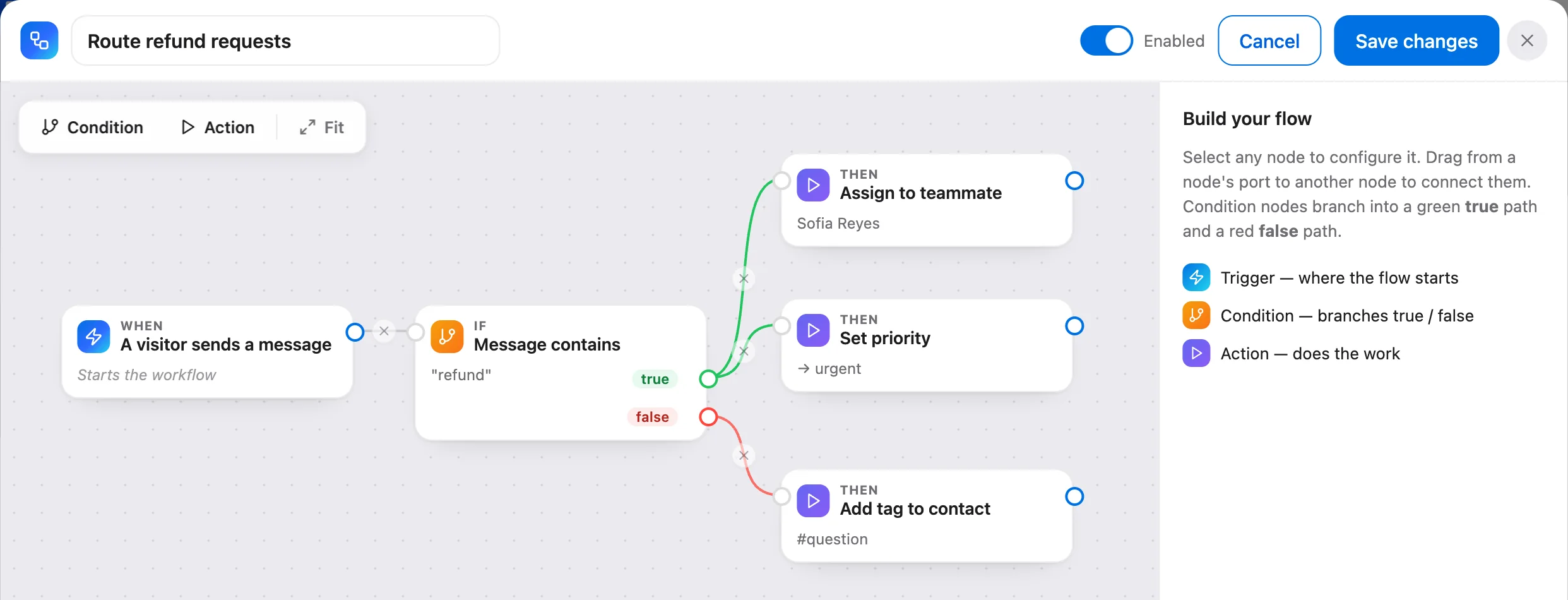
- A conversation is enrolled by a workflow action, which can fire when a conversation is created, a visitor sends a message, or a conversation is resolved, or manually from the inbox. Enrollment is per conversation, not per contact, and a new signup who has never started a conversation has nothing to enroll.
- A sequence stops when the customer replies, when someone resolves the conversation, or on auto-close.
- Talvo doesn't list open or click tracking or unsubscribe handling for sequences, so don't use them for commercial email that needs an opt-out.
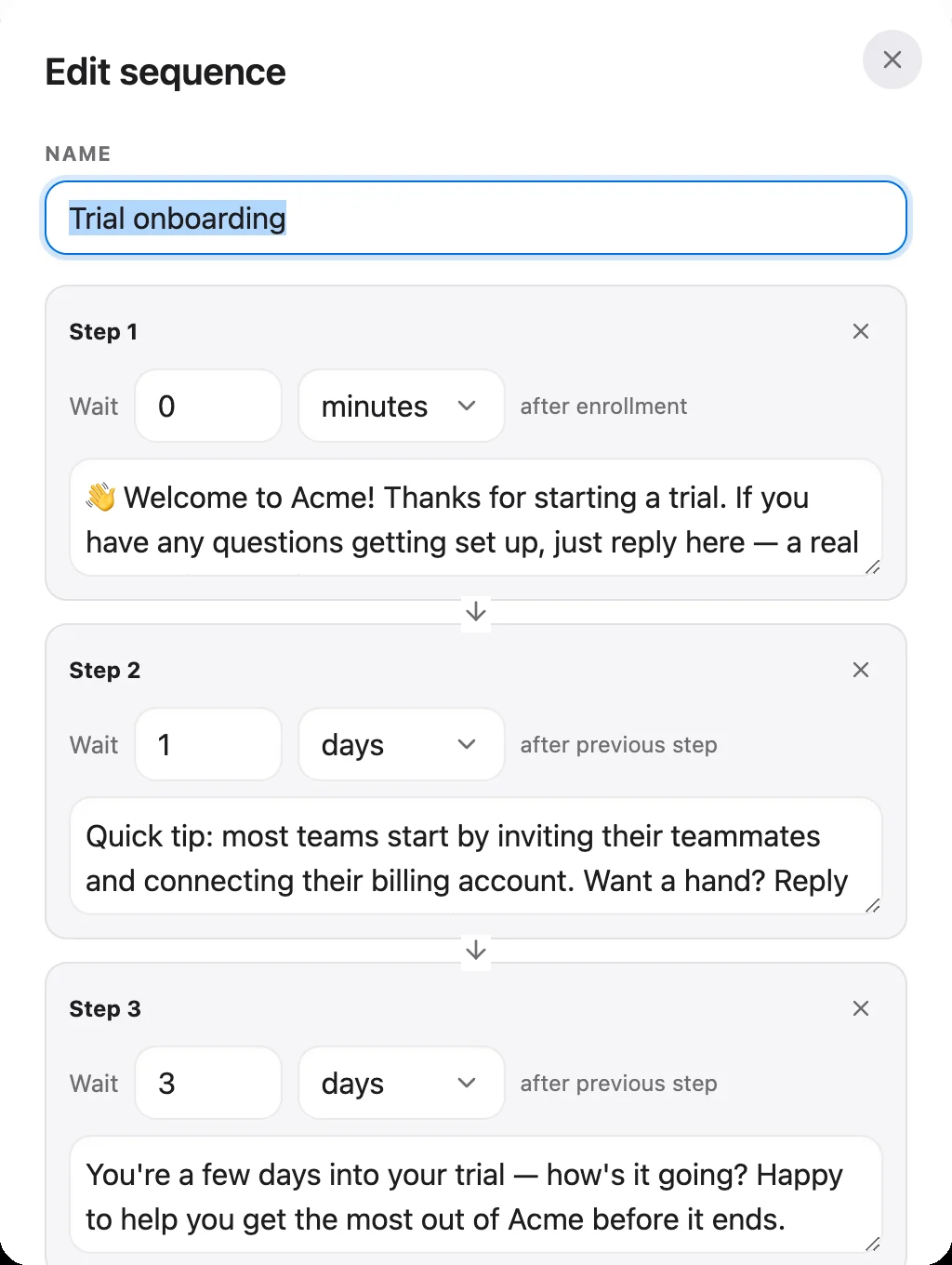
That fits a narrower job well: a person-to-person follow-up for someone who has already talked to you. A new user asks a setup question, your team resolves it, and a workflow enrolls that conversation in a three-step check-in over the next week. If they reply, they're talking to a human in the same thread, and the sequence stops.
So the split we'd suggest: dedicated email tool for the signup-to-activation series, Talvo for the replies and the human follow-ups. Details are on the sequences feature page and in the help article on how to build a workflow. If you're a team of one deciding what to buy first, customer support for startups covers the order.
Frequently asked questions
How many emails should a SaaS onboarding sequence have?
Five is a workable starting point: a welcome, a first-step nudge, a help email for people who got stuck, a use-case email for people who activated, and a check-in from a person. Skip emails for users who have already done the thing. No published study proves an ideal number, so judge yours by activation.
When should you send onboarding emails?
Send the first one at signup, then trigger the rest on behavior, such as whether the user completed your activation event within a couple of days. No controlled tests show the best delays, so test timing on your own signups once you have enough volume.
What should a SaaS welcome email say?
Name one first step, link straight to it, and invite a reply to a real person. Leave out the company story and the feature list. The goal is to get the user to your activation event.
Are onboarding emails transactional or marketing?
It depends on the message's primary purpose, judged by the FTC from its content. Account confirmations and password resets sit on the transactional side. Emails pushing upgrades or new features lean commercial, and a mixed message with a promotional-looking subject line is likely to be treated as commercial. This is general information, not legal advice.
Do onboarding emails need an unsubscribe link?
Commercial emails need a clear way to opt out, and the opt-out must be honored within 10 business days, plus your valid postal address. Truly transactional or relationship messages are exempt from most of CAN-SPAM's requirements, but the FTC reads that category narrowly, so many onboarding emails count as commercial. Ask a lawyer about your specific sequence.
What is a good open rate for onboarding emails?
There is no reliable benchmark. Reported welcome-email open rates range from about 35% to 84% depending on the source, and Apple Mail Privacy Protection inflates opens by loading content automatically. Track clicks and activation instead.
Should onboarding emails be time-based or behavior-based?
Behavior-based, with the first email sent at signup. A time-based calendar sends nudges to people who already activated. Branch on whether the user did your activation event, and stop emailing those who did.
Can Talvo send a SaaS onboarding email sequence?
Not as a lifecycle email tool. Talvo's sequences, on the Growth plan, post steps into a conversation and are emailed only when it is an email thread. They are enrolled by a workflow action or by hand, stop on reply or resolve, and have no documented open or click tracking or unsubscribe handling. Use a dedicated email tool for the marketing series.
Sources
Other products' prices and features change. We checked these pages; if something is out of date, tell us and we'll fix it.


