
On this page
- The eight, on one table
- Three rules before you count anything
- Volume: conversations per 100 customers
- Speed and promise: first response and SLA attainment
- Finish: resolution time and reopen rate
- Backlog: the oldest open conversation
- Satisfaction: CSAT, two ways, split by who answered
- Automation: AI resolution rate and hand-off rate
- What we left off, and why
- The monthly scorecard
- What Talvo reports, and what you compute yourself
- Frequently asked questions
Most lists of customer support metrics give you twenty-one of them, one line each, and no formula. That is a glossary, not a plan. If three people answer your customers, you need a handful of numbers you can compute in a spreadsheet on the first Monday of the month, and a clear idea of what to do when one of them moves.
This is that list: eight metrics, the formula for each, whether it counts every conversation or only a sample, and where the number comes from. Four of them already have their own deep guides, so those get a short card and a link. The depth here goes to the ones nobody else covers for small teams: reopen rate, backlog age and contacts per 100 customers, plus a one-page monthly scorecard.
The eight, on one table
"Census" means the metric counts every conversation, so a small team can trust it. "Sample" means it counts only the customers who bothered to answer, which is why it needs more care.
| Metric | Formula | Counts | Where the number comes from | Deep dive |
|---|---|---|---|---|
| Conversations per 100 active customers | Conversations in the month ÷ active customers × 100 | Census | Conversation count from your inbox; customer count from billing | This post, and reduce support tickets |
| Median first response time | The middle value of (first human reply − customer's first message) | Census | Your inbox or help desk | First response time SLA |
| SLA attainment | First replies inside target ÷ conversations that got a first reply | Census | Your SLA settings | First response time SLA |
| Median resolution time | The middle value of (resolved − created) | Census | Your inbox or help desk | This post |
| Reopen rate | Resolved conversations that came back within 7 days ÷ conversations resolved | Census | Counted by hand | This post |
| Backlog age | Open conversations at close of day, and the age of the oldest | Census | Your inbox | This post |
| CSAT, split by AI and human | Average rating, share of 4s and 5s, and the number of ratings | Sample | Your post-resolution survey | CSAT vs NPS |
| AI resolution rate and hand-off rate | AI-resolved ÷ all conversations; handed off ÷ AI-engaged | Census | Your AI agent's reporting | AI resolution rate, AI hand-off |
Eight is enough because a three-person team can act on eight. If a metric won't change a decision, it's decoration.
Three rules before you count anything
Use the median for times. A handful of overnight emails drags an average far above what a typical customer experienced, and Front's support KPI guide makes the same case for resolution time (Front). The worked example is in the first response time guide, so we won't rerun it.
Say which clock you used. Business hours and wall-clock time give different numbers for the same conversation. Write the choice at the top of your scorecard and never switch it halfway through a quarter.
Report AI conversations separately. An AI answer isn't a human first response, and satisfaction on conversations the AI closed tells you something different from satisfaction on the ones a person handled. Mix them and both numbers go soft. The AI resolution rate guide explains how to keep them apart.
Volume: conversations per 100 customers
A raw count of conversations rises when you grow, which is good news and tells you nothing. The rate tells you whether each customer needs less help from you than last month.
Define "active customers" once and keep it. Paying accounts that logged in during the month works for a SaaS company; orders in the last 90 days works for a shop. Then:
Conversations per 100 customers = conversations ÷ active customers × 100
Say you handled 340 conversations last month with 1,250 active customers. That's 340 ÷ 1,250 × 100 = 27.2. This month it's 360 conversations and 1,500 customers: 360 ÷ 1,500 × 100 = 24.0. The raw count went up 5.9%, and the rate went down by 3.2 contacts per 100. You didn't get busier per customer; you got better.
The rate also feeds your staffing plan. Multiply it by your expected customer count and you have a conversation forecast, which the support staffing calculator turns into hours. How to find the reasons behind the number, and bring it down, is the subject of how to reduce support tickets.
Speed and promise: first response and SLA attainment
Median first response is the typical wait for a first human reply. SLA attainment is the share of conversations where that wait met your target. Both are covered in full, with the benchmarks and staffing math, in the first response time SLA guide.
One thing the guide doesn't say loudly enough for a metrics hub: attainment is calculated from conversations that have received a reply. A conversation nobody has answered yet isn't in the denominator. A team can post a lovely 95% while one customer waits three days, which is why the backlog check below sits next to it.
Look at the slow tail too. If your tool only reports the median, take a month of waits and look at the slowest tenth by hand.
Finish: resolution time and reopen rate
Median resolution time is created to resolved, middle value. It tells you how long problems take. It doesn't tell you whether they were fixed, and that's what reopen rate is for.
Reopen rate = conversations resolved that came back within 7 days ÷ conversations resolved.
Take a month with 120 resolved conversations, nine of which the customer wrote back about inside a week: 9 ÷ 120 = 7.5%. Its mirror image, the share fixed first time, is 92.5%. Vendors define "first contact resolution" differently, so we use reopen rate and count it yourself the same way every month.
Here is why it matters. Two imaginary teams:
| Team A | Team B | |
|---|---|---|
| Median resolution time | 2 hours | 5 hours |
| Reopen rate | 18% | 4% |
Team A looks faster on the dashboard. But nearly one in five of its "resolved" conversations comes back, so it's closing threads to clear the queue. Team B is slower and its customers get the answer once. Resolution time without reopen rate rewards the wrong behavior.
Three practical details:
- Pick the window (7 days is a sensible start) and keep it. Only count conversations resolved at least that long ago, or the last few days of the month will look better than they are.
- Decide whether a new thread about the same problem counts. We'd count it. In Talvo, a customer's email reply to a resolved thread reopens it. Check what your tool does with a returning chat visitor.
- You'll probably count this one by hand. In Talvo you can add a conversation tag such as
reopenedwhen you spot one, then filter the inbox by that tag at month end. Analytics can't report by tag, so the count is a quick tally from the filtered list.
Talvo shows the median resolution time on the analytics page. Reopen rate isn't a report, so the tag-and-tally above is the method.
Backlog: the oldest open conversation
Most small teams look at what's arriving. Few look at what's been sitting there.
Once a day, at the end of your working day, write down two numbers: how many conversations are open, and how old the oldest one is. Count Open and Pending. Leave Snoozed ones out while they're snoozed, but glance at them weekly so a snooze doesn't become a hiding place.
An imaginary week:
| Day | Open at close | Oldest |
|---|---|---|
| Monday | 6 | 2 hours |
| Tuesday | 9 | 5 hours |
| Wednesday | 12 | 1 day |
| Thursday | 15 | 2 days |
| Friday | 18 | 3 days |
Every day the median first response could still look fine, because new chats get quick answers while the old ones age. The count climbing by three a day and the oldest passing your longest SLA target by Thursday are the signals. The rule that works: if the oldest conversation is older than your longest target, someone is named for it first thing tomorrow.
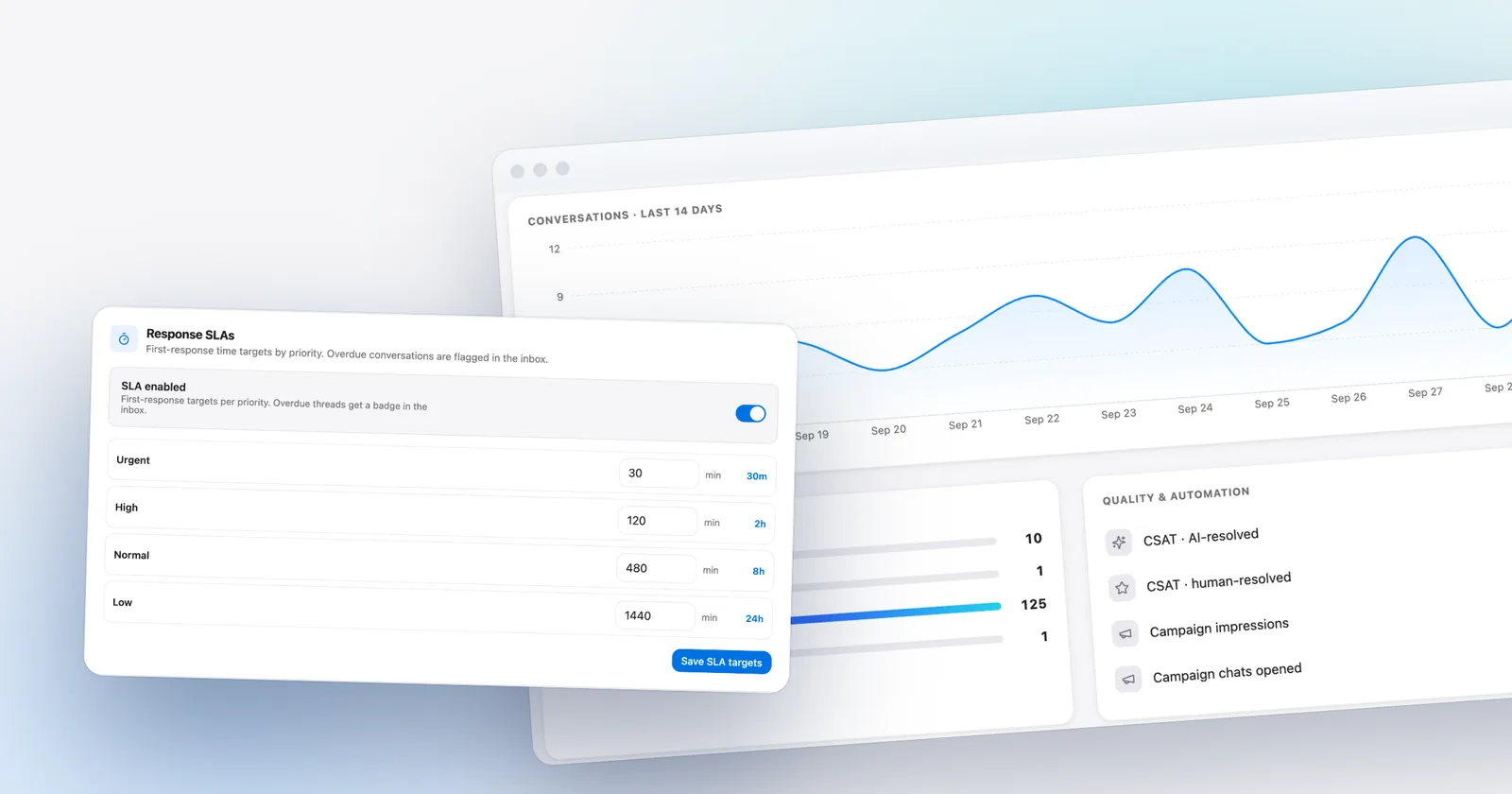
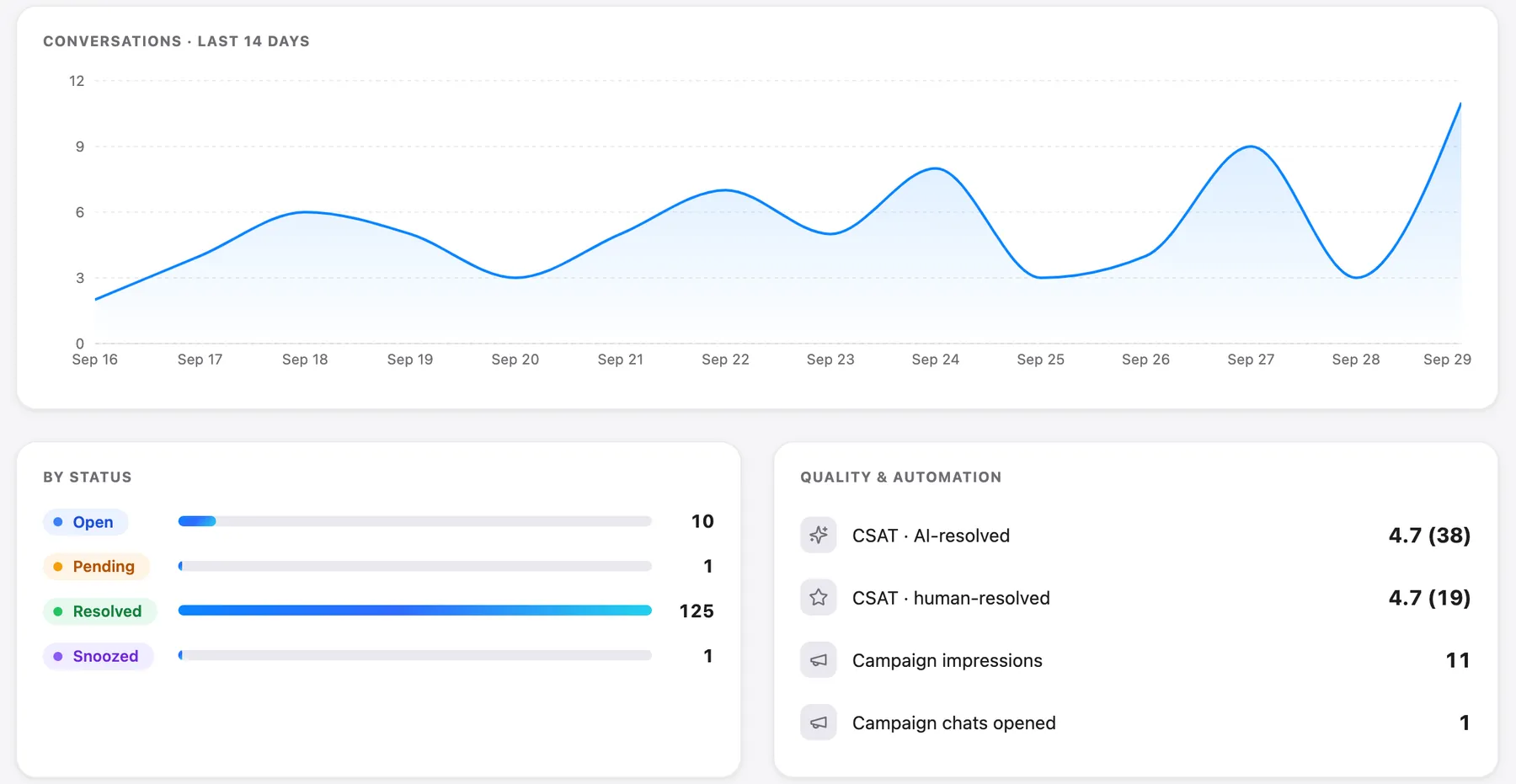
In Talvo you can read this in the inbox by filtering to open conversations, and the analytics page's "By status" breakdown shows how many sit in each status. The no-reply reminder, 12 hours by default under Settings → Inbox → Reply reminders and available on every plan, alerts the team when a customer has been waiting, which is a safety net rather than a substitute for the daily check.

Satisfaction: CSAT, two ways, split by who answered
Report the average rating and the share of 4s and 5s together, with the number of ratings. The two often tell different stories, and a score with no count is an anecdote.
Take ten ratings: 5, 5, 5, 4, 4, 4, 3, 2, 5, 1. They add to 38, so the average is 3.8. Seven of the ten are a 4 or a 5, so 70% are satisfied. Both are true, and different tools headline different ones. Help Scout's Happiness Score, for example, is the percentage of Great ratings minus the percentage of Not Good ratings (Help Scout docs). Never compare your number with a vendor's until you know which convention it uses.
Talvo reports the average out of 5, with the rating count; compute the share of 4s and 5s yourself if you want it. At small counts a single rating moves everything. The CSAT vs NPS guide has the margin-of-error table, including roughly ±16 points at 20 responses, and the survey templates.
Split it by who answered. Talvo's CSAT shows AI-resolved and human-resolved conversations separately on every plan, which is the check to run before you turn automation up.
Automation: AI resolution rate and hand-off rate
If you run an AI agent, two ratios belong on the scorecard: AI-resolved conversations as a share of all conversations, and handed-off conversations as a share of those the AI engaged. A rising resolution rate with falling AI-side CSAT means the AI is closing things badly, not well. Definitions, a way to audit a sample and the pricing implications are in AI resolution rate, and what a healthy hand-off looks like is in the AI hand-off guide.
What we left off, and why
Average handle time. For chat and email in a tiny team it measures how long you were typing, not how well you helped. NPS. It's a relationship measure for a quarterly survey, not a support number; see CSAT vs NPS. First contact resolution. It's the inverse of reopen rate and vendors disagree on what "one touch" means. Cost per conversation. It's worth knowing once a year, and the support cost calculator does the work.
The monthly scorecard
One page, the same rows every month. Fill "target" only after you have three months of history, because a target you invented in week one is a guess.
| Metric | This month | Last month | Target | Note |
|---|---|---|---|---|
| Conversations per 100 active customers | ||||
| Median first response (state the clock) | ||||
| SLA attainment | ||||
| Median resolution time | ||||
| Reopen rate (7 days) | ||||
| Backlog: open at close, oldest | ||||
| CSAT average, share of 4s and 5s, ratings | ||||
| CSAT, AI-resolved vs human-resolved | ||||
| AI resolution rate and hand-off rate |
- Pull the numbersRead the analytics tiles and write the window they cover beside each number, so next month compares like with like.
- Count the three by handTally reopened conversations, read your backlog log, and divide conversations by active customers.
- Read twenty conversationsPick the longest-waiting, the lowest-rated and a few at random. Numbers say where to look; threads say why.
- Write one sentence per moverFor every metric that moved, one line in the Note column about what you think happened.
- Choose one changeOne thing to try next month, with an owner. More than one and you won't know what worked.
When a number moves, here's where to look first:
| If this moves | Look at |
|---|---|
| Conversations per 100 customers up | The reasons for contact. One new cause usually explains it: a release, a billing change, a confusing email |
| First response up while backlog is flat | Notifications and who is watching the inbox, not total staffing |
| SLA attainment down, median fine | The slow tail: the few conversations that waited far longer than the rest |
| Resolution time down, reopen rate up | Whether you're closing too early |
| Oldest backlog item keeps aging | Ownership. Someone needs a name next to that thread today |
| CSAT down, speed flat | The lowest-rated threads, read in full |
| AI resolution up, AI CSAT down | A sample of AI-resolved conversations, checked for correctness |
What Talvo reports, and what you compute yourself
Talvo's analytics page shows, live today:
- total conversations, average CSAT (out of 5, with the rating count), median first response and median resolution
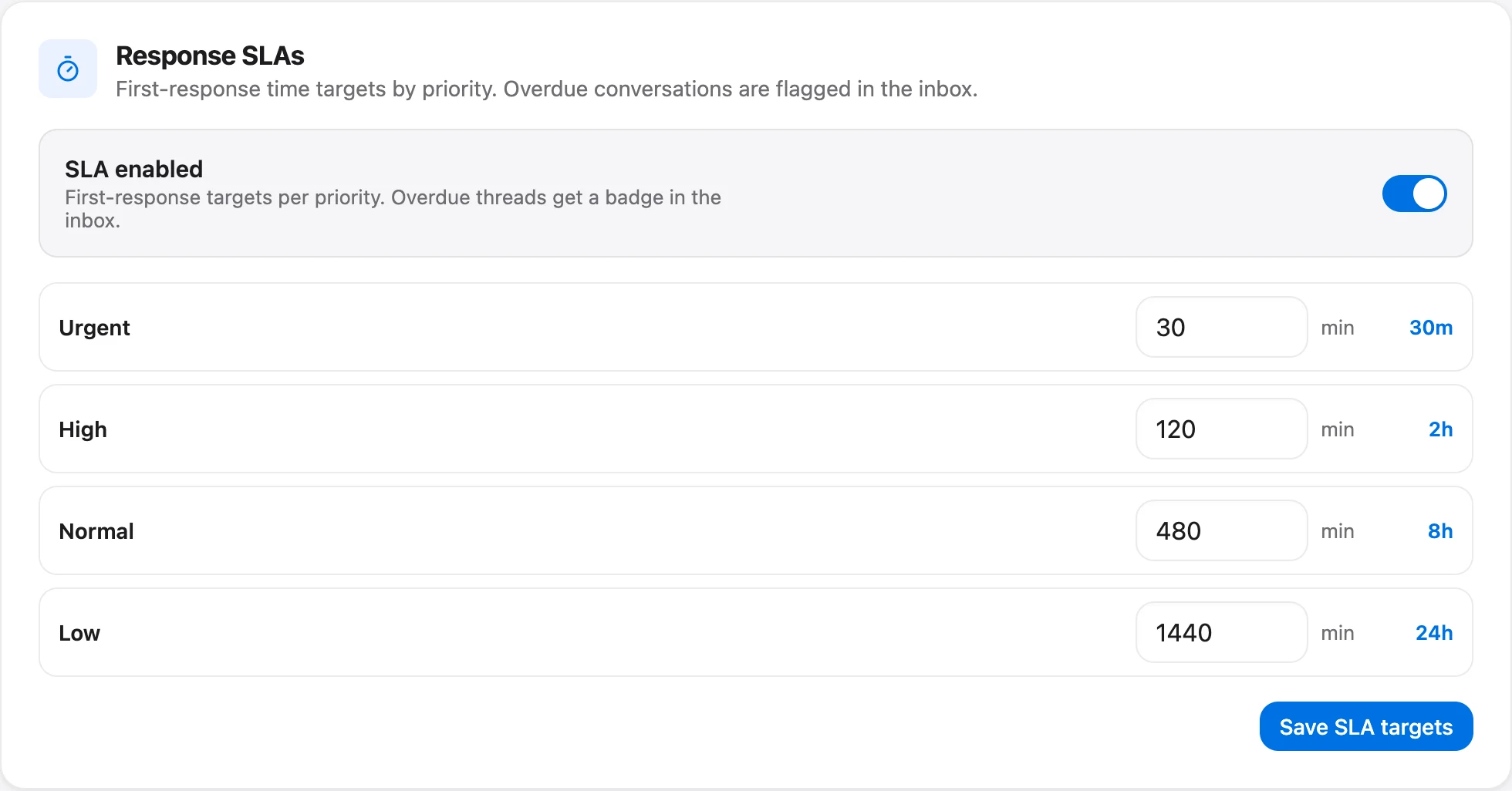
- SLA attainment as a percentage with "met of responded on time", an estimated deflection, AI resolutions with the number of AI-engaged conversations, and channel mix
- a conversation volume chart and a "By status" breakdown
- a quality-and-automation card with CSAT for AI-resolved and for human-resolved conversations, plus campaign impressions and chats opened
History depends on your plan: 7 days on Free, 90 days on Starter, 1 year on Growth and unlimited on Scale. Whatever window the page shows, write it next to the number on your scorecard. "Estimated deflection" is a dollar estimate based on an assumed cost per ticket, so treat it as an estimate and keep it off a scorecard you intend to trust.
| Metric | In Talvo's analytics | You compute |
|---|---|---|
| Conversations per 100 customers | Total conversations | Divide by your customer count |
| Median first response | Yes (median, not average) | The slow tail, from the threads |
| SLA attainment | Yes; SLA policies need Talvo's Growth plan | Share of unanswered conversations |
| Median resolution time | Yes | Nothing |
| Reopen rate | No | Tag and tally |
| Backlog age | Status breakdown | Daily count and oldest age |
| CSAT | Average, split AI vs human | Share of 4s and 5s |
| AI resolution and hand-off rate | AI resolutions tile; funnel on Scale | Hand-off rate below Scale |
The AI performance panel, the funnel from engaged to resolved to handed off, with ranked hand-off topics, is on the Scale plan ($299 a month, or $249 billed annually). SLA policies are on the Growth plan ($149 a month, or $119 annually); business hours and the post-resolution CSAT prompt are on every plan.
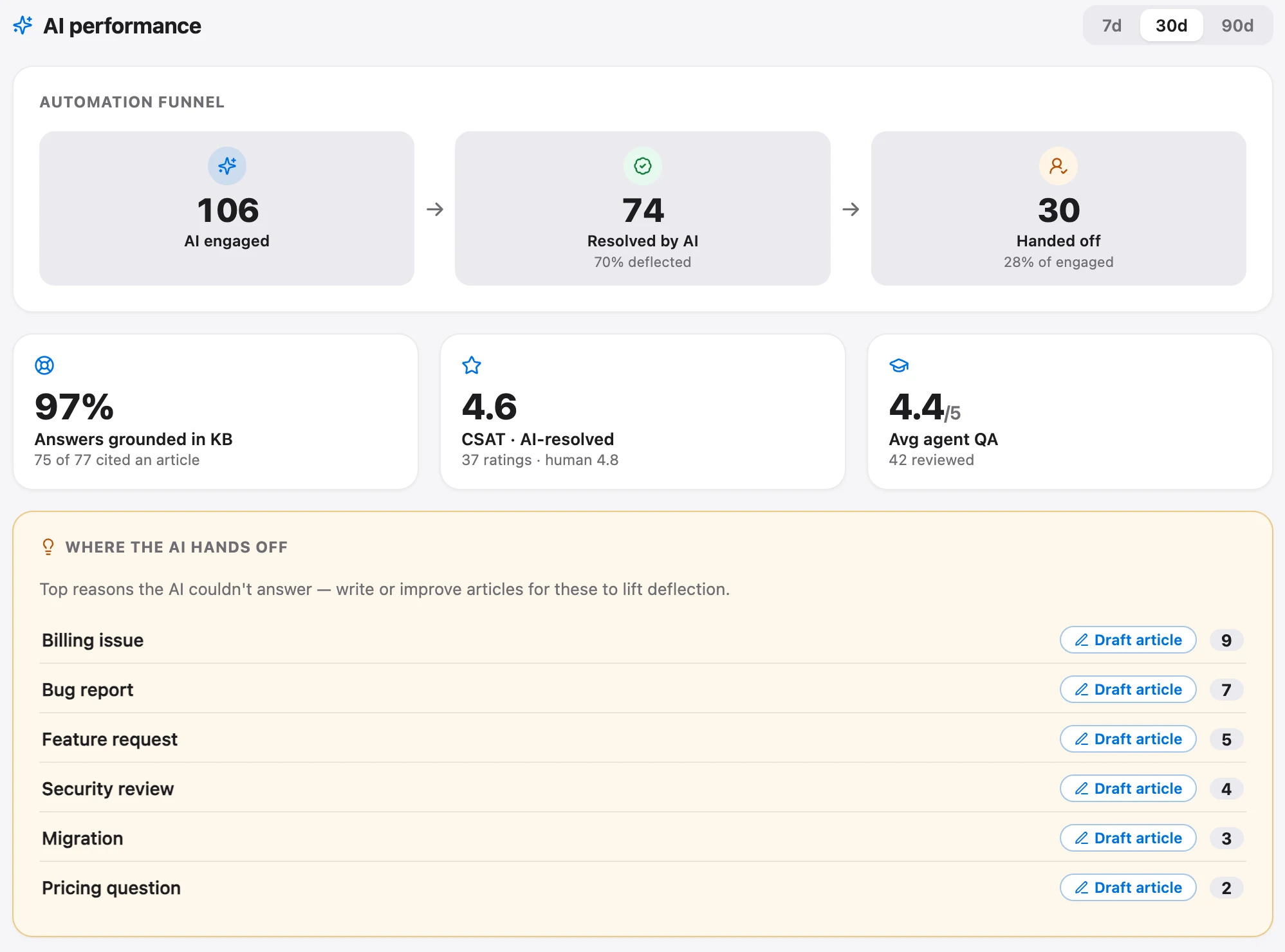
The analytics can't report by tag, so there's no per-topic breakdown in the app. That is one reason the contact-reason tally in the ticket-reduction guide lives in a spreadsheet.
Two more limits worth knowing. Talvo covers live chat and email, so conversations on SMS, WhatsApp or the phone won't appear in any of these numbers. And Talvo is new and in beta: we have no customer benchmarks for any of these metrics and don't publish any. The more useful benchmark for a small team is your own previous month, measured the same way.
Frequently asked questions
What are the most important customer support metrics?
For a small team, eight cover most decisions: conversations per 100 customers, median first response time, SLA attainment, median resolution time, reopen rate, backlog age, CSAT split by AI and human, and AI resolution and hand-off rates. Each can be computed in a spreadsheet, and each leads to a specific action when it moves.
What KPIs should a small support team track?
Keep the list short enough to act on, and prefer metrics that count every conversation (speed, resolution, reopen rate, backlog) over ones that depend on who answers a survey. Add CSAT with the number of ratings shown, and if you use an AI agent, report its conversations separately from human ones.
Should I use median or average response time?
Use the median. A few overnight emails can drag the average to hours when the typical customer waited minutes. Report the median for the typical wait and look at the slowest tenth separately. Talvo's analytics report the median first response and median resolution time.
What is reopen rate and how do you calculate it?
Reopen rate is the share of resolved conversations where the customer came back about the same problem inside a set window, such as 7 days: conversations that came back divided by conversations resolved. If 9 of 120 resolved conversations came back, the rate is 7.5%. Only count conversations resolved at least a full window ago.
How do you calculate conversations per 100 customers?
Divide the number of conversations in the month by your active customers and multiply by 100. With 340 conversations and 1,250 active customers the result is 27.2. Define 'active customer' once and keep it, then compare rates month to month rather than raw counts.
How do you measure AI chatbot performance?
Track the share of conversations the AI resolved, the share of AI-engaged conversations it handed off, and customer satisfaction on AI-resolved conversations compared with human-resolved ones. A rising resolution rate with falling AI-side CSAT means it is closing conversations badly. Talvo shows AI resolutions and CSAT split by AI and human on every plan, and a hand-off funnel on the Scale plan ($299 a month).
Does Talvo report support metrics by tag?
No. Talvo's analytics can't report by tag, so there is no per-topic breakdown in the app. You can tag conversations and filter the inbox by tag, then tally by hand. The analytics page covers total conversations, median first response, median resolution, SLA attainment, CSAT, AI resolutions and channel mix.
Sources
Other products' prices and features change. We checked these pages; if something is out of date, tell us and we'll fix it.


