
On this page
- Four separate jobs hide inside "multilingual support"
- Five ways to do it, side by side
- How one English help center can answer in Spanish
- When a person takes over
- Where machine translation is not enough
- Help content in more than one language
- What Talvo does not cover for multilingual teams
- Which languages to support first
- Measure it, because "fluent" is not the same as "correct"
- What multilingual support costs
- Frequently asked questions
When customer care is offered in the customer's own language, 75% of buyers say they're more likely to buy from that brand again. And even among people who read English comfortably, 60% still preferred care in their own language. That's from CSA Research's 2020 "Can't Read, Won't Buy" survey of 8,709 consumers in 29 countries, and it's the best-sourced argument for multilingual customer support that we found.
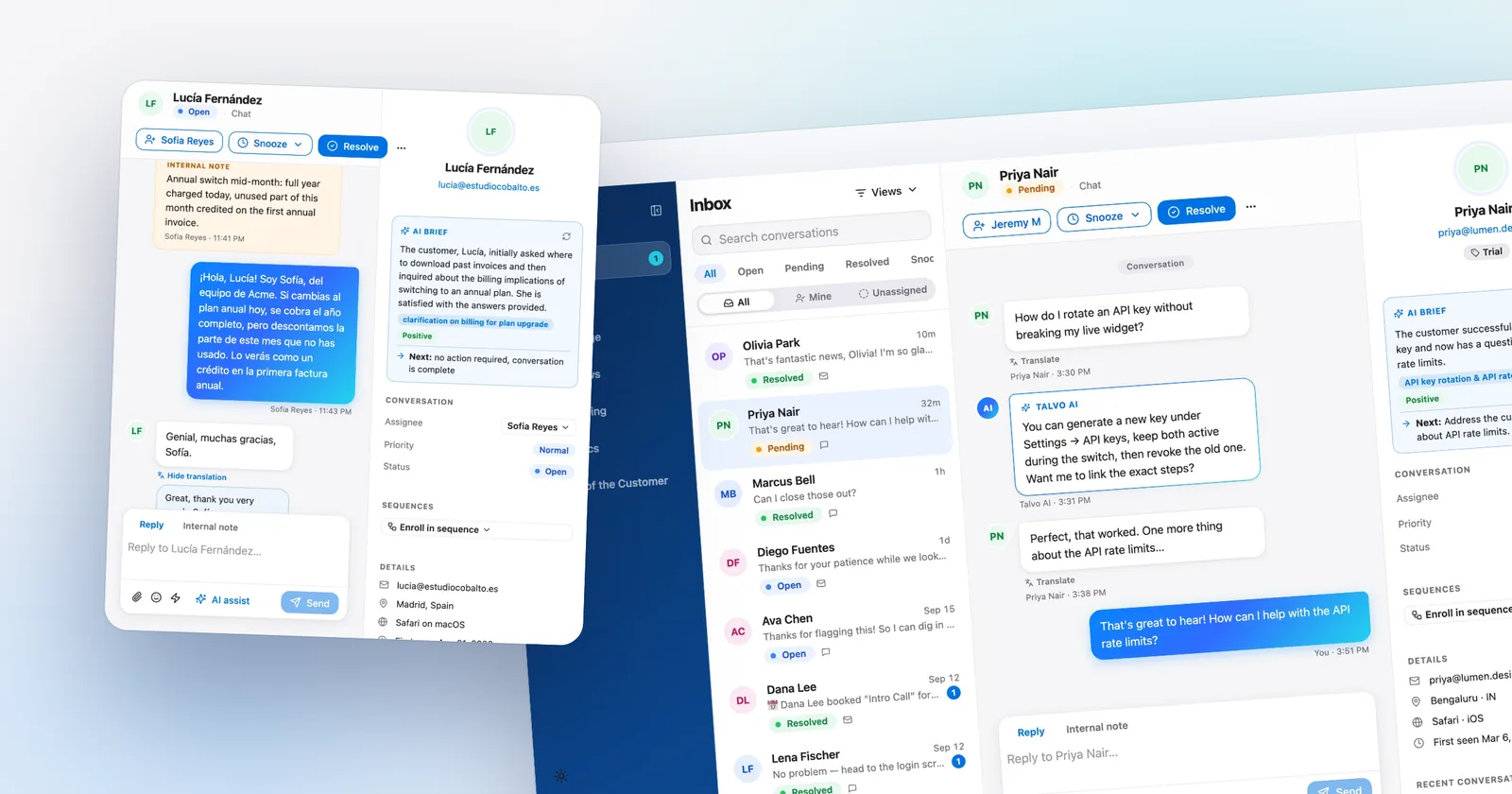
The usual response is "we can't afford a translation team." You may not need one. A team of two to fifteen can answer customers in Spanish, French or Japanese using a mix of three things: an AI agent that replies in the customer's language, machine translation inside the inbox for the messages a human has to read, and reviewed replies, either human-written or AI-drafted in the customer's language, for the moments that matter. This guide compares those approaches honestly, including where machine translation isn't good enough. Talvo is the worked example because we know exactly what it does and doesn't do.
Four separate jobs hide inside "multilingual support"
Teams get stuck because they treat this as one problem. It's four.
Answering is the AI or a human giving a correct answer. Reading is a teammate understanding what a customer wrote. Replying is writing back in the customer's language. Self-service is the help content customers find without asking. Each job has a different cheapest solution, and a tool that's strong at one may be silent on another.
That last point is the catch with Talvo, so we'll say it now. Its AI agent answers in the customer's language, its inbox can translate what customers write, and the copilot's AI-drafted reply (Starter and up) is written in the customer's language for a teammate to review and send. The catch is that the draft is still machine output, which we come back to below.
Five ways to do it, side by side
| Approach | Best for | Cost shape | Biggest quality risk |
|---|---|---|---|
| Hire or contract native speakers | A language that brings real revenue, with steady volume | A salary or contractor rate per language; hours must be covered | Coverage gaps: one person is sick and the language goes dark |
| Outsource to a multilingual support vendor | Many languages at modest volume each | Per-contact or per-hour contracts; get quotes | Vendor staff don't know your product |
| Machine translation inside the inbox | Reading what customers wrote so any teammate can respond; Talvo's copilot can also draft the reply in their language | Usually bundled with an AI or copilot plan | Subtle errors in tone, legal terms and idioms |
| AI agent replying in the customer's language | Repeat questions your articles already answer | Per resolution; on Talvo, $0.49 beyond the plan's allowance, the same in any language | Only as good as your articles; citations may point at articles in another language |
| Translated help center | Self-service in your top languages | Writing or translating articles, plus keeping them current | Translations drift out of date |
Other products offer pieces of this, so check what your current tool lists. As of October 2026, Intercom's pricing FAQ gives each agent 10 free AI auto-translation conversations a month and sells its Copilot at $29 per agent a month billed annually. Crisp lists multilingual AI on its Essentials and Plus plans, Help Scout lists unlimited AI Assist (edit and translate) on its paid plans, and Freshchat lists multilingual on its $49-per-agent Pro plan. Prices and limits like these change, so verify before you buy.
How one English help center can answer in Spanish
The mechanism that makes small-team multilingual support possible is cross-lingual retrieval, and it's simpler than the name suggests. A search that matches on meaning, not on characters, can connect a question in Japanese to an article written in English. The AI finds the right article, then writes the answer in the language the customer used.
In Talvo that's how the AI agent works. It detects the language the customer writes in, searches your published articles by meaning, and replies in that language, even when your articles are in another one. The help article on supporting customers in any language says the practical consequence plainly: one English help center can serve customers worldwide, without parallel article sets that drift apart.

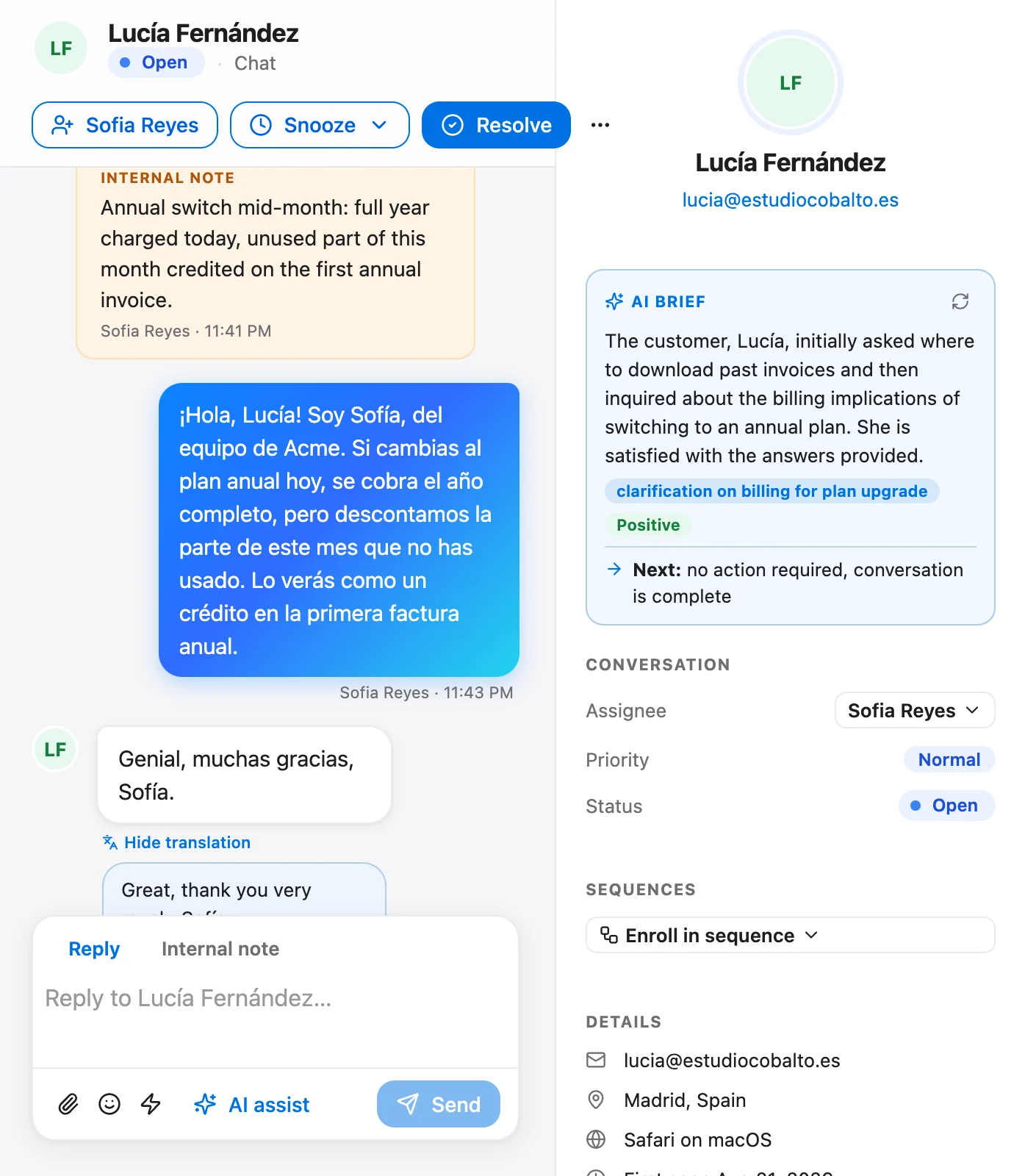
Here's what that looks like. A customer writes, "¿Puedo cambiar de plan a mitad de mes?" The agent finds your English article on changing plans, answers in Spanish, and shows the article it used. The citation may carry the English article's title. That's expected, and the help text calls it out. The answer is in Spanish; the title of the source isn't. If that bothers you, it's the best argument for translating your top articles, which we get to below.
A few details worth knowing. Names, product terms and code stay as written, so the AI won't rename your features. The reply language follows the customer, not your workspace setting, and if someone switches languages mid-chat, the agent follows. If the AI isn't confident it hands off to your team with the conversation intact, and a hand-off isn't billed as a resolution.
When a person takes over
Sooner or later a human has to read the message. Talvo's Translate button sits on any incoming message: click it to read the message in your own language, click again to switch back. Translation is per message and on demand, and the customer never sees that you used it.
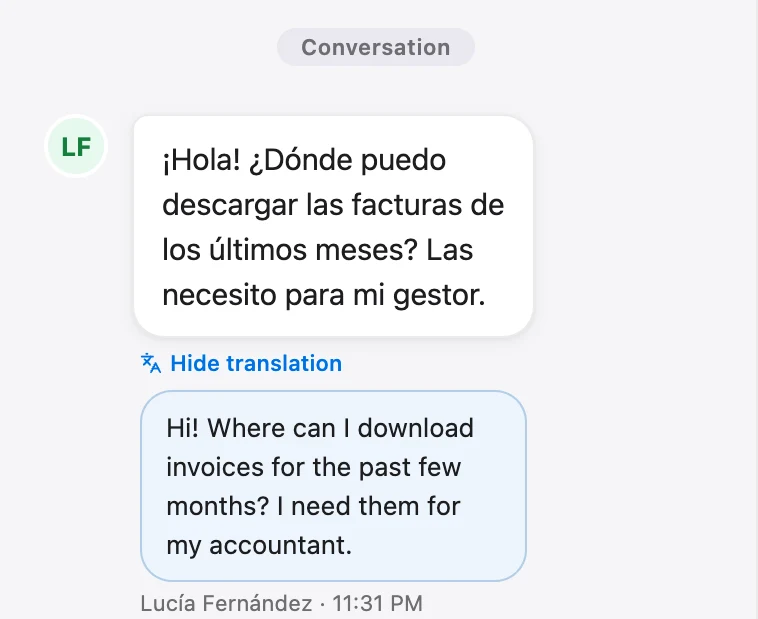
Plan gating matters here. The AI agent replying in the customer's language comes with the AI agent itself, so it works on any plan with AI resolutions, including the Free plan's 25 a month during the beta. The agent-side Translate button belongs to the AI copilot, which starts on the Starter plan at $49 a month.
Translate covers incoming messages. For the reply, the AI copilot (Starter and up) drafts one in the same language the customer used, grounded in your published articles with the sources it used. Review it before you send. For anything sensitive, have a bilingual teammate or a separate translation tool check the draft, because the draft is still machine output. If you skip the draft, you can write in the customer's language yourself or reply in plain, short English.
Where machine translation is not enough
Machine translation is good enough for a surprising amount of support. CSA Research found that 65% of consumers prefer content in their own language even when its quality is poor, that 66% use online machine translation, and that 67% will tolerate a mix of languages on a website. People are forgiving about wording when they get an answer.
They're less forgiving when the stakes go up. Machine output slips on tone, idiom and legal precision, and the person on the receiving end may not notice until the message is already sent.
| Situation | Machine translation OK? | What to do instead |
|---|---|---|
| "Where is my order?" or "How do I reset my password?" | Yes | Let the AI answer; confirm the article is accurate |
| Product how-to with names, settings and steps | Usually | Keep product terms untranslated, as the AI does |
| Refund, cancellation or billing dispute | Risky | Have a native speaker or a reviewed reply handle it |
| Legal, medical, safety or regulated wording | No | A qualified human, ideally with a vetted template |
| An angry customer | Risky | A person who can read tone, replying more slowly if needed |
| Jokes, slang, idioms | No | Write plainly; avoid them |
A simple protocol covers most of it: use short sentences, avoid idioms, keep product terms constant, and for anything on the risky rows, have a native speaker read the final text before it goes out.
Help content in more than one language
You have three levels, and most teams should start at the first.
English only, with a multilingual AI. Leave your help center as it is. The AI answers in the customer's language from your existing articles. This costs nothing extra and gets you most of the benefit.
Translate the top articles in your best languages. Look at the questions each language asks most, translate those few articles properly, and publish them as separate articles. Customers who browse your hosted help center see them in their language, and the citations stop being English titles. Talvo's help center page serves each article in the language it was written in, and we haven't documented a language switcher, so a translated article is a separate article you write or import.
A fully translated help center. Worth it only when a language is a major market and you can keep every translation current. Stale translations are worse than none, for the same reason a stale English article is: the AI will cite it confidently.
If you're moving from another tool, Talvo's importer reads one language per import. The guide to switching from another help desk shows how to pick the language during the scan. And check how your widget looks in each target language before launch: the labels and buttons around your content are part of the experience, and we haven't verified how Talvo's own widget labels are localized.
What Talvo does not cover for multilingual teams
No WhatsApp or SMS yet, and in many non-English markets those are how customers actually reach you. WhatsApp, SMS and Instagram/Messenger are on the public roadmap, not shipped. There's no choice of data region, which some European customers will ask about, and Talvo processes data in the United States. The hosted help center serves articles in the language they were written in. Talvo is also a 2026 beta launch, so there are no G2 or Capterra reviews from other teams yet. If you need a mature multilingual help center with a language switcher, or a vendor with native-channel coverage, a larger tool is the honest pick.
Which languages to support first
Start from your own data, not from a ranking of the world's languages. Skim your last 90 days of conversations, note which non-English languages appear and which ones convert, and add the markets in your sales plan.
For US-based teams, the demographic backdrop is large. The US Census Bureau reports that 67.8 million US residents, almost one in five, spoke a language other than English at home in 2019, up from 23.1 million, about one in ten, in 1980. That doesn't tell you which languages your customers speak, but it does say that ignoring all of them means ignoring a lot of people.
- Publish your top 10 articlesThe AI can only answer from published articles; drafts are invisible to it (how it works).
- Turn on the AI agentIn Talvo it's Settings, AI auto-resolve, and it's on by default for new workspaces.
- Test in three languagesAsk the same question in English and in your two most likely languages, and compare the answers.
- Check the hand-offsLook at what the AI handed off in each language. A poorly answered language usually means a missing article, not a translation problem.
- Translate the top gapsFor each language, write or translate the handful of articles that matter most, and publish them as their own articles.
Measure it, because "fluent" is not the same as "correct"
You need a way to tell whether support in another language is working. Three numbers help: hand-off rate by language, customer satisfaction by language, and repeat contact on the same issue. Talvo's Analytics overview shows average CSAT split between AI-resolved and human-resolved conversations, and the Scale plan's AI performance dashboard adds the engage, resolve and hand-off funnel; neither reports by language or by tag, so for language-level numbers plan to tally a sample yourself in a spreadsheet.
A simple routine works. Each week, read twenty conversations per language, using Translate if you need it. Note whether the answer was right, whether the tone was right, and whether the customer had to ask twice. Ask a bilingual friend or customer to sanity-check a few. If one language keeps going badly, check first whether the same question in your own language would have been answered. The help article makes that point: the usual cause is a missing article, not the language.
- Publish your top 10 articles in your main language
- Ask the AI the same question in three languages and compare the answers
- Decide which topics a person must review before anything is sent
- Review the copilot's drafted replies for refunds, billing and anything sensitive
- Schedule the weekly twenty-conversation spot-check
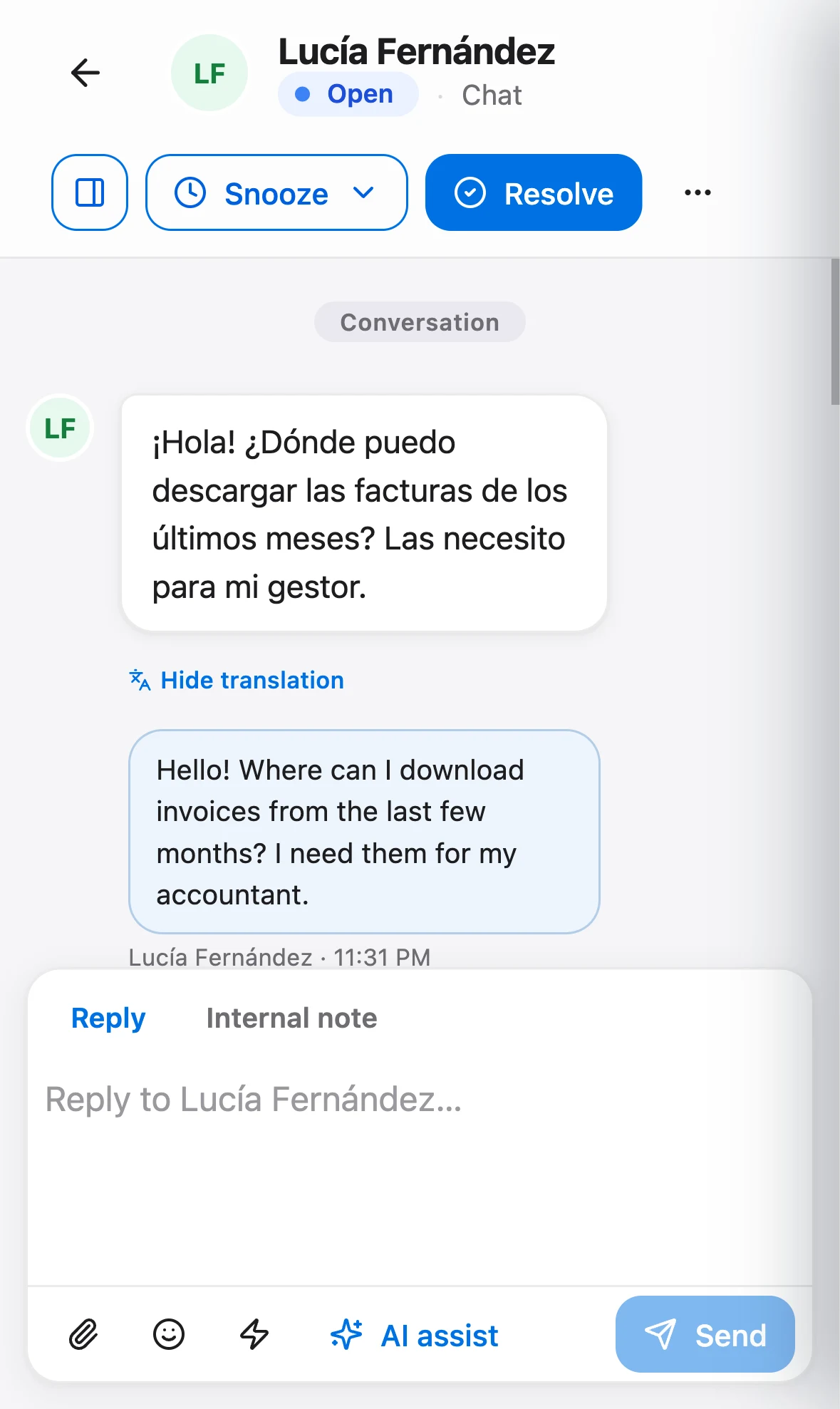
Because the inbox works in a phone's browser, you can do the spot-check from anywhere.
What multilingual support costs
With an AI agent, the price doesn't change by language. A resolution is a conversation the AI answered end to end from your published articles, and on Talvo it costs $0.49 beyond your plan's allowance whether the question was in English or Portuguese. A hand-off to a person isn't a resolution, so it isn't billed.
Say 60 conversations a month come in from Spanish and French speakers, and your articles let the AI finish half of them. That's 30 resolutions, well inside the 100 included on Talvo's Starter plan at $49 a month ($39 a month billed annually). For the mechanics of answering from your own articles, read our guide to a knowledge base chatbot, and for how per-answer billing adds up, see AI resolution pricing compared. If you're comparing tools, see Talvo vs Intercom and Talvo vs Crisp, and the AI agent page lists what each plan includes. Compare the price with the fixed cost of a bilingual hire, whose salary is yours to put into the arithmetic: the hire gives you judgment and tone, but only during their working hours, in the languages they speak.
Frequently asked questions
What is multilingual customer support?
It means answering customers in the language they write in, across four jobs: giving a correct answer, understanding what the customer wrote, replying in their language and offering self-service content. Small teams usually combine an AI agent, machine translation in the inbox and a few human-written replies.
How do I provide customer service in multiple languages without hiring?
Use an AI agent that detects the customer's language and answers from your existing help articles, plus machine translation to read incoming messages. Keep humans for refunds, legal wording and upset customers. On Talvo the AI agent replies in the customer's language, and on Starter and up agents translate incoming messages in one click and can send an AI-drafted reply written in the customer's language, after reviewing it.
Is machine translation good enough for customer support?
For simple questions it often is. CSA Research found 65% of consumers prefer content in their language even when quality is poor, and 66% use online machine translation. It's riskier for refunds, legal or medical wording and angry customers, where a native speaker should review the reply.
Do I need to translate my help center?
Not to get started. Search by meaning lets an AI match a question in one language to an article in another and answer in the customer's language. Translate your most-needed articles in your top languages over time, because citations otherwise point to titles in the original language.
Which languages should I support first?
Start with your own data: the non-English languages already appearing in your last 90 days of conversations, plus the markets in your sales plan. The US Census Bureau reports almost one in five US residents spoke a language other than English at home in 2019, but that doesn't say which languages your customers use.
Can an AI chatbot answer in the customer's language?
Yes. Talvo's AI agent detects the language a customer writes in and replies in the same language, even when your articles are written in another one. It follows the customer if they switch languages mid-conversation, and names, product terms and code stay as written.
How do I measure the quality of support in other languages?
Each week, read a sample of about twenty conversations per language, using translation if needed, and note whether the answer was right, the tone fit and the customer had to ask twice. Track hand-off rate by language. A weak language usually means a missing article, not a translation problem.
Do customers prefer support in their own language?
CSA Research's 2020 survey of 8,709 consumers in 29 countries found 75% are more likely to buy again when care is in their language, and even among confident English readers 60% preferred their own language for support. It's a survey of consumer preferences, not a measure of your results, so test with your own customers.
Sources
Other products' prices and features change. We checked these pages; if something is out of date, tell us and we'll fix it.
- CSA Research, Can't Read, Won't Buy - B2C (press release, July 7, 2020; 8,709 consumers in 29 countries)
- US Census Bureau, Language Use in the United States: 2019 (ACS-50, August 2022)
- Talvo help: Support customers in any language
- Talvo help: The AI brief and one-click translate
- Intercom pricing page and FAQ (checked Oct 21, 2026)
- Crisp pricing page (checked Oct 21, 2026)


